
Technical SEO is the foundation upon which organic search success is built. It refers to the optimization of your website’s behind-the-scenes elements that search engines use to understand and rank your content. Think of it as the invisible architecture that allows search engine crawlers to navigate your website efficiently and effectively. Technical SEO has four core pillars:
- Crawlability
- Indexability
- Mobile-friendliness
- Site speed
Table of Contents
- Unveiling the Power Beneath the Surface: Your Guide to Technical SEO
- Why SEO?
- How Does Technical SEO Fit In?
- The Pillars of Technical SEO: Building a Strong Foundation
- Charting Your Course: The Technical SEO Analysis Checklist
- Unveiling the Landscape: Essential Tools for Technical SEO Analysis
- Putting it into Action: Analyzing Your Website with the Checklist & Tools
- Conquering the Challenges: Fixing Technical SEO Issues & Prioritization
- Common Technical SEO Issues & Solutions
- Technical SEO Best Practices
- Technical SEO Checklist
- Maintaining Your Technical SEO Advantage

Unveiling the Power Beneath the Surface: Your Guide to Technical SEO
Technical SEO is the foundation upon which organic search success is built. It refers to the optimization of your website’s behind-the-scenes elements that search engines use to understand and rank your content. Think of it as the invisible architecture that allows search engine crawlers to navigate your website efficiently and effectively.
Here’s why conducting a technical SEO analysis is crucial for your website:
- Increased Visibility: A technically sound website is more easily crawled and indexed by search engines, leading to higher visibility in search results.
- Improved User Experience: Technical SEO factors like mobile-friendliness and fast loading speeds directly impact user experience, which is a key ranking factor for search engines. A happy user is more likely to stay engaged and explore your offerings.
- Enhanced Organic Traffic: By addressing technical SEO issues, you remove barriers that prevent search engines from fully understanding your website. This translates to attracting more organic traffic, the lifeblood of any successful online presence.
Investing time in a technical SEO analysis is an investment in your website’s long-term success. It’s the first step to ensuring your website is search engine friendly and primed to attract the qualified traffic you deserve.
Why SEO?
As we’ve written about elsewhere on our blog, SEO is a form of evergreen marketing in many other places. That is when an SEO strategy is executed correctly, it has the potential to become a lead-generation powerhouse.
Once you make the initial investment into an SEO campaign, as long as some routine maintenance is performed, you’ll likely have an asset that keeps sending leads your way for many years.
This costs a fraction of the price compared to leads from PPC or social media advertising campaigns.
How Does Technical SEO Fit In?
Most people familiar with SEO seem to understand that content and backlinks are required to earn free traffic from Google. There are endless guides that focus on publishing more and more content or getting more and more backlinks.
Few, however, delve into the foundation of SEO — how well the underlying website functions for users and search engine crawlers alike. In the industry, this is known as technical SEO.
Technical SEO is a simple term, but it covers many topics. Ultimately, it comes down to a well-built website — how fast it loads, how clean the coding is, the internal linking structure, if any internal or external links are broken or run through complex redirect chains if images are broken, whether or not the design is responsive and loads in a user-friendly way when on a slow connection… really, the list could go on for days.
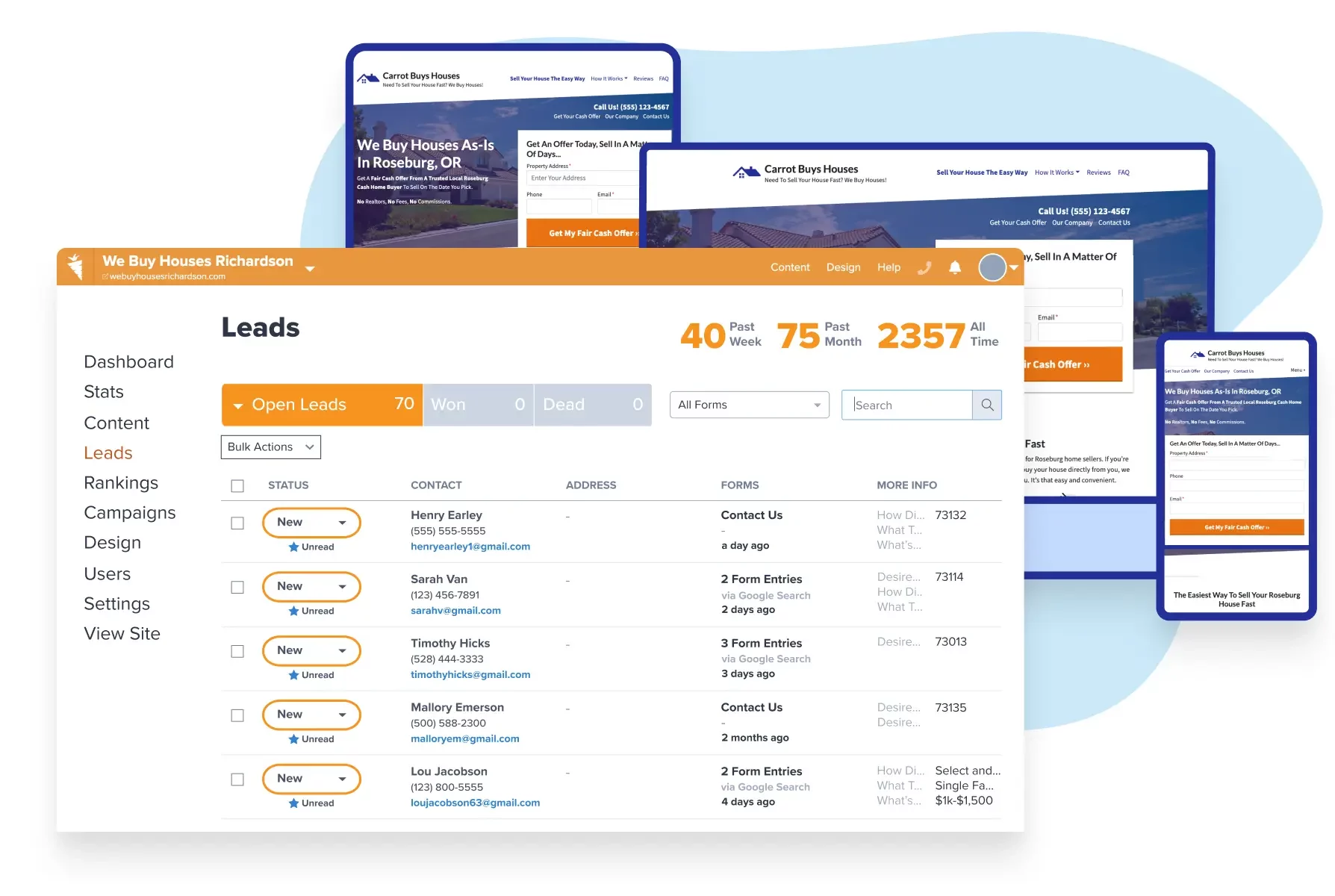
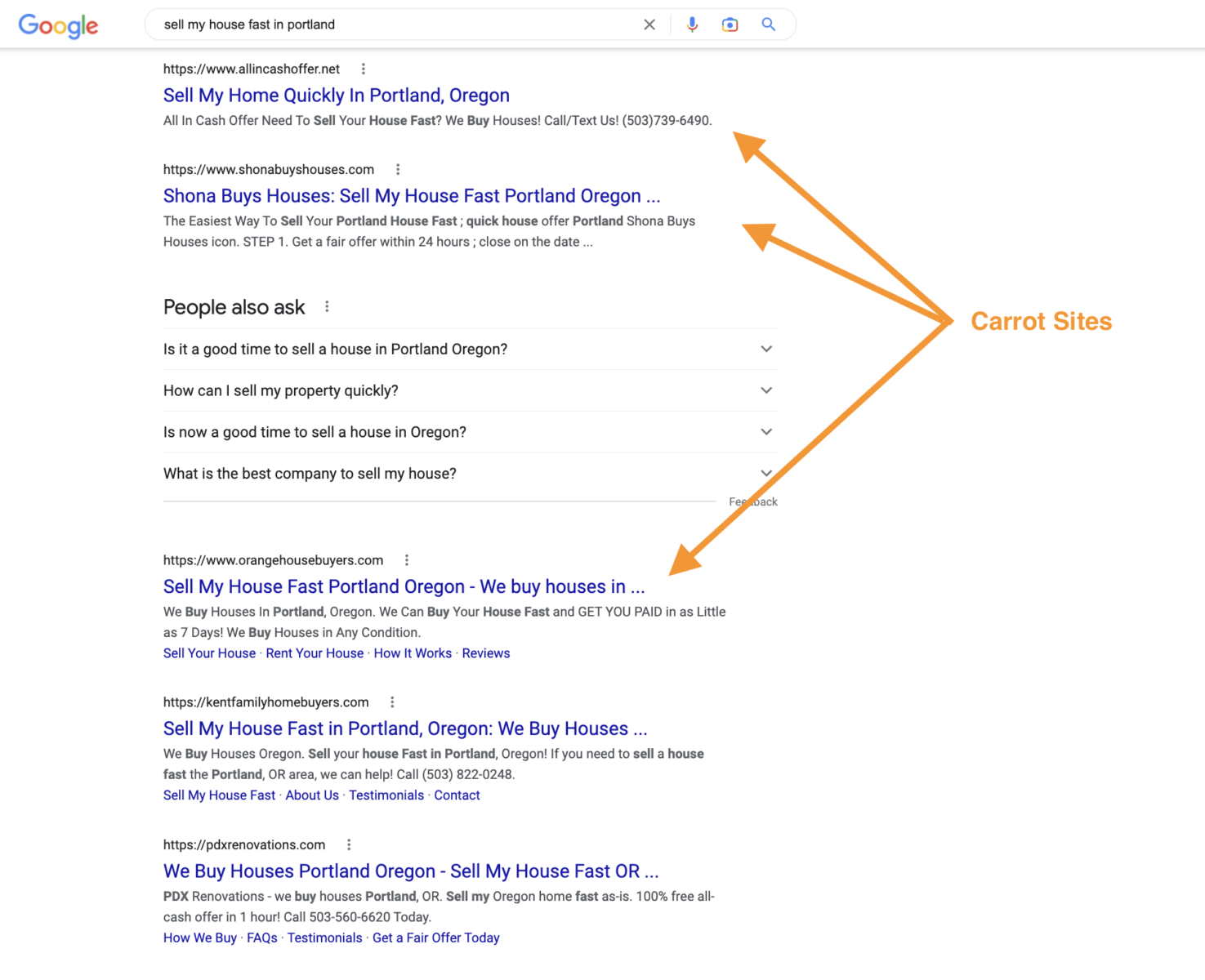
We haven’t discussed this much because Carrot members don’t have to worry about it. All Carrot sites have a search-engine-optimized tech stack baked in.
However, many people reading this article won’t be using this system, so I aim to help you by providing a technical SEO checklist and some pointers on the best tools to use in your analysis.
The Pillars of Technical SEO: Building a Strong Foundation
Technical SEO encompasses a variety of factors that work together to ensure search engines can easily access, understand, and present your website to users. Here are the four core pillars of technical SEO:
- Crawlability: Imagine search engines like giant spiders crawling through the web, discovering and indexing websites. Crawlability refers to how easily these search engine spiders can navigate your website. This includes having a well-structured sitemap, optimized robots.txt file, and internal linking that allows the spiders to find all your important pages. Good crawlability ensures your website’s content gets seen by search engines.
- Indexability: Once search engines crawl your website, they must understand your content to determine its relevance for search queries. Indexability refers to whether search engines can include your pages in their search results. Factors like proper use of meta tags, structured data markup, and fresh, high-quality content all contribute to good indexability. If a page isn’t properly indexed, it won’t appear in search results.
- Mobile-friendliness: In today’s mobile-first world, a website that isn’t optimized for smartphones and tablets is a major disadvantage. Mobile-friendliness ensures your website displays correctly and provides a seamless user experience on all devices. Search engines prioritize mobile-friendly websites in search results, giving you an edge over non-optimized competitors.
- Site Speed: Nobody likes a slow website! Site speed refers to how quickly your website loads for users. Search engines consider page load speed as a ranking factor, as slow loading times can lead to frustrated users and high bounce rates. Optimizing images, minimizing code, and using a reliable web host all contribute to a faster website, which benefits both search engine rankings and user experience.
By focusing on these core pillars, you create a solid technical foundation for your website. Search engines will be able to efficiently crawl and index your content, and users will have a positive experience when they visit your site. This combination is a recipe for organic search success.
Charting Your Course: The Technical SEO Analysis Checklist
A technical SEO analysis checklist is your roadmap to a healthy and search engine friendly website. Just like any journey, it’s important to have a plan to ensure you’re covering all the important bases. Here are the key areas to evaluate during your technical SEO analysis, each playing a crucial role in search engine visibility:
- Crawlability:
- Robots.txt: Is your robots.txt file configured correctly to allow search engine crawlers to access your important content?
- Sitemap: Does your website have a well-structured sitemap that clearly communicates all your pages to search engines?
- Internal Linking: Is your website’s internal linking structure optimized to allow search engine crawlers to navigate efficiently and discover all your content?
- Indexability:
- Meta Tags: Are your title tags and meta descriptions optimized with relevant keywords and clear descriptions to help search engines understand your content?
- Structured Data Markup: Have you implemented structured data markup to provide search engines with additional context about your content, potentially leading to richer search results?
- Noindex Directives: Are there any pages on your website that you intentionally don’t want search engines to index? Are these pages properly marked with a noindex directive?
- Mobile-Friendliness:
- Responsive Design: Does your website display correctly and provide a user-friendly experience on all devices, especially smartphones and tablets?
- Mobile Speed: Does your website load quickly on mobile devices? Slow loading times can significantly hurt your mobile search ranking.
- Site Speed:
- Page Load Time: Are your website’s pages loading fast enough for users? Tools like Google PageSpeed Insights can help you identify areas for improvement.
- Image Optimization: Are your website’s images optimized for size and quality to ensure fast loading times without sacrificing visual appeal?
- Caching: Is your website leveraging browser caching to improve repeat visitor experience and overall page load speed?
By systematically working through this checklist, you’ll gain valuable insights into your website’s technical SEO health. The next step is to leverage SEO tools to delve deeper into each area and identify any specific issues that need to be addressed.
Here’s an example of what your XML sitemap should look like:
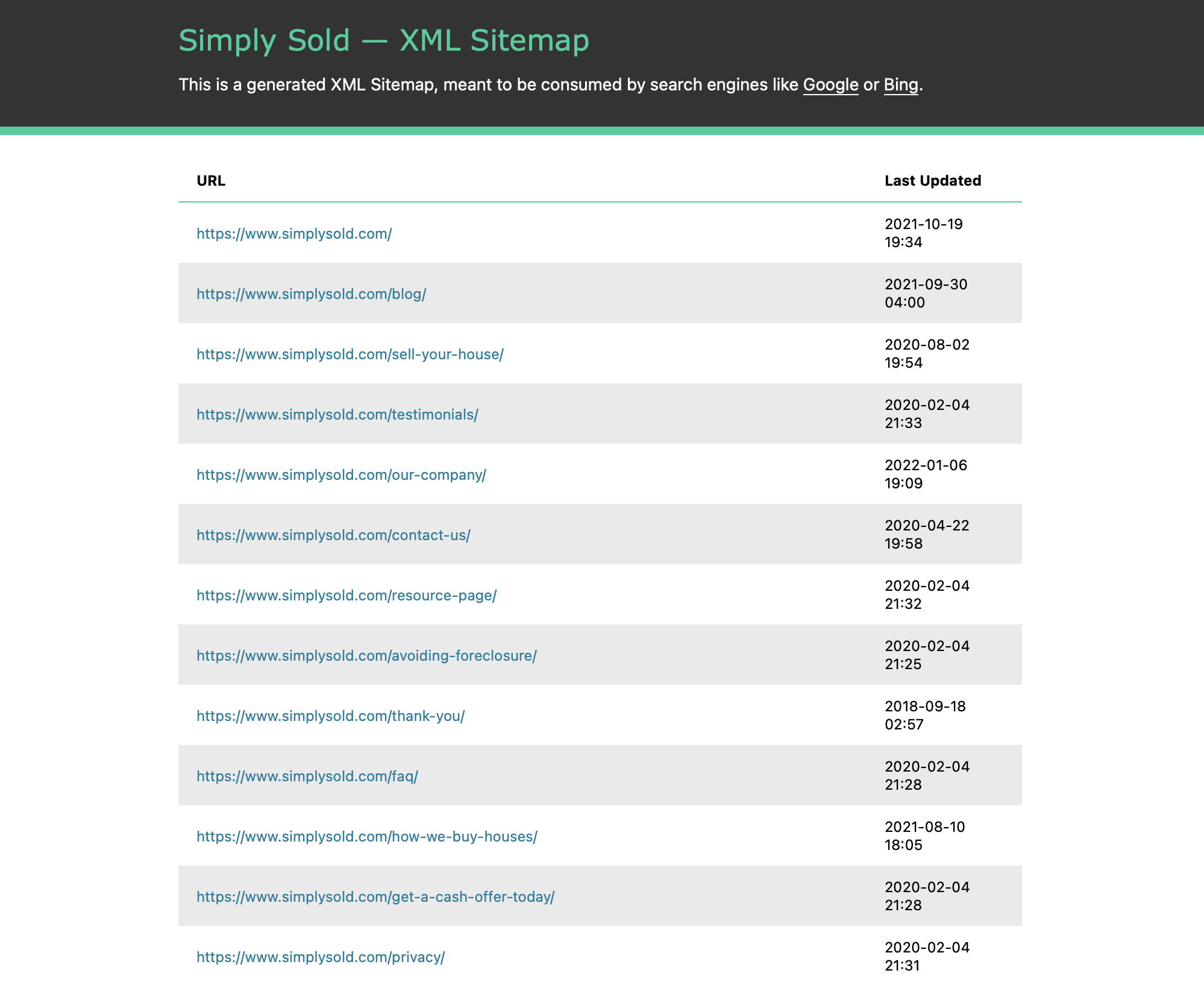
If you’re a Carrot member, then this is handled for you. Carrot ensures your site is configured correctly and that Google can find and index all the pages on your site.
Unveiling the Landscape: Essential Tools for Technical SEO Analysis
While a technical SEO checklist provides a solid framework, SEO tools act like powerful magnifying glasses, allowing you to zoom in and identify specific technical issues impacting your website. A combination of free and paid tools can equip you to conduct a comprehensive technical SEO analysis.
Here are some essential tools to consider for your technical SEO toolbox:
Free Tools:
- Google Search Console (GSC): This free powerhouse from Google offers a wealth of insights into your website’s search engine performance, including crawl errors, mobile usability issues, and sitemap status. It’s a must-have for any technical SEO analysis.
- Google PageSpeed Insights: Focused specifically on website speed, this free tool analyzes your website and provides actionable recommendations for improvement. It’s a great way to identify areas where you can optimize page load times.
- Mobile-Friendly Test: Another free offering from Google, this tool allows you to quickly test how your website displays on mobile devices. It’s a simple yet effective way to ensure your website provides a seamless mobile experience.
Paid Tools:
- Screaming Frog SEO Spider: This desktop application acts like a virtual SEO spider, crawling your website and identifying technical issues like broken links, missing meta tags, and crawl errors. It’s a powerful tool for uncovering a wide range of technical SEO problems.
- SEMrush Site Audit: Part of the comprehensive SEMrush SEO suite, the Site Audit tool offers a deep dive into your website’s technical health. It provides detailed reports on crawl errors, mobile usability, and on-page SEO optimization, making it a valuable tool for identifying and prioritizing technical SEO issues.
- Ahrefs Site Audit: Similar to SEMrush, Ahrefs offers a Site Audit tool that crawls your website and generates reports on technical SEO issues. It provides insights into broken links, internal linking structure, and mobile responsiveness, helping you identify areas for improvement.
Remember, the best approach often involves a combination of free and paid tools. Free tools like Google Search Console and PageSpeed Insights offer a fantastic starting point, while paid tools can provide more in-depth analysis and reporting capabilities. Choose the tools that best suit your needs and budget to empower your technical SEO analysis.
Putting it into Action: Analyzing Your Website with the Checklist & Tools
Now that you’re armed with the technical SEO checklist and a toolbox of powerful tools, it’s time to delve into analyzing your website. Here’s a step-by-step walkthrough to guide you:
Step 1: Gather Your Tools
Start by having your chosen technical SEO checklist and tools readily available. This might include the free Google tools (Search Console, PageSpeed Insights, Mobile-Friendly Test), and potentially a paid SEO tool like Screaming Frog or SEMrush Site Audit.
Step 2: Work Through the Checklist
Use the technical SEO checklist as your roadmap. Go through each section (crawlability, indexability, mobile-friendliness, site speed) and assess your website’s health in those areas.
Step 3: Leverage the Tools
For each section of the checklist, utilize the relevant SEO tools to gain deeper insights. Here’s how some tools can be applied:
- Crawlability:
- Google Search Console: Check the “Crawl Errors” report to identify any issues preventing search engines from accessing your pages.
- Screaming Frog: Crawl your website using Screaming Frog to identify broken links and crawl errors.
- Indexability:
- Google Search Console: Use the “Coverage” report to see if any important pages are blocked from indexing or have indexing issues.
- Mobile-Friendliness:
- Google Mobile-Friendly Test: Enter your website URL and see how it renders on mobile devices.
- Screaming Frog: Screaming Frog can also identify mobile-friendliness issues during its crawl.
- Site Speed:
- Google PageSpeed Insights: Analyze your website with PageSpeed Insights to identify areas for improvement regarding loading speed.
Step 4: Interpreting the Results
Each tool will provide reports and data that pinpoint specific technical SEO issues. Here’s a general approach to interpreting the results:
- Free Tools:
- Google Search Console: The reports will highlight issues with clear explanations and often suggest solutions.
- Google PageSpeed Insights: The tool will provide a score and specific recommendations for improvement, like optimizing images or reducing page size.
- Paid Tools:
- Screaming Frog: The software generates a comprehensive report detailing various technical SEO issues. You’ll need some familiarity with SEO best practices to interpret the findings.
- SEMrush/Ahrefs Site Audit: These tools offer detailed reports with explanations and prioritization of technical SEO issues, making them easier to understand and address.
Step 5: Take Action!
Once you’ve identified technical SEO issues through the checklist and tools, it’s time to take action! Prioritize the most critical issues that are likely to have the biggest impact on your search engine ranking and user experience. Many SEO tools offer suggestions for fixing the identified problems.
Remember, a technical SEO analysis is an ongoing process. As you make changes and optimize your website, it’s important to revisit the checklist and tools periodically to monitor progress and identify any new issues that may arise.
Conquering the Challenges: Fixing Technical SEO Issues & Prioritization
The technical SEO analysis has unearthed valuable insights, but the real magic happens when you address the identified issues. Here’s where prioritization becomes crucial.
Not all technical SEO issues are created equal. Some can significantly hinder your search engine ranking and user experience, while others might have a lesser impact. Focusing on the most critical issues first will yield the biggest return on your investment.
Here’s how to approach fixing technical SEO issues with prioritization in mind:
- Severity: Start by addressing the most severe issues first. These might include crawl errors that prevent search engines from accessing your pages, missing or duplicate meta tags that confuse search engines, or critical mobile usability problems that frustrate users.
- Impact: Consider the potential impact of each issue. For example, a large number of broken links can significantly hurt your website’s ranking, while a single missing image alt tag might have a lesser effect.
Common Technical SEO Issues & Solutions
Here are some frequent technical SEO culprits and how to tackle them:
Broken Links:
Identify broken links using SEO tools and replace them with working links or remove them entirely.
How to Find & Fix Broken Links
Fixing broken links on your site is important for some key reasons:
- It creates a better experience for your visitors: nobody likes clicking on a link and getting an error message.
- It helps Google crawl your site more efficiently: you don’t make it hard for people to contact you, so why would you treat Google that way?
- It helps to pass link juice or link equity throughout your website: this helps your content rank better due to its extra authority.
- it shows Google that your site is well-maintained and of high quality: Google considers broken links an indication that your site is outdated and poorly maintained.
Suppose you want to find and fix broken links on your site. Use any crawler to scan your site and identify all the broken links. Screaming Frog is an option here—it’s free for sites with up to 500 pages!
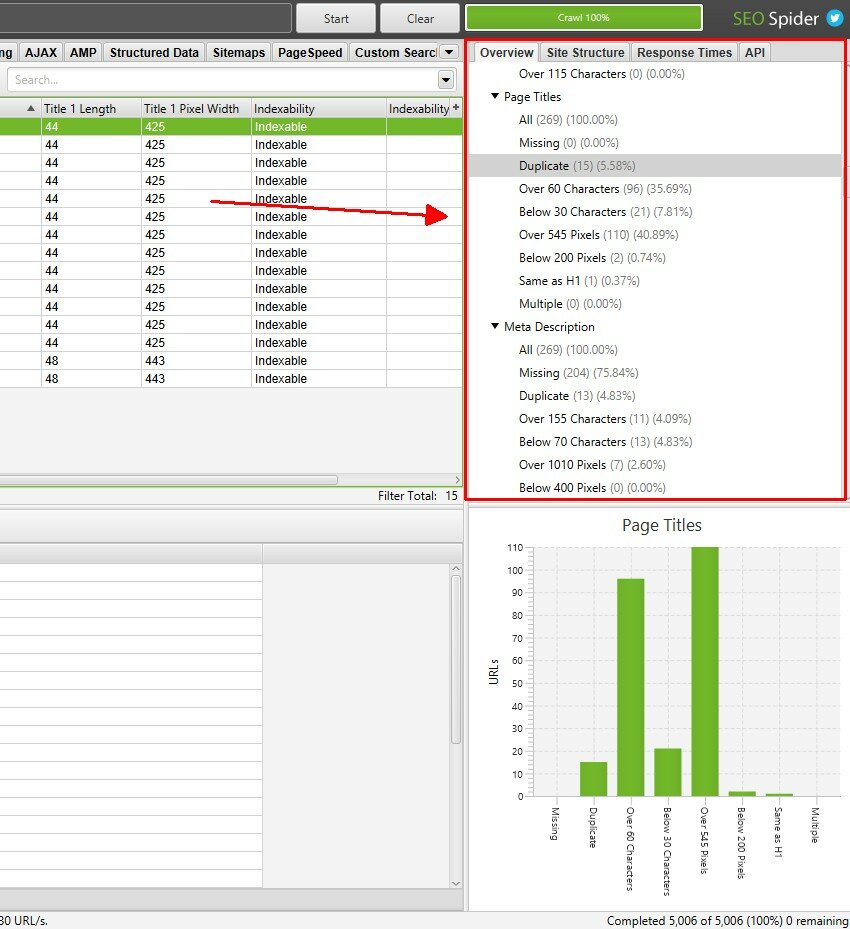
When scanning for these errors, replace all 4xx and 5xx error pages, and either remove or replace those links with updated, correct links, avoiding the use of redirects where possible. For more info, read this guide on how to fix broken internal links.
Slow Loading Pages:
Analyze your website with Google PageSpeed Insights and implement recommendations to improve page load speed. This could involve optimizing images, reducing page size, and enabling browser caching.
How to Improve Your Site’s Load Speed
Engagement 101 teaches if your site doesn’t load quickly, people won’t stay on it.
40% of visitors will leave a site that takes longer than 3 seconds to load.
So if you want people to stick around (AND if you want to improve your SEO), you need a fast website. Test your website using Google’s PageSpeed Insights.
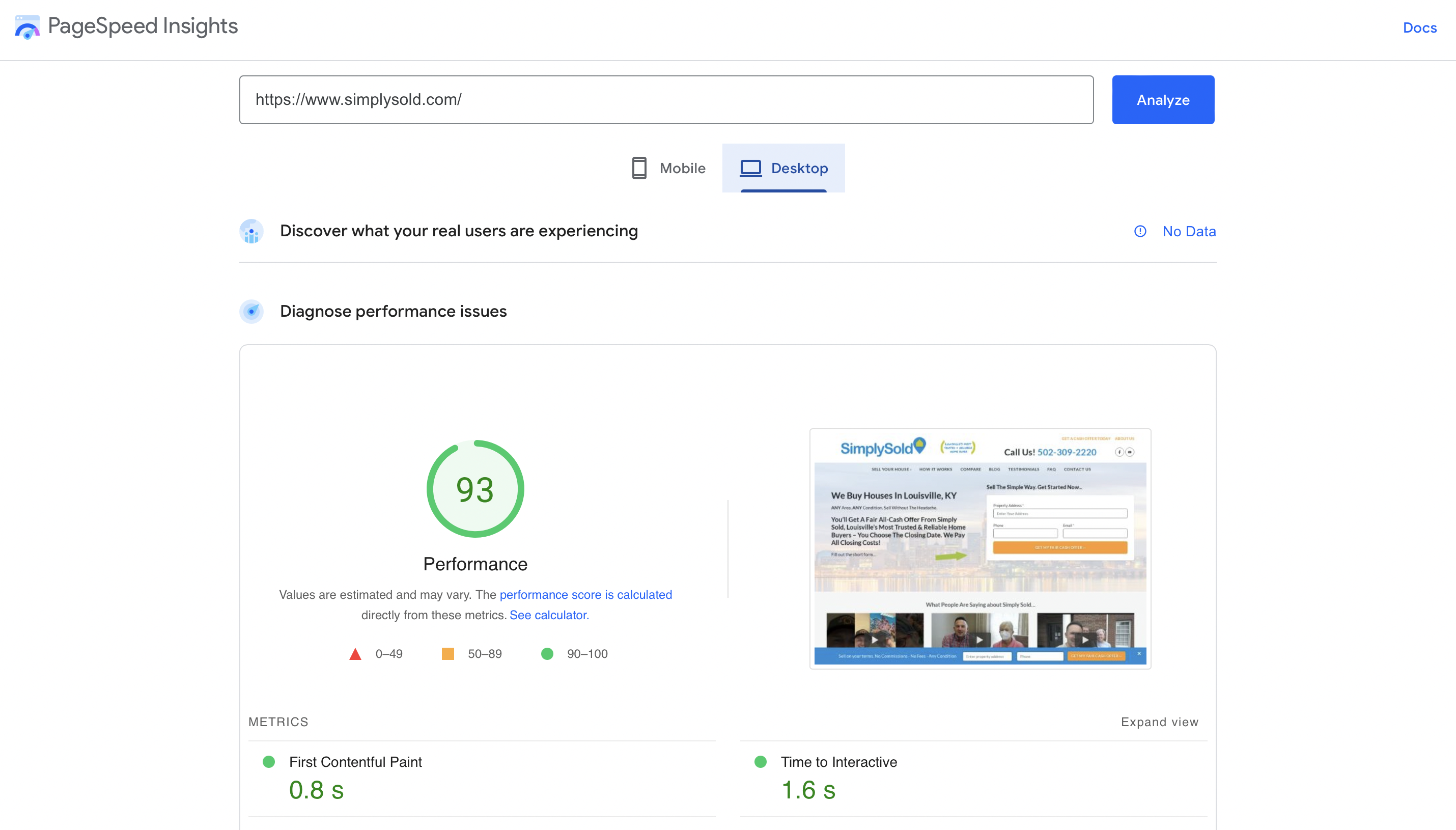
There’s a clear correlation between sites that load fast and rank well…
Good news for Carrot members—out of the box, their websites are 69.8% faster than custom websites.
How do you make your site load fast if you’re not a Carrot member? Here are some tips…
- Use a content delivery network (CDN): a globally distributed system of servers that delivers content to visitors based on their geographic location allows visitors from all over the world to load your content quickly, no matter where they are.
- Compress your images: images are often the heaviest elements on a page, slowing down your site’s loading speed. To avoid this, compress your images before you upload them to your site. You can use a free tool like TinyPNG to do this.
- Optimize your code: if your website’s code is bloated or inefficient, it can slow down your site’s loading speed. To avoid this, minify your HTML, CSS, and JavaScript files. You can use a free tool like Minifier to do this.
Crawl Errors:
Use Google Search Console to identify crawl errors and fix any underlying issues preventing search engines from accessing your pages. This might involve fixing robots.txt configuration or resolving server-side errors.
How to Fix Crawl Errors
Redirects can significantly impact user experience and crawl efficiency, particularly if they are broken, form chains, or create loops.
Similar to broken links, they deteriorate the user experience and can confuse bots. Even functioning redirects add complexity, and my guiding principle for dealing with search engine crawlers is to maintain simplicity whenever possible.
There’s inconsistency in statements from Google’s representatives regarding how much link equity is transferred through redirects. Commonly, this involves redirecting from old to new domains, but it’s equally applicable to page-to-page redirections. Why take the chance?
Addressing and fixing these issues, or ideally, replacing them with straightforward, final URLs, enhances both user and crawler navigation, ensuring total PageRank value is directed to your ultimate URL.
Review Your Content:
Ensure all important pages have unique and relevant title tags and meta descriptions to help search engines understand your content.
How to Review Your Content
While this isn’t a content audit discussion, content quality is still vital in technical SEO upkeep. A site audit should evaluate content quality, pinpointing issues such as:
- Duplicate content,
- Broken images,
- a high number of low word count pages, and
- Incorrect tag usage, including duplicates or absences of:
- H1,
- title, and
- meta descriptions.
Naturally, high-quality and well-organized content tends to rank better and engage users. This isn’t a straightforward “pass/fail” situation, but during a tech audit, if the content lacks quality, it’s crucial to note that a content audit should be the next step.
It’s also worth being aware that some themes can cause issues with your content. Incorrect tag usage can often be tied to theme configuration instead of the way in which the content itself has been formatted.
Insecure Website (Missing SSL): Ensure your website uses HTTPS encryption by installing an SSL certificate. This improves your website’s security and gives you a slight ranking boost in search results.
How to Ensure Your Site is Secure
Google has stated that it prefers sites that use HTTPS, the secure version of HTTP. They’ve even started giving a slight ranking boost to sites that use HTTPS.

If you’re unfamiliar with HTTPS, it’s a more secure way of transmitting data over the internet. When you visit an HTTPS site, all the data exchanged between you and the site is encrypted. That means it’s much harder for hackers to intercept and steal that data.
This is especially important for real estate investors and agents because you often deal with sensitive information like addresses, phone numbers, and email addresses.
To use HTTPS, you need to get your SSL certificate — a digital certificate that authenticates your website’s identity and enables encryption. You can request your SSL certificate through your website host or hire someone else to help you.
If you’re a Carrot member, then your site is automatically HTTPS encrypted. This will result in a safer experience for your website visitors and better rankings in Google.
Missing Localization Configuration:
If you target international audiences, verify your website’s hreflang tags are correctly configured. This helps search engines understand your website’s language variations and deliver the most relevant version to users in different regions.
How to Check Your Localization Config
Incorrect or absent hreflang or HTML lang attributes can hinder organic search performance, particularly for websites targeting diverse regions or languages.
In my experience, multilingual sites often start as problematic whenever I begin a technical SEO audit.
Properly implementing these attributes ensures that search engines present the correct content to the intended audience.
If you only run your site in English and think you can forget about this type of thing, I’d caution you to think again.
It’s still beneficial to implement this, as it aids search engines and other tools in recognizing the primary language of your page.
This boosts accessibility, enabling screen readers to apply the correct language pronunciation rules, and it also enhances search engines’ comprehension of your site’s content.
With content translation becoming more routine, these straightforward steps significantly enhance content accessibility to a broader audience, and Google likes it when you consider this.
Subpar Mobile Experience:
Even if your website uses a responsive design, conduct a mobile-specific SEO audit. This might reveal issues like slow mobile load times or usability problems on smaller screens. Prioritize fixing these issues to ensure a smooth mobile experience.
How to Make Your Site Mobile-Friendly
It’s no secret that more and more people are using their phones to surf the web. Over 60% of all internet traffic now comes from mobile devices!
If your site isn’t set up for mobile SEO, you’re missing out on a ton of traffic (and potential leads).
It also means that Google is starting to penalize sites that aren’t mobile-friendly. In other words, if your site isn’t optimized for mobile devices, you could be pushed down in the search results…
To avoid this, you must ensure your site is “responsive.” That means it should adjust to fit any screen size, whether a phone, tablet, or desktop computer.
Test your site using Google’s mobile-friendly test.
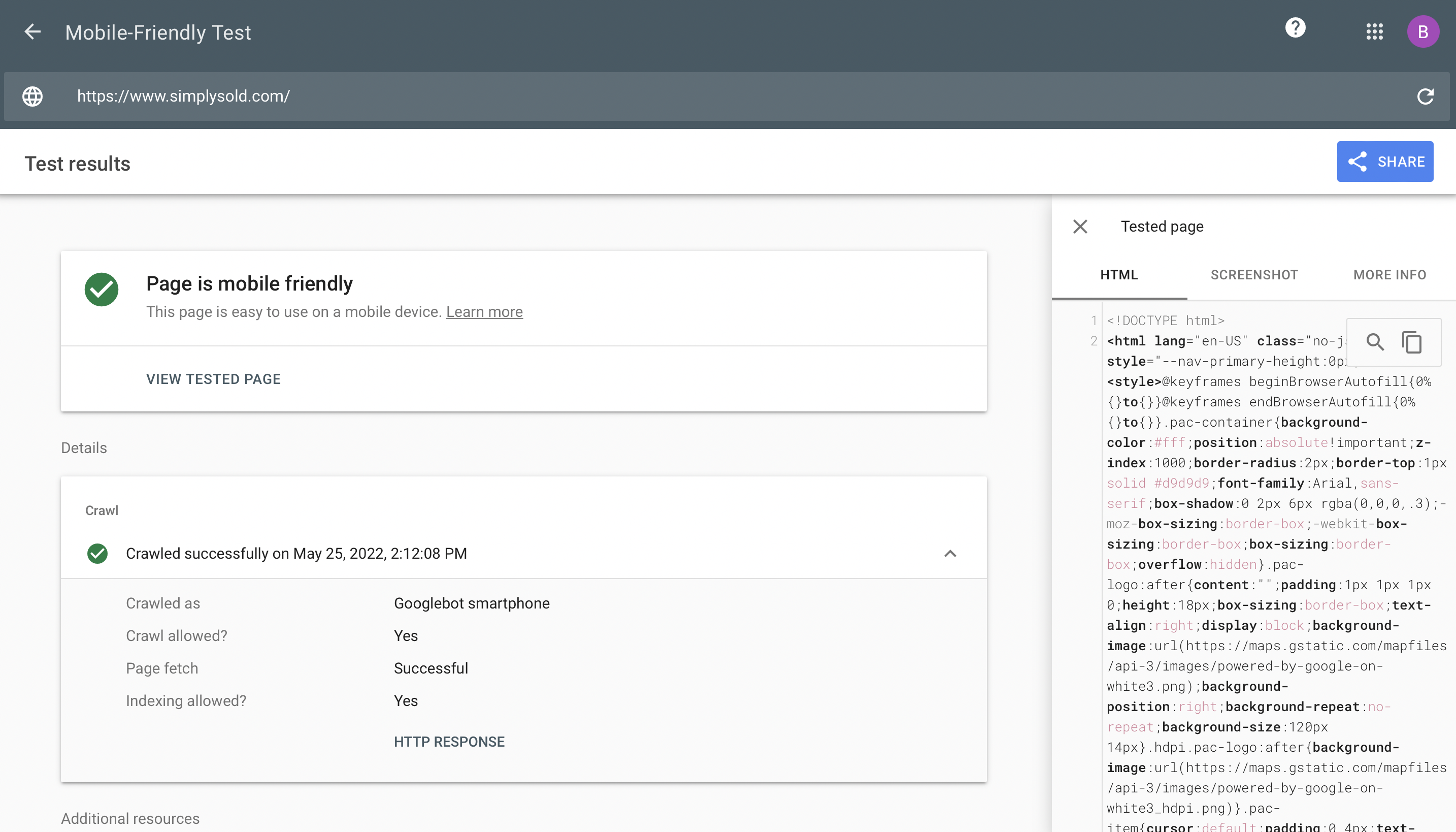
If you’re a Carrot member, then your site is automatically responsive. We build all Carrot sites using responsive design, so you don’t have to worry about this!
Poor Page Experience:
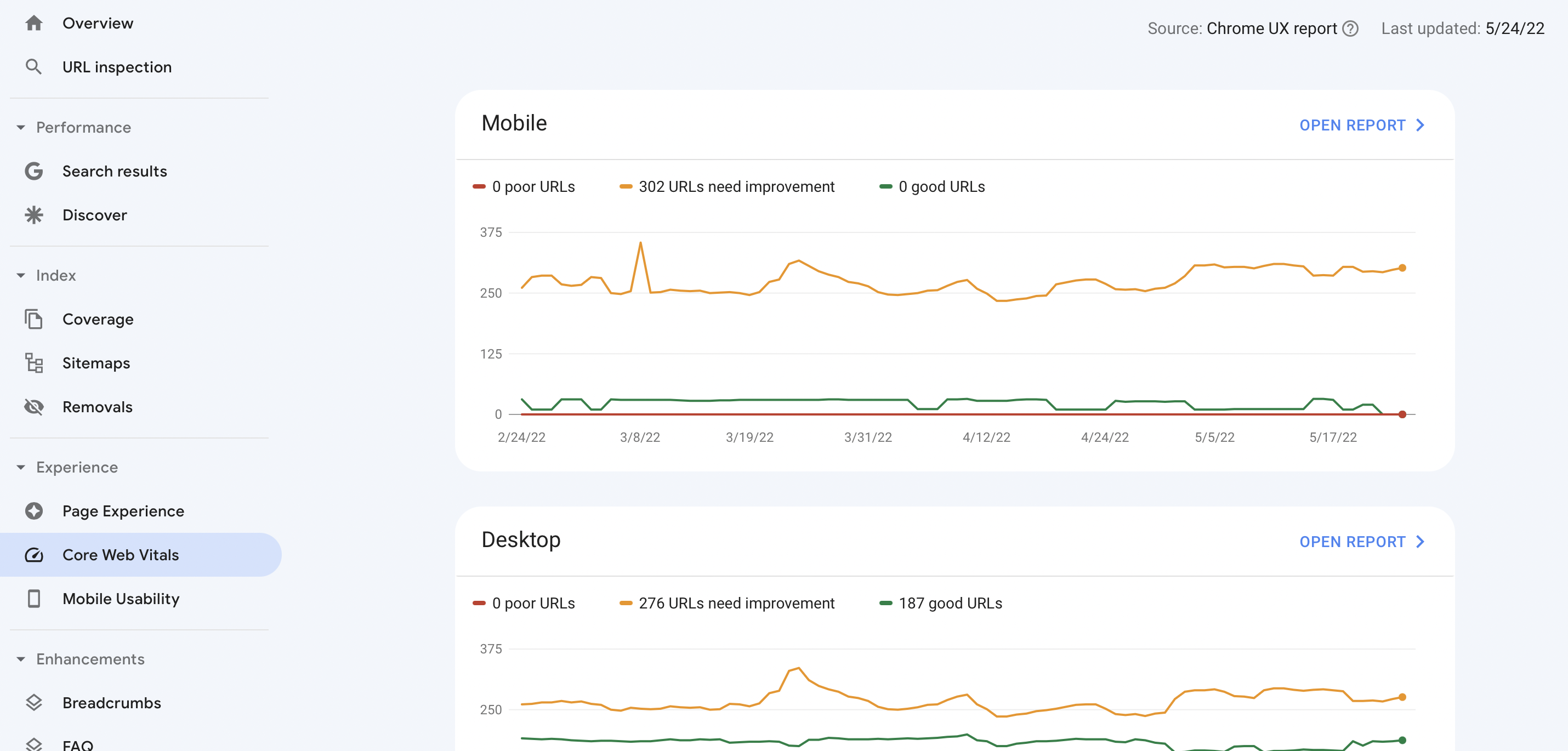
Page experience encompasses various factors that impact user experience, including mobile-friendliness, loading speed, and visual stability. Use Google Search Console’s “Core Web Vitals” report to identify areas for improvement in page experience. Optimizing these factors can significantly enhance user experience and potentially improve your search ranking.
How to Improve Your Page Experience
Google is continually updating its page experience signals. Core Web Vitals combined with existing search signals, including mobile-friendliness, safe browsing, HTTPS security, and intrusive interstitial guidelines, are all factors here.
If you need a refresher, read this guide to Core Web Vitals.
Core Web Vitals are comprised of five factors:
| Largest Contentful Paint (LCP) | How long it takes for the largest content element on the screen to become visible. A good LCP score is 2.5 seconds or less to provide a good user experience. |
| Interaction to Next Paint (INP) | Measures a website’s overall responsiveness, grading the time a site takes to respond after a user interacts with the page. A good INP score is under 200 ms (milliseconds). |
| Cumulative Layout Shift (CLS) | monitors unexpected content jumps as a page loads to measure its visual stability. A good CLS is 0.1 or less. |
| First Content Paint (FCP) | Tracks how long it takes from the instant a page starts loading until any content is visible. A good FCP is less than 1.8 seconds. |
| Time to First Byte (TTFB) | How long it takes a browser to receive the first byte of page data from a web server. A good TTFB is under 0.8 seconds. |
These ranking factors can be measured in a report found in Google Search Console, which shows you which URLs have potential issues:
Finding In-Depth Solutions:
These are just a few examples, and the solutions can vary depending on the specific issue. For more in-depth solutions and troubleshooting steps, leverage the resources available online. Many SEO tools offer detailed guides and explanations for fixing technical SEO problems. Additionally, reputable SEO websites and blogs often publish articles and tutorials on common technical SEO issues and solutions.
Remember, tackling technical SEO is a journey, not a destination. By prioritizing issues, implementing solutions, and monitoring progress, you can create a technically sound website that thrives in search engine results and provides a seamless user experience.
Technical SEO Best Practices
Performing a technical SEO audit may initially appear complex, but with a methodical approach and the correct toolkit, it transforms into a critical element of your online marketing plan.
Here are what I consider to be the best steps for conducting this in-house:
- Select Your Tools: Not everyone has a big budget for software. High priced tools like Ahrefs and Semrush can make the process faster, but they aren’t mandatory. Please make use of whatever you can and simply get on with it. Action matters more than software.
- Develop a Routine: Acknowledge that this isn’t a one-time fix, so frequency is key. Depending on your website’s size and intricacy, a schedule will help—be it monthly, quarterly, or semi-annually—to proactively manage potential issues. At Dialed Labs, we use weekly audits to maintain and monitor our client sites.
- Prioritize Findings: Address issues based on their potential impact on your site’s effectiveness and user experience, and remember that not all discoveries demand immediate action. Implement the highest impact fixes first.
- Detail Changes and Monitor: By keeping detailed logs of your fixes, you can evaluate what techniques are fruitful and discover any fixes that may not have gone to plan. We keep a detailed “Activity Log” for client projects to transparently showcase daily updates.
- Stay on the Cutting Edge of SEO: Winners more or less take all in SEO, so being second best is hardly the right strategy. If you want to be at the top of the SERP, staying in the loop with the most recent official and community-driven guidelines and trends is essential.
- Engage with External Experts: Sometimes, external insights can make a significant difference. Consider consulting with professionals for a more in-depth and comprehensive review.
Technical SEO Checklist
It’s easy to get lost in the weeds as you go through a process like this. Download and print out the following checklist. It will help you stay on track and not miss anything important.
Verify Indexability
- Check robots.txt to ensure it’s correctly configured to allow Google to crawl your website
- Check for noindex pages. Use tools like Google Search Console (free), Screaming Frog, or Ahrefs to identify pages with a noindex attribute
- Verify your XML sitemap is accurate and updated
- Check Google Search Console to make sure your site is being crawled
Identify and Fix Broken Links
- Use a tool like Google Search Console or Screaming Frog to find 4xx and 5xx errors
- Fix and replace broken links to ensure all links lead to valid, relevant pages
Optimize Redirects
- Look for broken, chained, or looping redirects that need fixing
- Replace complex, multi-step redirects with direct, final URLs
Enhance Site Security
- Ensure your site is using HTTPS (instead of HTTP) for secure data transmission
- Verify your site’s SSL certification is valid and current
Improve Page Experience & Core Web Vitals
- Optimize load performance by looking for elements that commonly slow down a page (like large images)
- Run a page or site audit to find technical SEO issues impacting your CWVs
Review & Upgrade Content Quality
- Check for broken images
- Check for missing image alt text
- Evaluate page word count
- Verify proper use of H1, title tags, and meta descriptions
Check Localization Settings
- Implement correct hreflang and HTML lang attributes
- Ensure property language and regional targeting
Enhance Site Load Speed
- Use CDN (Content Delivery Network)
- Compress images
- Minify HTML, CSS, and JavaScript
Ensure Mobile-Friendliness
- Test your site’s responsive design for different screen sizes
- Optimize for mobile user experience
The Road Ahead: Maintaining Your Technical SEO Advantage
Congratulations! By conducting a technical SEO analysis, you’ve taken a significant step toward improving your website’s search engine visibility and user experience. However, technical SEO is an ongoing process, not a one-time fix.
Search engine algorithms and user expectations constantly evolve, so it’s crucial to revisit your technical SEO health regularly. Scheduling periodic technical SEO audits (every 3-6 months) allows you to identify and address any new issues that may arise.
Remember, the technical SEO checklist and tools you explored earlier are valuable companions on this journey. Use them to monitor progress, stay up-to-date with technical SEO best practices, and ensure your website remains search engine-friendly over time.
Ready to Take Your Technical SEO to the Next Level?
If you’d like to delve deeper into technical SEO or need assistance implementing solutions, we’re here to help! We offer a variety of resources, including:
- In-depth guides on specific technical SEO topics
- SEO consultations tailored to your website’s needs
- Ongoing technical SEO monitoring and maintenance services
By investing in your website’s technical SEO health, you’re investing in its long-term success. Contact us today to explore how we can help you achieve your SEO goals!



![EP 338: Follow-Up Mastery #1: Investors, Stop Losing Deals to Bad Messaging [Free Scripts]](https://image-cdn.carrot.com/uploads/podcast-blog-feat-guest-13.png)