Author: Brendan Holmes

  • We Analyzed 50+ Google Ads Accounts: Here Are The Best PPC Keywords for  Motivated Seller Leads [DATA]

    We Analyzed 50+ Google Ads Accounts: Here Are The Best PPC Keywords for Motivated Seller Leads [DATA]

    When you spend money on Google Ads, you want those ads to consistently drive motivated sellers to your website. But what are the best PPC keywords for motivated seller leads?
    Well, that’s what we’re going to show you. We just compiled five years’ worth of Google Ads keyword data — 29,000 keywords and 217,416 clicks from over 50 Google Ads accounts.

    Of course, there are a lot of different PPC keywords for motivated seller leads, so as a part of our criteria for this report, we are only sharing keywords that:

    • Had at least an 8.15% conversion rate
    • And a cost per lead of $250 or less

    Before we proceed, a few important points to consider provide a better understanding of these keywords.

    • All campaigns utilized the Google Ads Search Network with manual bidding.
    • Although these keywords have shown performance across more than 50 different markets in the United States and Canada, it’s essential to note that results may vary. It’s advisable to include various other keywords and match types in your Google Ads account, as they can also generate motivated seller leads.
    • Additionally, it’s crucial to account for market fluctuations. What may have been a successful keyword last year might yield different results this year.
    • For accurate measurement, we relied on conversion tracking implemented on all sites. To our knowledge, all Carrot sites had reliable conversion tracking. If you’re uncertain about the accuracy of your conversion tracking, we recommend reading our conversion tracking blog post to learn how to ensure its correctness.

    Let’s dive into the 20 best PPC keywords for motivated seller leads based on their conversion rates and cost per lead.

    Top 20 PPC Keywords for Motivated Seller Leads

    What Are the Best PPC Keywords for Motivated Seller Leads?

    If mastering keyword bidding were easy, many of us here at Carrot would be out of a job.

    There are three challenging aspects to consider regarding keywords: volume, cost, and quality. Naturally, you want your keywords to generate high search volume, which means more ad exposure and opportunities to capture leads.

    However, with high search volume also comes many people who have no interest in your service. Attracting clicks from individuals who will never convert is far from ideal, especially when you’re paying for each click. Search advertisers must be cautious with broad keywords and make the most of long-tail keywords.

    While it’s true that broad match keywords often have a lower cost-per-click, most Google Ads members want to invest their money in what works.

    That’s where long-tail keywords come into play. These keywords target a smaller but highly relevant audience along the intent scale. Bidding on these keywords is crucial for advertisers who want to minimize wasted ad spend.

    Don’t underestimate the power of negative keywords. They are truly fantastic! Negative keywords allow you to exclude searchers who have demonstrated no interest in your company, preventing their clicks from draining your budget.

    For example, if you’re seeking motivated sellers and have no interest in retail properties, showing your ads doesn’t make sense when someone searches for “what’s my house worth.” By adding this term as a negative keyword, you’ll immediately notice the difference it makes.

    In summary, finding the best PPC keywords for motivated seller leads requires a strategic approach that balances volume, cost, and quality. Utilizing long-tail keywords and leveraging negative keywords will help you attract a more relevant audience and maximize the return on your advertising investment.

    Top 20 PPC Keywords for Motivated Seller Leads

    1. “sell my house” – phrase match
    2. [we buy ugly houses] – exact match
    3. “sell my house” – phrase match
    4. “we buy houses” – phrase match
    5. how to sell the house fast – broad match
    6. need to sell house quickly – broad match
    7. [we buy houses] – exact match
    8. [sell my house] – exact match
    9. sell house for cash – broad match
    10. “sell my home” – phrase match
    11. “sell your house for cash” – phrase match
    12. “sell your house” – phrase match
    13. “home investors” – phrase match
    14. “sell house online” – phrase match
    15. “ugly houses” – phrase match
    16. “we buy homes: – phrase match
    17. “sell my home for cash” – phrase match
    18. “sell my house ” – phrase match
    19. “we buy ugly houses” – phrase match
    20. “companies that buy houses” – phrase match

    How To Find More PPC Keywords for Motivated Seller Leads

    Want to find your keywords? We recommend at least trying some of the keywords within this post, but if you’re deadset on doing your research, you can use Google’s Keyword Planner and Google Ads Search Terms Reports.

    Is Google Ads Worth It for Real Estate Investors?

    Google Ads can still be very worthwhile for real estate investors. It offers numerous benefits, such as targeting and reaching motivated leads, a pricing model based on performance, and easy tracking of return on investment (ROI). However, some disadvantages can be overcome with specific strategies.

    If budget concerns you, you can avoid direct competition with larger competitors by focusing on more specific, long-tail, or localized keywords. This approach can help lower the cost of bidding on highly competitive keywords related to motivated sellers.

    While these keywords may not have the same level of demand as others in your market, they can still effectively drive higher-converting traffic to your website.

    Robert manages his campaign. He’s successful because he uses the right keywords within his account. He doesn’t need 1000s of keywords but sticks with a small batch of the most effective.

    Google Ads Testimonial

    “In 2017 we wanted to shift our real estate business from a standard brokerage model to an investments model that flips homes. We didn’t know quite where to start. After some research, we found Carrot and got our websites up and running.

    We needed to start bringing in leads and had Brendan set up our Google PPC. Our business skyrocketed inside of just a few months.

    Google PPC has provided us with consistently high-quality leads. Inside of just 2 years, we doubled our business revenue. We couldn’t have done it without the Carrot team and especially Brendan setting up our Google ads. Thank You!”

    – Robert Grand

    How to Increase Google Ads Conversion Rate

    First, let’s clarify what a conversion rate is. The conversion rate for specific PPC Keywords for motivated seller leads refers to the number of people who click on an ad using that keyword and successfully convert, divided by the total number of people who clicked through.

    Calculating the conversion rate is relatively simple. You need to divide the number of conversions within a given time frame by the total number of visitors to your site and then multiply that by 100%.

    Conversion rate = (conversions / total visitors) * 100%

    For example, if your motivated seller site had 292 visitors and 21 conversions last month, your conversion rate would be 7.19%.

    To increase Google Ads conversion rates for real estate investors targeting motivated sellers, here are five key strategies:

    1. Refine your keyword selection: Choose relevant and specific keywords that align with the intent of motivated sellers. Utilize long-tail keywords to target a more qualified audience and minimize wasted ad spend. Additionally, consider negative keywords to exclude irrelevant searches and improve targeting.
    2. Optimize landing pages: Create high-converting landing pages that align with the messaging and expectations set by your ads. Ensure your landing pages provide value, address the needs of motivated sellers, and make it easy for them to take action. Use compelling copy, engaging visuals, and clear call-to-action buttons to encourage conversions.
    3. Test ad copy variations: Experiment with different ad copy variations to identify what resonates best with your target audience: test headlines, descriptions, and calls-to-action to find the most effective combination. A/B testing can help determine the optimal ad copy that generates higher conversion rates.
    4. Implement ad extensions: Take advantage of ad extensions to provide additional information and enhance the visibility of your ads. Sitelink extensions, call extensions, and structured snippets can improve the user experience, increase ad relevance, and drive more qualified clicks. Utilize these extensions strategically to highlight unique selling points and encourage conversions.
    5. Leverage retargeting: Implement retargeting campaigns to reach users who have previously interacted with your ads or website. By staying top-of-mind and re-engaging potential sellers, you can increase conversion rates. Tailor your retargeting messages to address specific pain points or offer incentives to encourage motivated sellers to take the desired action.

    Remember continuously monitor and analyze your campaign’s performance, make data-driven adjustments, and optimize your Google Ads strategy to maximize conversion rates over time. Data transformation is a critical step in this process, as it allows you to import insights from your campaign’s performance metrics, helping you refine your Google Ads strategy and ultimately achieve higher conversion rates over time.

    Check out these 13 ways to stand out from the competition and increase conversion rates.

    Once you get Google Ads and your website dialed in, you can achieve a steady flow of quality leads…
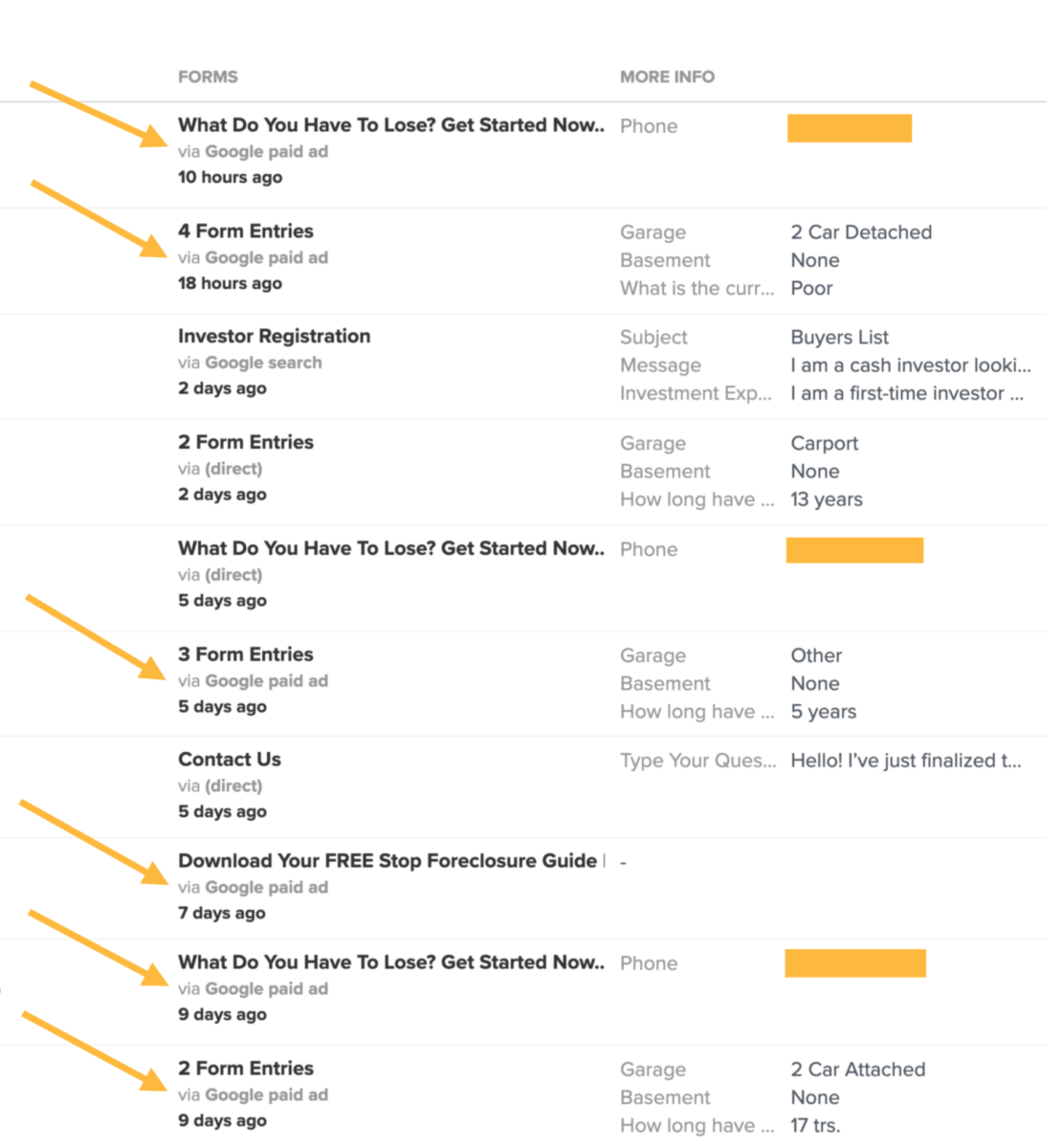
    consistent Google Ads motivated seller leads

    Note About Conversion Rate

    It’s important to remember that while Google Ads will drive traffic to your website, that doesn’t guarantee conversion or a consistent lead flow. You’ll also need to ensure that your website or landing page (wherever you send people after they click on your ad) is set up to convert. Carrot websites are built with the highest conversion rates in the industry, and you can try us risk-free for 30 days.

    Cracking the Google Ads Auction: Unveiling the Process

    It helps to understand how Google Ads determines which ads should show during an auction, which takes place every time someone searches on Google or visits a site that shows ads.

    The Google Ads auction process can be summarized in the following steps:

    1. Advertiser Bids: Advertisers participating in the auction set bids for specific keywords or placements. They indicate the maximum amount they are willing to pay for a click on their ad.
    2. Quality Score Evaluation: Google evaluates the quality of the ads and landing pages associated with the keywords. Factors considered include ad relevance, expected click-through rate, landing page experience, and ad formats.
    3. Ad Rank Calculation: Ad Rank is determined by multiplying the maximum bid by the Quality Score. Ad Rank determines the position of an ad on the search results page or other ad placements.
    4. Ad Placement: When a user enters a search query or visits a webpage that triggers an ad, Google looks at the Ad Rank of all eligible ads. The ad with the highest Ad Rank typically gets the top position, and subsequent ads are placed in descending order.
    5. Ad Display and Cost: If an ad is clicked, the advertiser is charged based on the cost-per-click (CPC) bid. The actual CPC paid by the advertiser may be lower than the maximum bid and is influenced by factors such as competition and the ad’s Quality Score.

    It’s important to note that the auction process occurs in real-time for each search query or ad placement, ensuring that the most relevant and valuable ads are displayed to users while maximizing the advertiser’s ROI.

    You can learn more about how bidding on keywords can help you create a cost-effective campaign.

    Google Ads Testimonial

    “Hey Trevor, Just wanted to let you know what a great program you have set up for me. My web page went live the first week of July this Year. I received 5 leads after the 2nd week with a Little PPC campaign on Google.

    I spoke and met with 3 Motivated Homeowners that week. I put 2 Homes under contract that week. I sold both homes to a local investor at $30k profit on each home. I also will resell the renovated home at 3% of the sell price of about $700k each.

    Thank You for a great program In just over a Month I put under contract 2 Homes with over $100k profit. Can’t wait to see what the next few months brings.

    Thank You Again”

    – Roy Franklin

    Conclusion

    Many real estate investors are skeptical about using Google Ads due to concerns about cost. There are indeed risks involved, and the monetary investment can be substantial. Some markets may require monthly budgets ranging from $5,000 to $10,000, and the average cost per click on Google Ads is around $10 to $20.

    Now, I’m not suggesting that you need to have such a high budget. However, I recommend investing a minimum of $1,000 per month (for smaller markets) to $3,000 per month and giving it at least 2-3 months to see tangible results.

    It’s important to acknowledge that a certain level of risk is involved, as with any advertising campaign. But if your campaign is successful, the potential rewards are significant.

    If you’re worried about not having the expertise to use Google Ads effectively, don’t be. You don’t have to be an expert yourself. Let us assist you with our Google Ads QuickStart service.

    With this service, you’ll receive:

    • Assistance from Google Ads Certified Professionals who will set up your account
    • Lead tracking to keep you informed about the number of leads generated for your business
    • Keyword research with match types
    • Conversion tracking
    • Installation of retargeting tags
    • Mobile-optimized ads
    • Geo-targeting
    • Ad extensions such as Sitelinks, Callouts, Calls, and Structured Snippets
    • Lists of negative keywords to refine your targeting
    • Initial optimization of keyword bids

    Discover more about this service and how it can benefit your business today!

  • Google Ads Update to Broad and Phrase Keywords

    Google Ads Update to Broad and Phrase Keywords

    In 2022, Google announced that it would simplify Google Ads match types. This post explains what this means and what you’ll need to do to your Google Ads accounts.

    Google recently made improvements to keyword matching technology and rules on how it selects keywords in your account.

    This Google Ads update is designed to help:

    • Control which keywords match a search query.
    • Reduce account complexity by giving more control over traffic without managing multiple match types.
    • Allow you to attract more qualified and high-performing traffic using fewer keywords easily.

    Here’s what Google’s announcement means.

    Change: The BERT algorithm has improved keyword matching precision

    BERT algorithm technology interprets language, queries, and search intent. This applies to keyword match type behavior. This makes keywords, particularly broad match type, more predictable and aligned with the search intent. 

    Change: Exact match type data also applies to broad and phrase match types

    To understand this change, we need to refresh our memory about some big changes in early 2022. Google retired modified broad match keywords and announced it will prefer exact match keywords that are identical to the search query. 

    Now the same logic that applies to exact match keywords will apply to broad and phrase match. If your ad group doesn’t have an exact match keyword that is the same as the search query but has broad or phrase match keywords identical to the query, Google will prioritize the broad and phrase keywords that exactly match the search query.  

    Here’s an example:

    If someone searches for house buyers near me and you’re targeting broad match house buyers and broad match house buyers near me, the identically matching broad match keyword house buyers near me will be preferred unless you’re targeting exact match house buyers near me, in which case the exact match will be served.

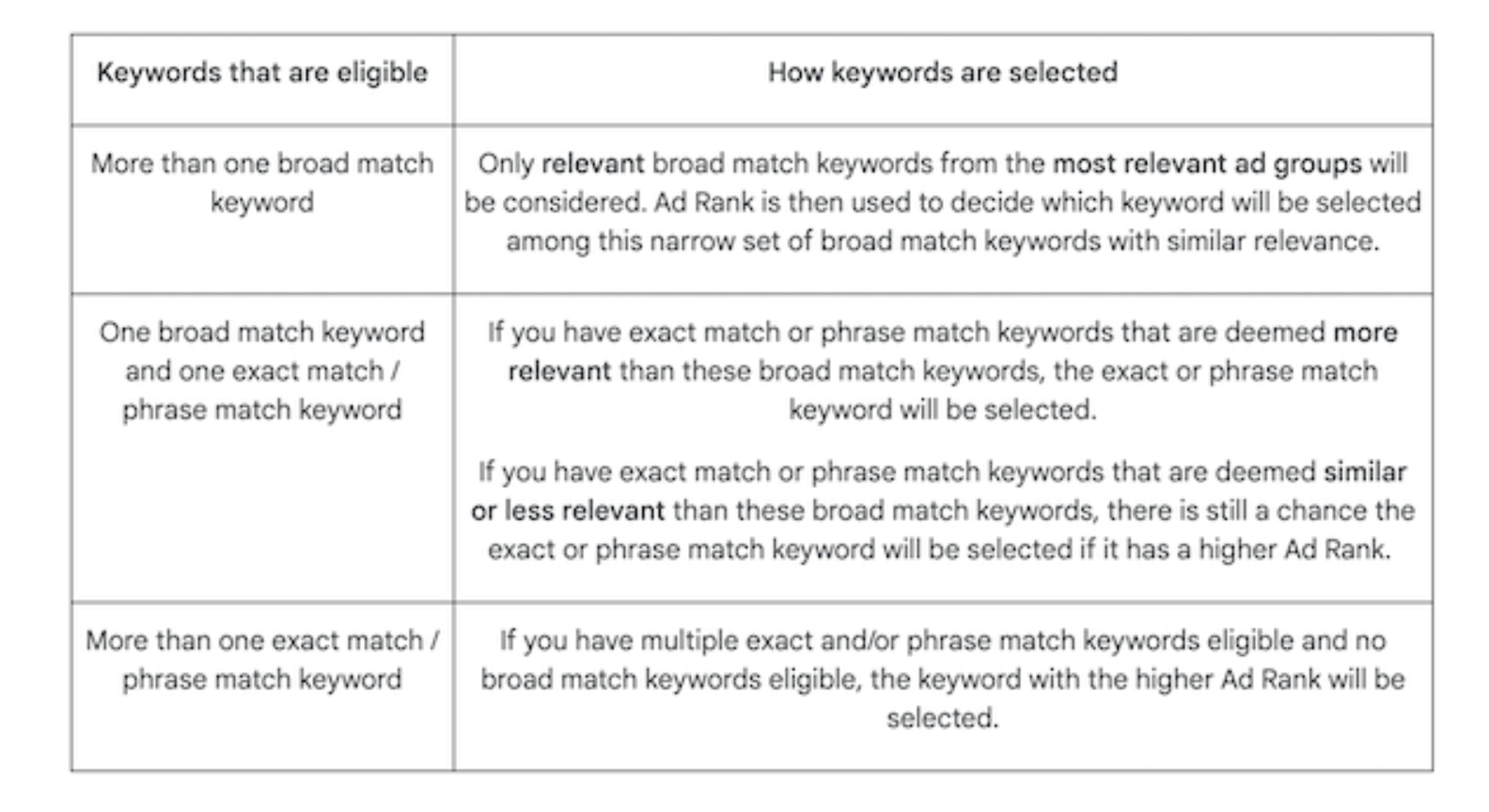
    Change: If you have multiple keywords and match types that are relevant, but not identical, to the search query, Ad Rank will not be the only deciding factor

    If keywords are relevant to a search query, but none are identical to it, Google will not just use Ad Rank, but Ad Rank plus other relevance signals to determine the keyword it serves. “Other relevance signals” include the meaning and intent of the search term and the meaning of your targeted keywords based on their associated landing pages. 

    Here’s an example:

    If someone searches “fast house buyers near me” and you are targeting the phrase match fast house buyer and the broad match house buyer, Google will select the phrase match keyword because it’s more relevant, even if it has lower Ad Rank than the broad match keyword.

    Google states, “These rules ensure that the most relevant keyword will always be prioritized, so you can more easily use broad match and still maintain control.” Google provided the chart below to illustrate this logic.

    Additional Points

    Previously, we’ve directed members about using the same keywords with multiple match types to identify the highest-performing keywords. Google is saying this is not necessary any longer. 

    You can get more “qualified” traffic using fewer keywords 

    This is only what Google is saying. With these improvements, it’s possible to maintain better control over which keywords match a query. This is especially true with broad match keywords. This should “reduce account complexity” and eliminate the “extra work” of using multiple match types to control where traffic goes in your account.

    You should create “thematically” consistent ad groups

    Google suggests to “group keywords into thematically consistent ad groups so your ads will serve from the ad group you expect them to.”

    A basic example can be, if you’re an investor and inherited and cash are your most popular searches, you would create two ad groups:

    • One ad group with creatives for selling an inherited house.
    • A second ad group with creatives for selling for cash.

    If you’re pairing broad match keywords with a Smart Bidding strategy, there’s no longer a benefit to using multiple match types 

    What this means is that since broad match keywords are now more precise and predictable, plus they now follow the same logic as an exact match, you can target the appropriate broad match keywords and get the same results as you would if you targeted the phrase and exact match version of that keywords.

    Google says… “Also note that when you use broad match with Smart Bidding, there’s no benefit to using the same keywords in multiple match types. Broad match already covers the same queries and improves performance with real-time bid optimization.”

    What Does This Mean for Real Estate Agents and Investors?

    Test different match types. Even going as far as creating broad match experiments.

    We’ve always recommended taking Google’s messaging seriously but also with caution. Historically, broad match keywords have caused more wasted spending in real estate campaigns than they have lead generation.

    If what Google is promising, broad match keywords might be the future. Just monitor your account and make adjustments to keep quality searches high.

    Changes to Consider Making Now

    To help you get the most out of these upcoming changes, we suggest the following best practices:

    • Monitor performance and shift budgets where necessary: Traffic may fluctuate due to these changes, so make adjustments as needed.
    • Regularly check your “Recommendations”: Check the “Add new keywords” to maintain keyword coverage and “Remove redundant keywords,” which helps you consolidate duplicate keywords.
    • Continue to use negative keywords: Exclude matches you don’t want with negative keywords.

    Moving Forward

    We’ll monitor these new policies and send updates as they become available.

    For now, it’s important to be aware of these changes. This at least gives you an idea of what some recent changes mean.

  • How to Resolve Google Ads Limited by Budget Status In Your Real Estate Campaign

    How to Resolve Google Ads Limited by Budget Status In Your Real Estate Campaign

    If your real estate Google Ads campaign is getting the “limited by budget” notice, you’re probably asking yourself some questions:

    • Should I trust Google?
    • Are they just trying to get more money from me?
    • What can I do?
    • Is Google Ads even worth it on a limited budget?

    If you are limited by budget, you’ll likely not get as many clicks as possible if you have more to work with.

    Here’s a real-life comparison of a Google Ads account for motivated sellers who took a budget from $55.92 to $16.67 daily.

    $55.92 per day budget: 14-Day Period:

    • Leads: 6
    • Clicks: 56
    • Impressions: 1836
    • Spent: $671.27

    $16.67 per day budget: 14-Day Period:

    • Leads: 1
    • Clicks: 16
    • Impressions: 452
    • Spent:  $292.24

    As you can see, the drop in daily budget can significantly impact accounts.

    When your account is limited by budget, it’s as if you are trying to withdraw money from a bank account with no funds.

    That means Google has to wait until more money is available to be able to show ads.

    In this post, we explore what that “limited by budget” notice means and some strategies you can use to get the most out of your real estate Google Ads campaigns after seeing this message.

    What Does “Limited By Budget” Mean?

    The Google Ads support guide states that your campaign status is “Limited by Budget” which means:

    “A campaign status used when your average daily budget is lower than the recommended amount. When this happens, ads aren’t regularly showing as often as possible.”

    Simply put, if your keywords and bids could spend more than your daily budget limit, you will get this message.

    Google Ads limited by budget notice

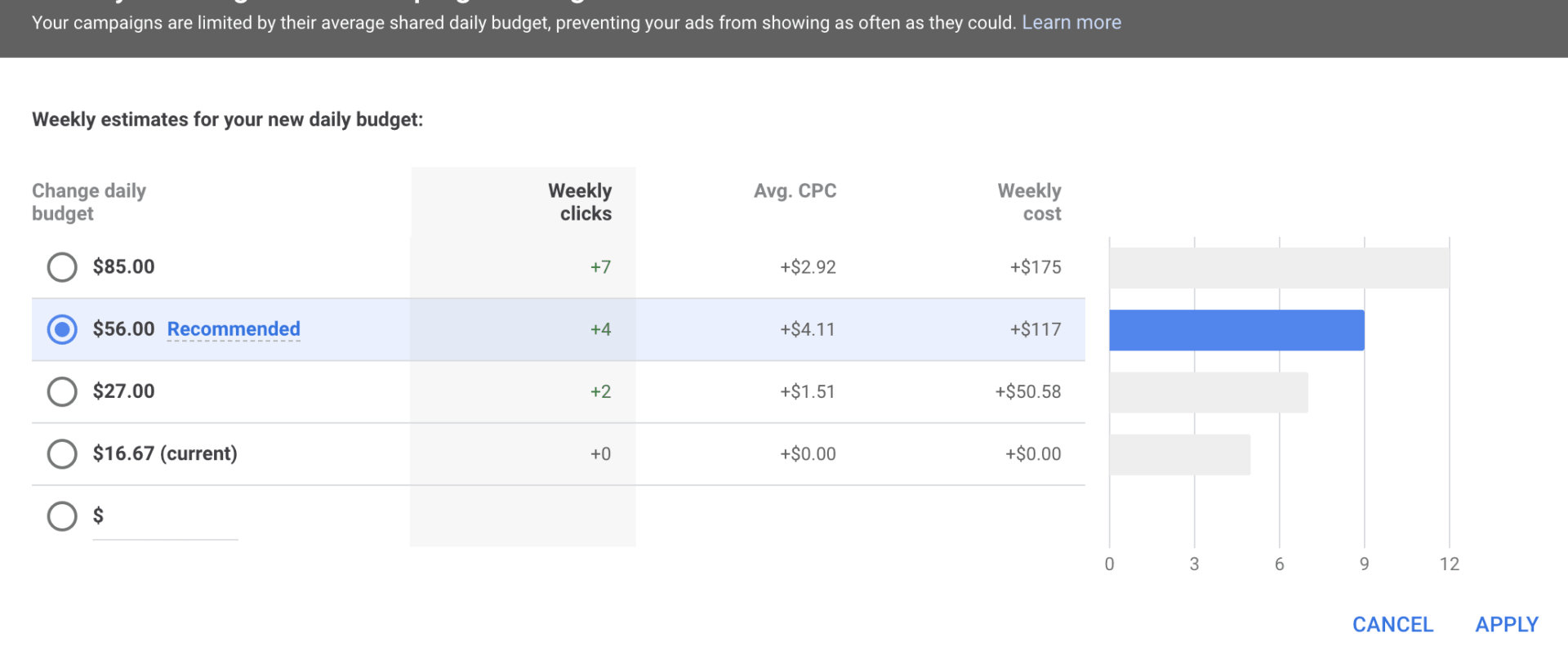
    To see what Google recommends your daily budget be, click on the bar graph icon “Eligible (Limited) Limited by budget” message. You will see a graph like the one below. This can help you understand how much you limit your account and what a new budget might mean.

    Google Ads budget recommendations

    What Happens When Your Real Estate Campaigns Are Limited By Budget?

    Your ad impressions will be lower. Being limited by the budget will impact how often your ads can be shown throughout the day. If you run out of budget early in the day, you’ll have data that don’t necessarily represent the campaign’s health. 

    Your ads will not receive as many clicks. Obviously, your clicks will go down if your ads aren’t getting impressions. From the example above, sometimes you can see a significant dip even in 14 days. We’ve been asked, “Isn’t having fewer clicks a good thing?” meaning “bad” clicks are eliminated. That’s not the case. Even a limited-by-budget campaign can attract clicks that aren’t 100% what you’re looking for.

    Your conversion rates can suffer. Hockey great Wayne Gretzky once said, “You miss 100 percent of the shots you don’t take.” If your Google Ads budget is limited, you’re missing opportunities to convert visitors into leads with each missed click.

    What Limited By Budget Factors Impact Your Real Estate Campaigns

    Your real estate keyword selection. If you’ve done your job finding the keywords that fit your real estate business research, then the keywords in your account should give you a chance to convert to leads. So, if people search for motivated seller keywords and click on your ads, your limited budget will be spent quickly.

    Your real estate ad copy. Be specific in your ad copy. If your ads are too broad, it might attract the wrong type of real estate visitor.

    Your keywords bids. Every keyword clicked is going to cost you money. You’ll tap out your budget sooner if your bids are higher.

    Your campaign settings. Google Ads offers many campaign settings that can impact your budget. You can raise and lower device bids, ad schedules, and target locations and use automated bid strategies.

    Overall… Your daily budget will be the #1 factor.

    Ideas That Can Help Optimize Google Ads Accounts Limited By Budget

    Here are some ideas you can implement for an account limited by budget. These ideas can help stretch your daily spending, but at some point, you’ll be sacrificing keywords, impressions, and/or leads if you don’t have the budget to 1) show ads throughout the day and 2) show ads in the top four ad positions.

    1. Decrease keyword bids. Since your budget will only stretch so far, each click puts your ads closer to shutting down for the day. You can decrease your bids on keywords that you’ve found are too expensive to be at the top of the page or have consistently been within the number one or two ad positions. You can bid for a lower ad position, such as three or four. You’ll need to monitor your average ad positions to be sure your ads still serve on the top of the page.
    2. Create an ad schedule. You can run some reports to see if you can find time pockets that have generated the most leads and create schedules only to show ads within those times. Unfortunately, real estate isn’t like other industries. Your best-motivated seller lead might come at a time you don’t expect. But, if you can find good data, playing the odds can help extend your budget.
    3. Consider your target locations. Run some geographic reports to find the areas with the highest cost per click, the most clicks, and, most importantly, the highest conversion rates. If you’re targeting multiple areas, find those with a lower cost per click and enough search volume to help conversion rates. Remove some areas from your target locations if they are too expensive and/or aren’t generating leads.
    4. Device bid adjustments. You have the option to change your bids for devices – mobile, desktop, and tablets. Run a device report to find your cost per click, clicks, and leads. You might find desktop devices get clicks, but leads aren’t as high as mobile devices. You can adjust your desktop bids by decreasing them by a percentage.
    5. Negative keywords. Not all real estate keywords are created equal. Motivated seller campaigns aren’t looking for buyers, and real estate agent buyer campaigns aren’t looking for sellers. Find the keywords that don’t make sense for your campaign and add them to your negative keyword list. This will allow your budget to, for the most part, be spent on searches from your target audience. Need a little help? Here’s a free negative keyword list for a motivated seller campaign.

    You always want to be evaluating your Google Ads account. That could be on a bi-weekly or monthly basis. It would be best to constantly track your current keywords, ads, settings, bids, and so on. You’re always looking for the best ways to accomplish the end goal… generate more leads at a lower cost.

    One of the biggest advantages to Google Ads and other paid traffic sources is you can see data quickly and restructure accounts to improve results quickly.

    If you have keywords that aren’t generating leads but have the most clicks in your account, it might be a good time to re-evaluate your keyword approach. Ask yourself:

    • Are you getting enough leads to justify the cost of these keywords?
    • What are the actual search terms that are converting?
    • Is it possible to focus on less expensive variations of that keyword?

    For example, if you’re bidding on “sell house,” but the actual search terms that convert are “sell house fast,” you might be able to save some money by being more precise with your keyword targeting.

    Being limited by budget might be part of your Google Ads experience. Some might be starting and managing their campaigns without the comfort level. Others might split marketing budgets between Google Ads, Facebook, and direct mail.

    But you can still make the most of your real estate Google Ads account by knowing what causes the “limited by budget” status and adjusting your strategy to fit your account’s expectations better.

  • Google Ads Housing Policy Update – Here’s What You Need to Know

    Google Ads Housing Policy Update – Here’s What You Need to Know

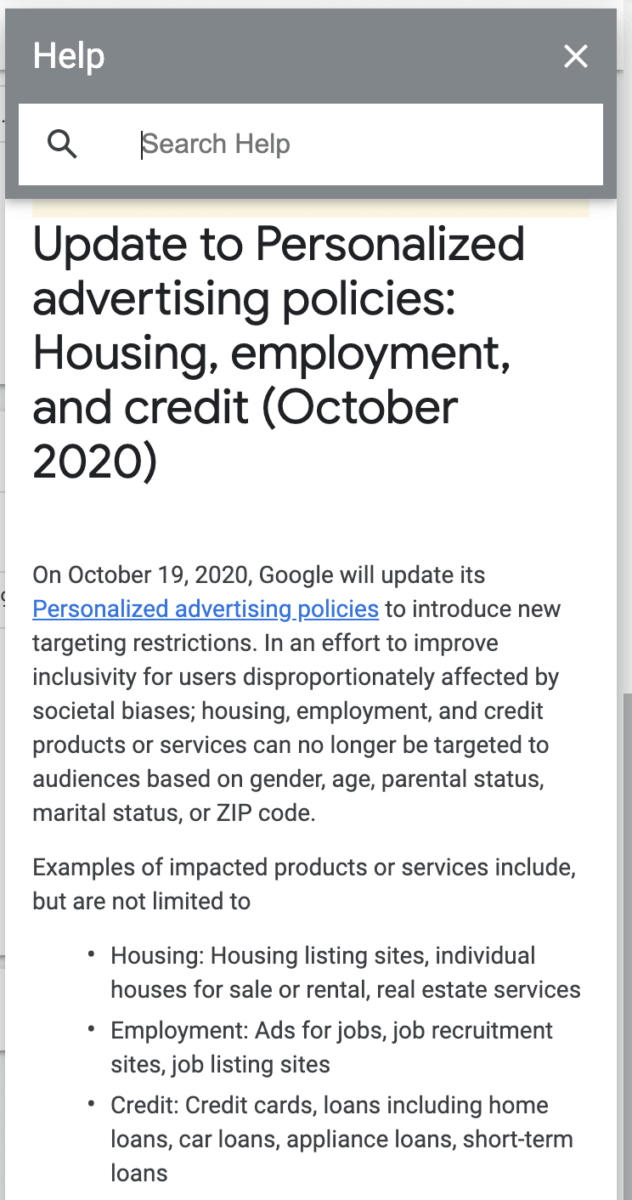
    As announced in August 2020, a new Google Ads Housing Policy, affecting accounts for real estate investors and agents, will change service policies on October 19th, 2020.

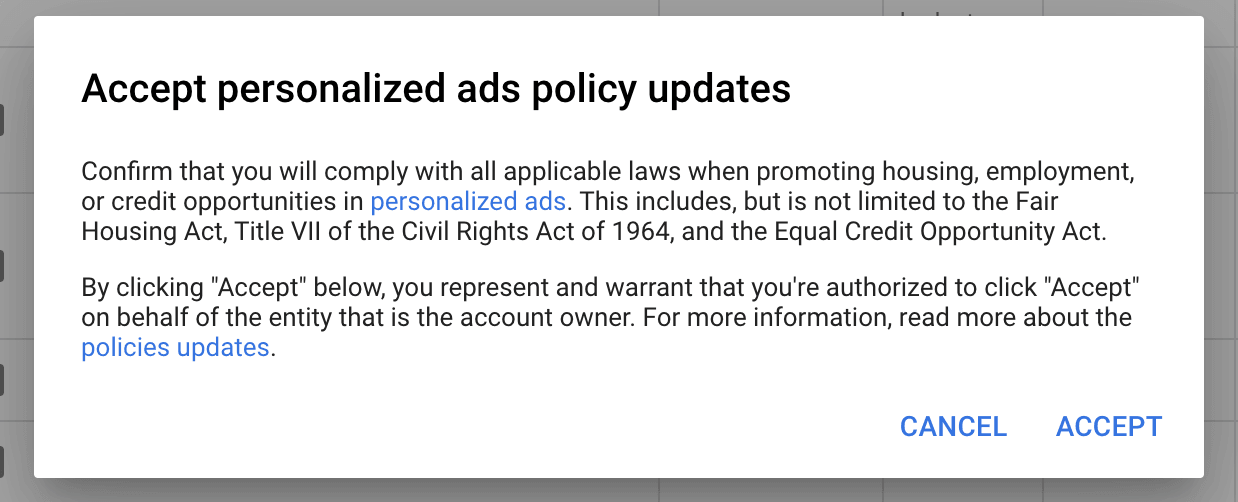
    Carrot members have started to receive emails and notifications within their accounts with this “Update to Personalized advertising policies: Housing, employment, and credit” title.

    We wanted to get the jump on the potential changes you’ll be facing and the mindset leading into October.

    This is a pretty significant change for Google Ads. Following Facebook’s move to special ad categories in 2019, Google presents its housing policies.

    The New Rules

    • Potentially impacted members will receive notifications in their Google Ads account, prompting them to acknowledge the housing policy changes and to agree to comply with relevant local laws. If you had not acknowledged these changes when the policy was enacted on October 19, accounts cannot create any new campaigns until they click to accept the changes.
    • Additionally, when the policy goes into effect, real estate advertisers will no longer be able to target audiences based on gender, age, parental status, marital status, or ZIP code. Any existing campaigns targeting newly restricted audiences will no longer be eligible to serve.

    For more information about the policy and how to acknowledge the changes in your account, you can refer to the upcoming policy for housing on the Personalized ads page or on the Google FAQ page.

    What This Means for Real Estate Agents and Investors

    Advertisers will need to update their campaigns before this policy goes into effect to ensure they aren’t negatively impacted.

    It will be determined how this policy affects accounts, but early indications are:

    • Zip Code targeting will no longer be available
    • Zip Code exclusions will no longer be available
    • Demographic exclusions will no longer be available

    Some of the restrictions advertisers can use for excluding certain audiences based on age or income might also be affected. If you’re currently excluding specific income levels or ages, be aware that you might need to remove those restrictions in October.

    Some of those accounts are already seeing warnings.

    Google Ads Housing Policy notice in an account

    What Should I Do Now?

    For now, there isn’t anything to change unless you want to get ahead of the game. You can accept the policy and make the necessary changes to your targeting and/or demographics.

    You’ll see a message in your account like this:

    accept the new Google Ads Housing Policy

    Changes to Consider Making Now

    Zip Code Targeting/Excluding

    If you’re currently using a zip code based targeting strategy, now might be the time to get a headstart. Removing your zip codes and moving into a town, city, or county strategy.

    Here’s What We Recommend: As you make this move, think about taking advantage of the county or city-specific landing pages, as well as adjusting ad copy to match the new locations.

    Age Exclusions

    Accounts using age exclusions will also be affected. From what we know, this won’t be an option if you’re currently excluding such age groups as 18 to 24 or 25 to 34.

    Here’s What We Recommend: We might find something different come October, but for now, there might be an opportunity to add more negative keywords, update ad copy, and utilize ad extensions to make it clear who your audience is.

    Income Exclusions

    There’s also a potential that Google won’t allow for income exclusions. Some accounts have excluded such income levels as “Top 10%” due to the level of houses.

    Here’s What We Recommend: Again, you can focus more on the ad copy and utilizing your ad extensions to communicate the type of homes better you’re either willing to buy or sell. If you’re an investor with motivated seller campaigns, you can also take advantage of better images and niched copy on your real estate landing pages.

    Moving Forward

    We’ll continue to monitor these new policies and send updates as they become available.

    For now, it’s essential to be aware of these changes. This at least gives you an idea of what changes will be coming and how your mindset might have to shift come October.

    We won’t see the full impact until the new policy is implemented, but we can start adjusting both the ads and the website to further speak to the audience.

  • Google Ads Traffic Has Increased 4% During COVID-19 – Necessary Adjustments to Also Increase Your Leads

    Google Ads Traffic Has Increased 4% During COVID-19 – Necessary Adjustments to Also Increase Your Leads

    Google Ads Uncertainty During COVID-19

    Have you felt like this recently? Are you unsure if you should stop your Google Paid traffic right now?

    You’re not alone, but stay positive. We’re in this together!

    We’ve been answering these questions since March by providing data and challenging our members to shift their mindsets.

    This has led us to create this blog post. We want to show you what we’re seeing, why you need to change, and how to make those adjustments to WIN in Google Ads during COVID-19 and other events that can cause accounts to go haywire.

    We’re here to put your mind at ease.


    Additional COVID-19 Articles:


    What Our Google Ads Data is Showing During COVID-19

    Google Ads real estate investor statistics durning covid-19

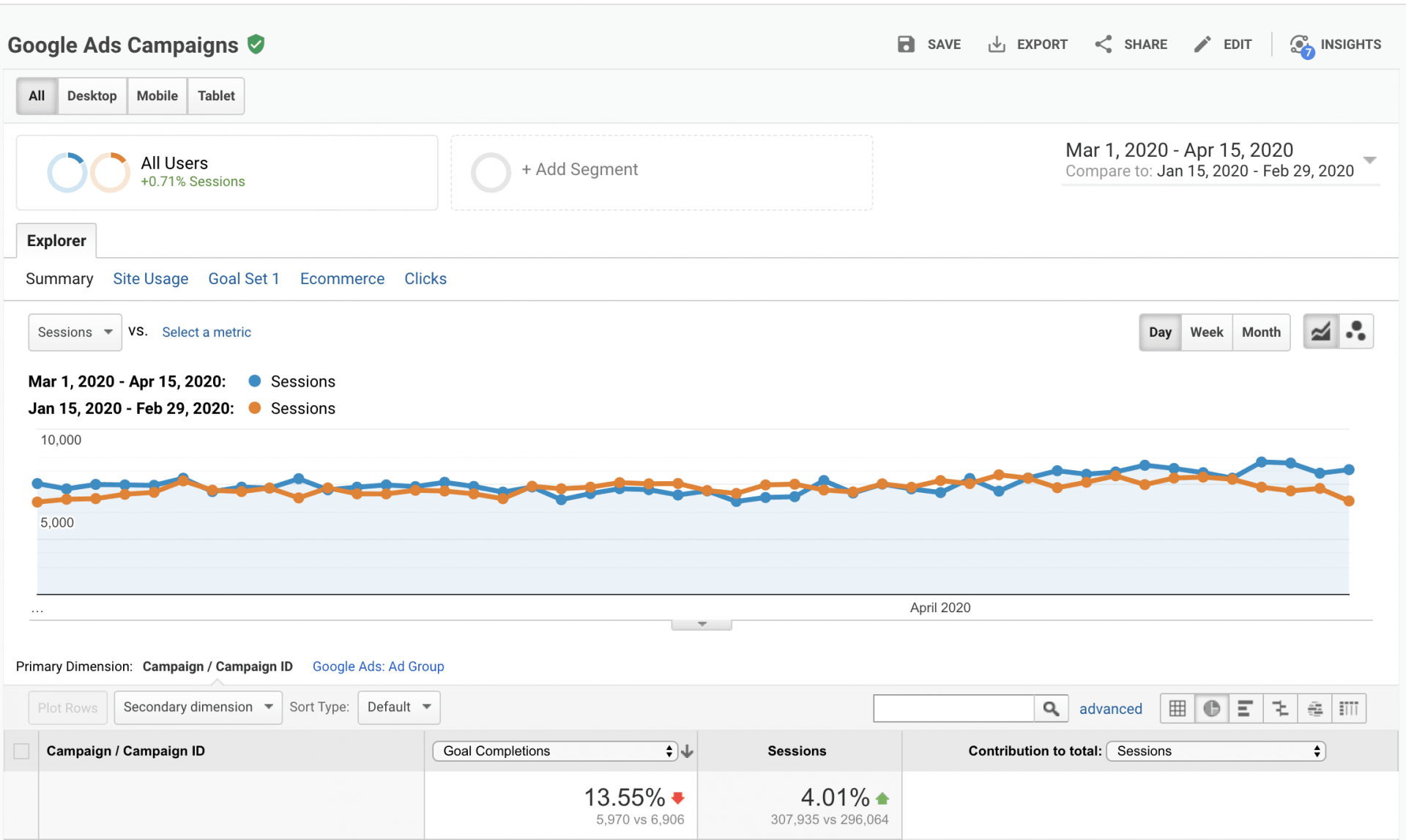
    Numbers were compared from January 15-February 29 and March 1-April 15.

    • Sessions from Google Ads have increased by 4.01%.

      Sessions are defined as…

    “A session is a group of user interactions with your website that takes place within a given time frame. For example, a single session can contain multiple page views, events, social interactions, and eCommerce transactions.”

    • Leads have decreased by 13.55%.
    • Across all members accounts, cost-per-click has increased by 39.3%, and to be expected, the cost per lead has increased by 19.4%.

    What does this mean? In “normal times” a conversion issue could mean you’re lacking credibility on your website. Or, not enough website personalization and customization.

    During COVID, it’s most likely due to searchers whose comfort level with the current situation is low. This presents a major opportunity to communicate with your audience in a different, more impactful way.

    So…

    Why Are Leads Down By 13.55%?

    Our best-educated hypothesis… there is a lack of communication between your visitors and your website messaging.

    Visitors need to know, during this time, that they still have options to sell their house right now. If they’re landing on a page that still has the typical message without educating them about what they can do, they’ll likely bounce for now.

    Communication is as important as ever. You need to tell them what they can do during this time where people are uncertain. For example, communicate that they can:

    • Send photos of their house
    • Join a video call
    • Join a Facebook Live for a walk-through
    • Hop on a phone call
    • Get the selling process started without ever meeting in person

    More on this below…

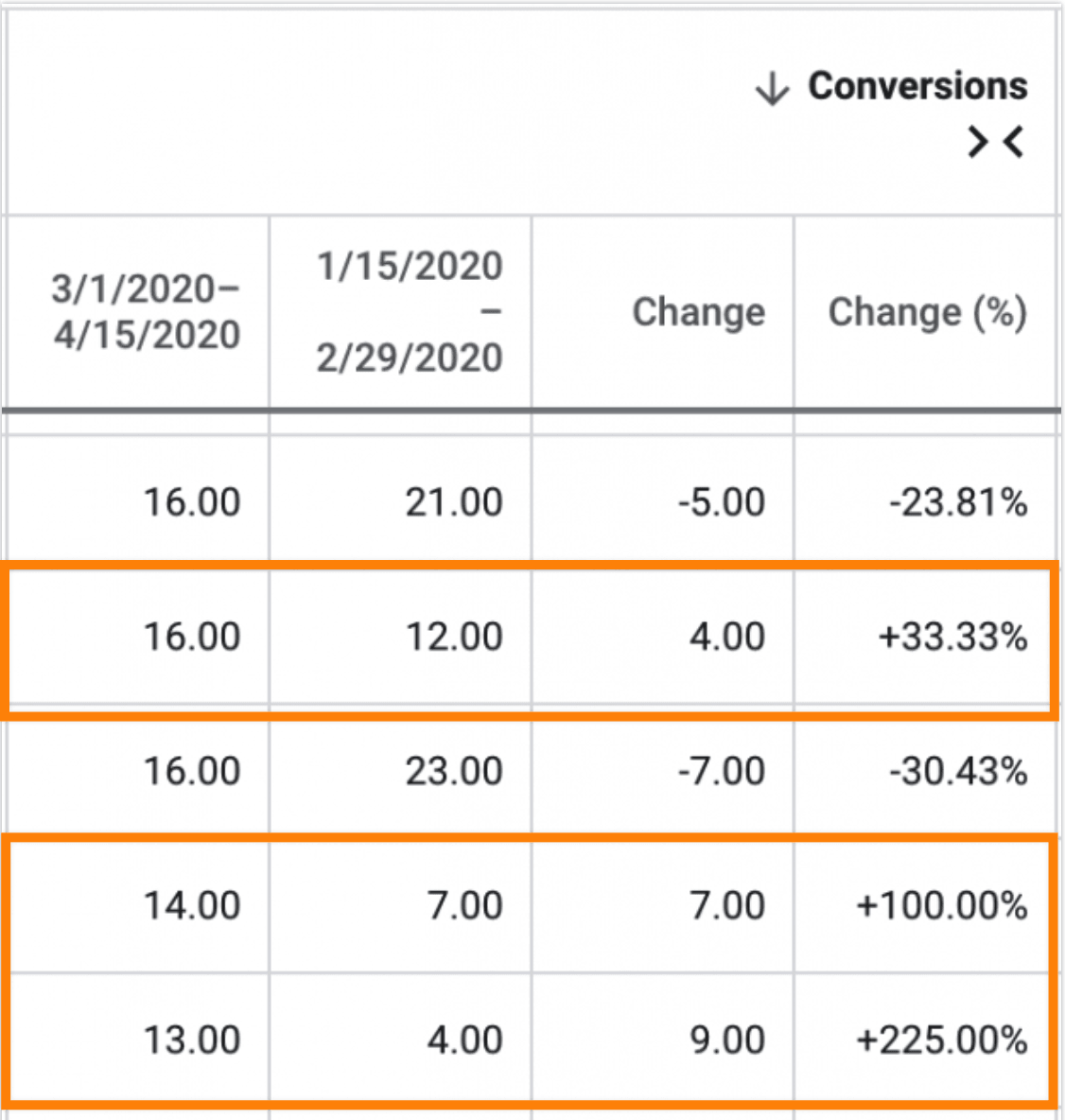
    What Can You Do Right Now to Increase Leads by 33, 100, or Even 225%?!

    The members (not all, but MOST) who have made the necessary steps to communicate to their audiences are seeing an increase in lead volume during the COVID-19 pandemic.

    real estate investor google ads during covid-19

    We wanted to give you some general tips to help make your Google Ads accounts more effective until this time in history is over.

    3 Simple Things You Can Do Today to Increase the Effectiveness of Your Google Ads Accounts

    Tip #1: Communicate and Build Relationships With Your Audience

    During “normal” times, Google Ads best practices dictate that you dig deep into as much data as you can find so you can be all but certain your next campaign will succeed.

    But, we’re in unknown territory holding a lot of uncertainty. No one knows for sure what to totally expect from their accounts right now.

    The ones who will have the most success will be those who take their best, common-sensed, educated move and immediately put their campaigns into action.

    Think of it this way.

    If you don’t try and decide to wait it out, you’ll fall further behind your competitors.

    If you make educated moves but fall short, you’ll at the very least have an idea of how to adjust your approach going forward.

    You don’t have a lot of time to collect a bunch of performance data… we can help with that.

    Your goal should be to find a way to communicate with your audience.

    It can be as simple as creating a Google Ads specific landing page with a COVID-19 message. For example…

    Google Ads Covid-19 landing page message

    Or, adding more content to your website from blog posts. Carrot Content Pro members have access to blog posts such as…

    covid-19 content pro blog post for real estate

    Or, switch it up a bit and shoot a quick video, such as this Carrot member did…

    Can You Still Sell Your House During Covid-19 Lockdown? | Candid Property Solutions

    Now, take your video a step further and create a VideoPost to add to your blog. Simply upload a video and receive a transcription for your content for a blog post in minutes.

    Check this out…How to Create Real Estate Content in Under 10 Minutes with Carrot’s VideoPost

    If you need to help to generate ideas for scripts, check out…The Content Marketing Playbook During COVID-19

    Tip #2: Refine Your Ad Copy

    This goes for your Google ads and any other paid advertising you create throughout the current pandemic.

    Google Ad’s character limitations don’t allow much room to convey a deeply sensitive and empathetic message, but you can utilize space to communicate that you’re still buying as well as other key points.

    We’ve seen ads use copy such as:

    • We’re Still Buying
    • We Can Rest Your Mind
    • No Strangers to Your Home
    • No-Direct Contact Required
    • You Can Still Sell Your House
    • A Phone Call Is All It Takes
    • We Can Buy Via Video, Phone, and Email

    You want to create ads that showcase the options they have and the value your service can give them during these circumstances your audience is currently in.

    If you can get to the heart of how your services can bring peace and closure to your customers’ lives, during this crisis and other times, you’ll stand a much better chance of surviving and thriving in the future.

    Tip #3: Trim Wasted Ad Spend

    During “normal” times, it can be easy to keep average-performing ad groups or keywords live as long as they’re bringing in some leads.

    But right now a shift to pause those ad groups or keywords and add to negative keyword lists might be a smart approach.

    Of course, you can then revive these ad groups and keywords once we’re out of this pandemic.

    If you need to cut your budget, a simple strategy would be to pause ad groups and/or keywords that haven’t produced a lead in the past month or two. Or, those ad groups and/or keywords that have converted one or two times in the past month or two.

    These might be low-hanging fruit keywords. Choose to pause those for now and hang onto the ad groups and keywords that make the most impact.

    It’s also important to continue to add search terms to your list of negative keywords

    Negative keywords will prevent your ads from showing up for future searches that seem to be related to your service but have nothing to do with it.

    We’ve seen terms that seem really good but aren’t converting into leads. Such as…

    “sell my house in 55+”

    So, that term is becoming an exact match negative term for now.

    We’ve also seen an influx of game-related terms, possibly due to more kids being without things to do. Terms such as…

    “how to sell your house in Rocitizens Boblox”

    These are search terms that can’t be predicted.

    Even during times like these, the old saying “you gotta spend money to make money” holds true for paid traffic. Merely pausing your campaigns altogether just isn’t the way to go.

    But, there are just smarter ways of figuring out the most efficient way to keep your campaigns live.

    You should always be looking for the most cost-effective approach to Google ads, but right now, it’s okay to tighten the spending up without feeling like you’re missing out on leads.

    Wrapping up

    The Google Ads industry changed entirely in the last month. Much of what we considered certainties only a few short weeks ago still remain today, but there are things you need to view a little differently for now.

    Adapting during these uncertain times will help you to continue to grow.

    It’s likely that you have already come under pressure to reduce spend or, at the very extreme, you’ve paused your account. These are sensible reactions given the circumstances, but are they the only options? 

    The answers to these questions depend a lot on each individual’s situation, but in this post, we hope to educate you on how to make these positive decisions and how to best adapt Google Ads during these challenging times.

  • Meet Aspen – Our Latest Premium Design!

    Meet Aspen – Our Latest Premium Design!

    We just announced our latest Premium Website Design for Advanced Marketer Plan members… Aspen.

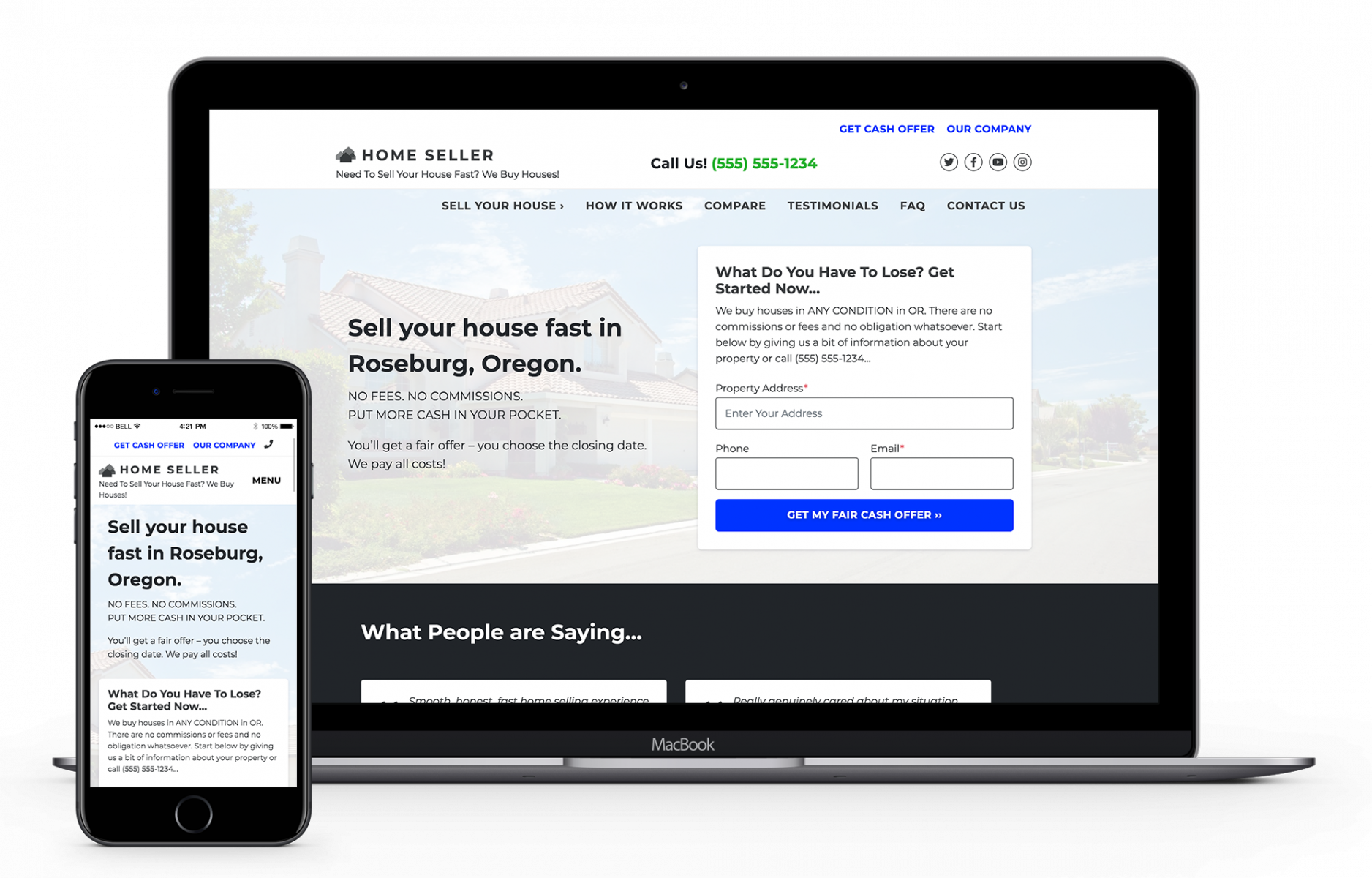
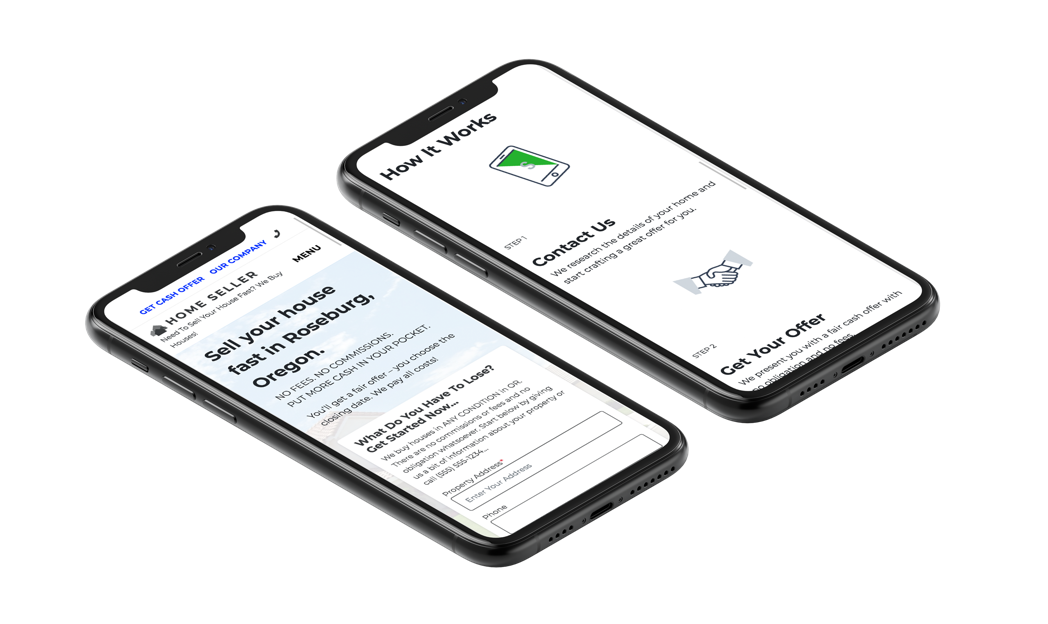
    Aspen is clean, fast (like all of our designs on all plans), beautiful on mobile, and gives you even more style and polish in the body content of your website. This new design is built from the ground up to sync with our Visual Editor to make editing your site as easy and fast as possible.

    This website design isn’t just beautiful, it converts with the same principles as all of our other Carrot site designs.

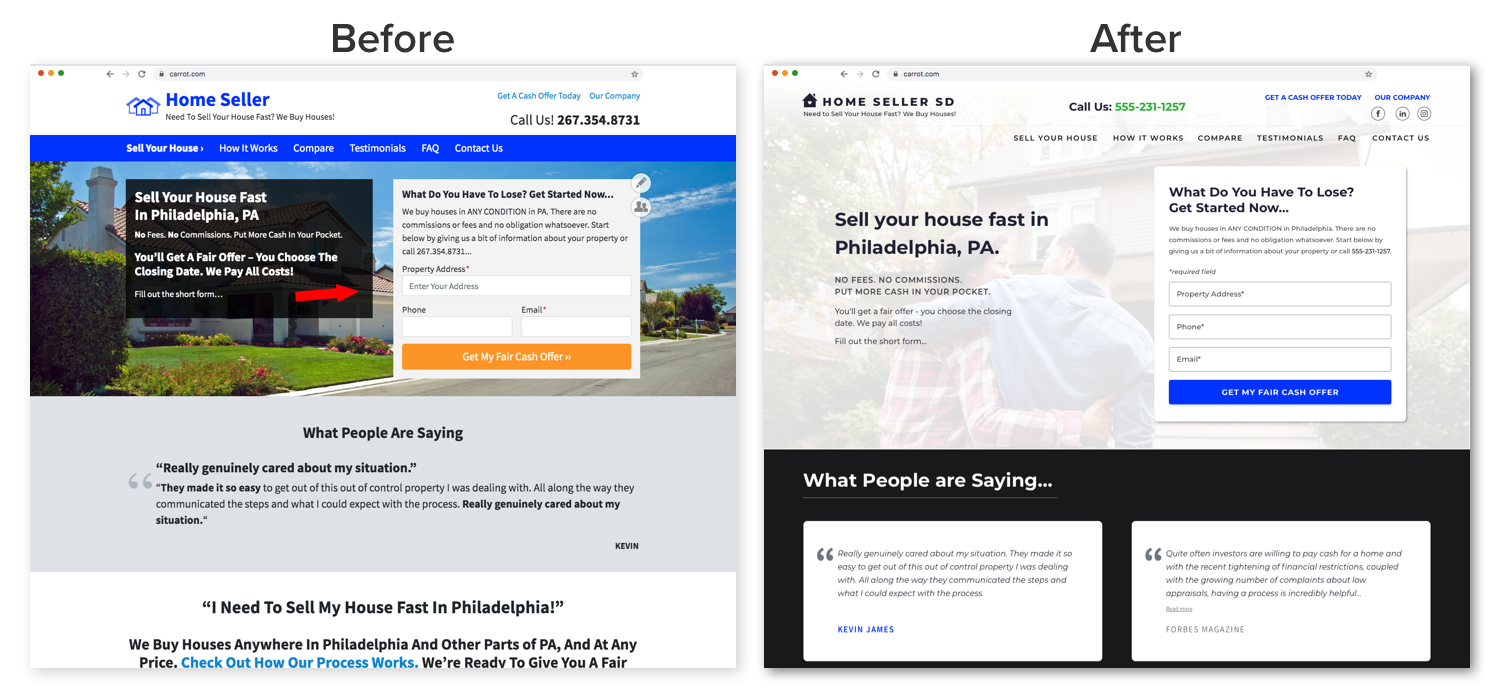
    carrot aspen design before and after
    Carrot Design Before and After. Take a Look at the Aspen Design on the Right
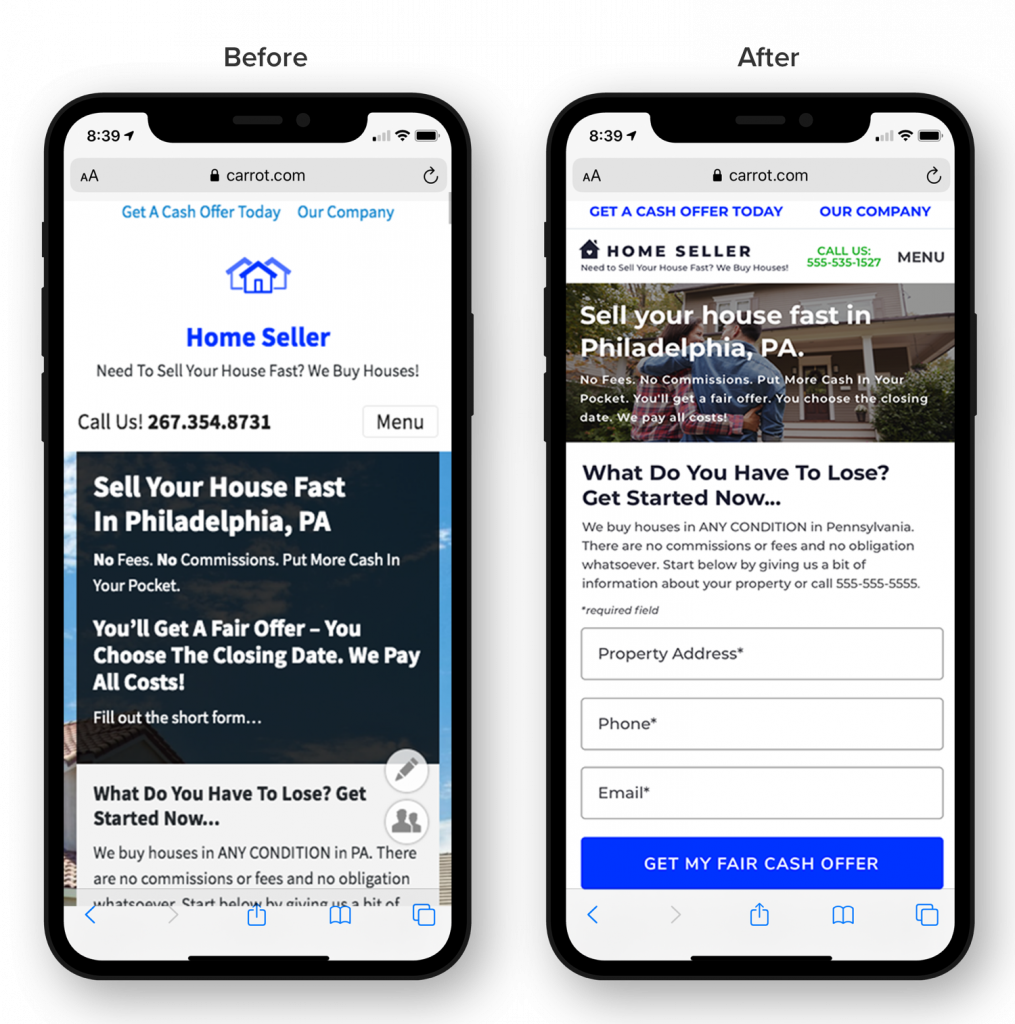
    Carrot Aspen Design on Mobile

    For a design like this, Website Build Expert estimates that you’d pay $5,000 to $10,000.

    So – the kicker question: How much are we going to charge you?

    It’s included with our Advanced Marketer member’s first access to new site styles!

    Since we want this design to remain a unique and distinguishable theme for high-performing investors and agents, for now, it’s only available for our Advanced Marketer members.

    That may sound like a bummer if you’re not yet an Advanced Marketer member. But we want to ensure that high-performing real estate professionals like yourself get exclusive access to the best that Carrot has to offer and that you get to try it out before anyone else.

    And if you aren’t yet an Advanced Marketer member, you can upgrade your plan with just a few clicks…

    Note: We have a time-sensitive offer at the bottom of this post for those of you who aren’t Advanced Marketer members. Read on.

    Once you’re an Advanced Marketer, you can switch to the Aspen design just as easily…

    Plus, Aspen isn’t the only benefit you’ll get with Advanced Marketer. You’ll also get…

    • Track 20 SEO keyword phrase rankings per site
    • 12 Content Pro blog posts and 12 Premium blog posts every single month
    • Quarterly one-on-one strategy calls
    • 10% off any Carrot marketplace services that you purchase
    • And, of course, first access to new site styles (like Aspen) when we release them in the future!

    Upgrade to Advanced Marketer and Claim Aspen Today!


    If you’re already an Advanced Marketer member, then test Aspen and let us know what you think! If you’re not, then go preview it on your website to see what you think.

    If you like it, consider upgrading so you can have access to Aspen and other new site styles we release that will further distinguish your website from online clutter – always with the same industry-leading conversion rate that we are known for.

    Carrot Premium design

    Time-sensitive Offer for Our Core and Content Pro Members (and Non-members)

    If you upgrade to Advanced Marketer, you’ll immediately get access to the Hemlock theme and all the other goodies that come with an Advanced Marketer membership.

    We want to sweeten the deal for you even more…

    Upgrade to Advanced Marketer and you’ll also get access to an exclusive FREE BONUS: The Entrepreneur Freedom Formula – Trevor’s 5 core processes he uses to regain 20+ hours per week, drive more results with less effort, delegate faster with more confidence, and get more freedom and flexibility in your business in 2020.

    If you’re looking to scale up your leads and stand out from the competition, this Advanced Marketer Upgrade package and training series will help you head into the fall with momentum and clarity.

  • Bing Ads For Real Estate: How To Create An Account The Right Way…

    Bing Ads For Real Estate: How To Create An Account The Right Way…

    We’ve already written about why Bing ads can be crazy profitable for real estate investors and agents. But how do you set up a Bing Ads account? Well here’s how…

    But first, we need to clear something up. In early 2019, Bing Ads was rebranded as Microsoft Advertising. In this article, we’re going to reference Bing Ads.

    Real estate investors can be very busy and sometimes don’t have the necessary time to research and create marketing campaigns, especially when it comes to pay-per-click advertising.

    We understand the requirement to streamline some of this process. That’s why we created this simple step-by-step guide to creating your own Bing Ads account. It’s for short-on-time investors needing to expand their online marketing.

    In a previous post, we covered why Bing Ads for real estate isn’t a waste of your time and should be considered as a viable advertising resource. But, just don’t take our word for it, check out this post from another highly regarded PPC company 25 Reasons to Use Bing Ads Now.

    Create A Bing Ads For Real Estate Account In 15 Minutes

    First, go to the  Microsoft Advertising (Bing Ads) sign up page.

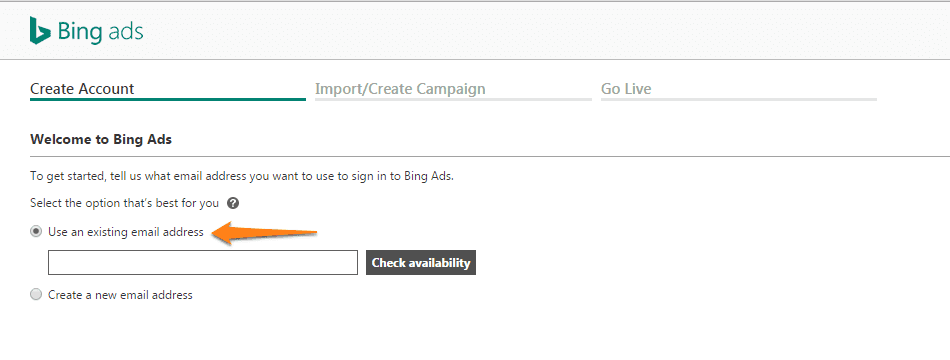
    You’ll be given 2 options: Use an existing email address or create a new email address.


    Option 1: Use An Existing Email Address To Create An Account

    Go to the Bing Ads sign up page and enter an existing email address. Click Check availability to check if your email address is available to use.

    bing ads account creation

    Image: Bing

    If you have an email address you already use to sign in to Microsoft products (like Skype or Xbox LIVE), all you need to do is sign in and the transition will be complete. If you’ve never used this email to sign into a Microsoft product, you’ll be able to sign up for a new account.

    1. Click Next
    2. Sign into Bing Ads
    3. Enter Bing Ads account info
    4. Click Create Account.

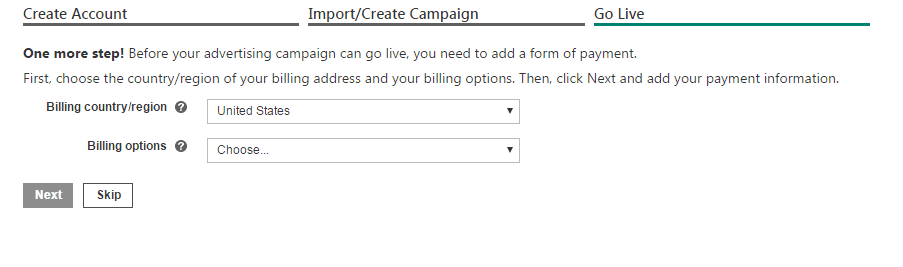
    After you’ve created your Bing Ads account, you can set up your campaign by importing from Google AdWords (see below) or by creating a new campaign. You can also skip this step and click Continue. Enter your billing and payment information and click Next. You can also skip this step and enter your billing and payment information later by clicking Skip.

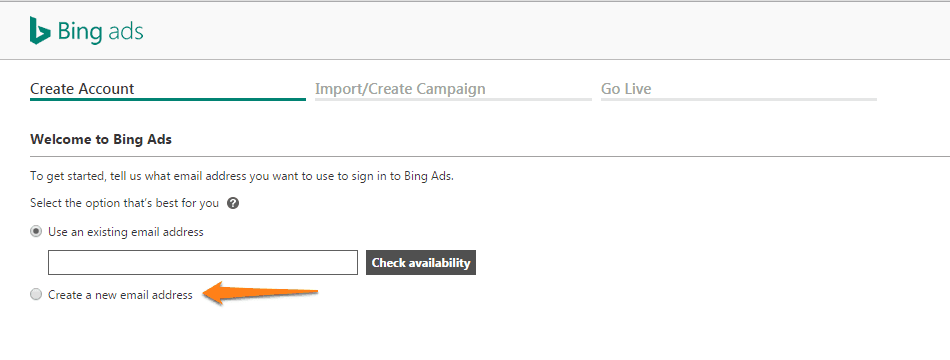
    Option 2: Create A New Email Address And Then Create An Account

    Go to the Bing Ads sign up page

    create a bing ads account 3

    Image: Bing

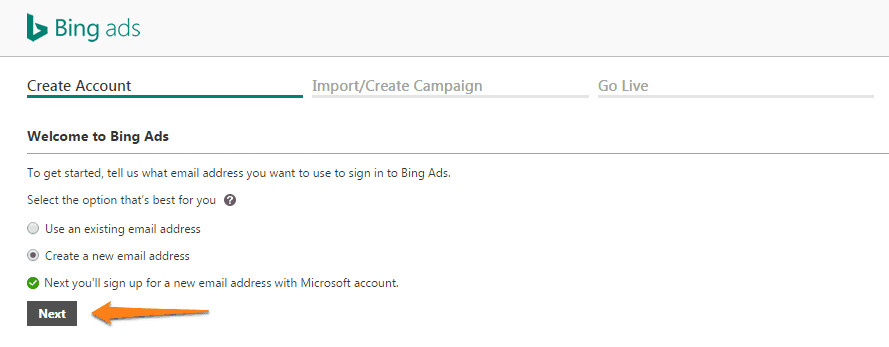
    Select Create a new email address and click Next.

    create a bing ads account step 4

    Image: Bing

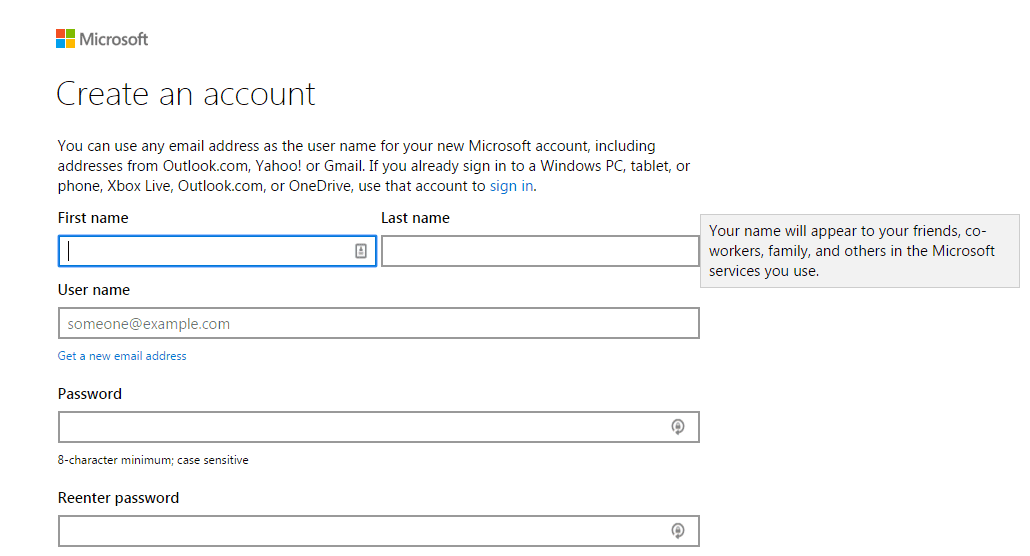
    A Microsoft account is an email address and password you use to sign in to Microsoft services or devices. If you use an email address and password to sign in to services like Skype, Xbox LIVE, or Outlook.com, you already have a Microsoft account.

    1. Enter information for the new account
    2. Click Create account
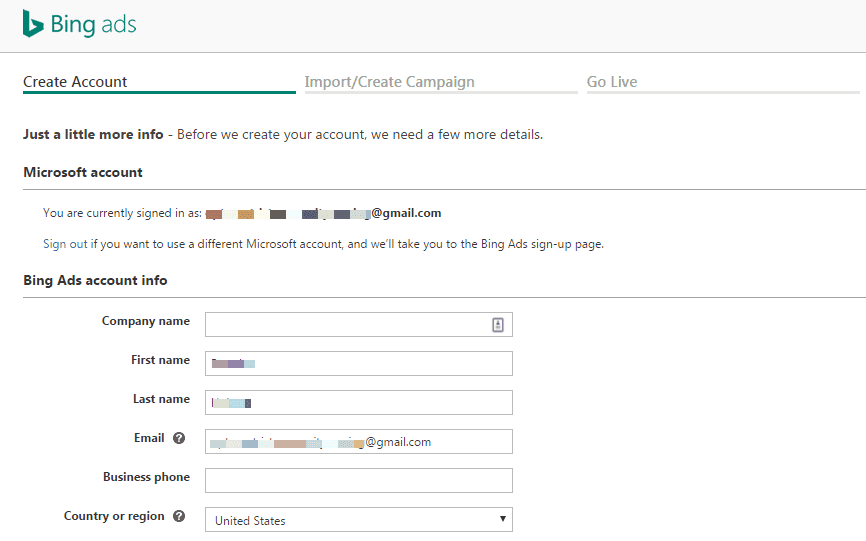
    3. You’ll be taken to the Bing Ads Create Account page directly after creating your new Microsoft account and will already be signed in with your new account
    4. Enter Bing Ads account info
    bing ads account step 5

    Image: Bing

    1. Click Create Account
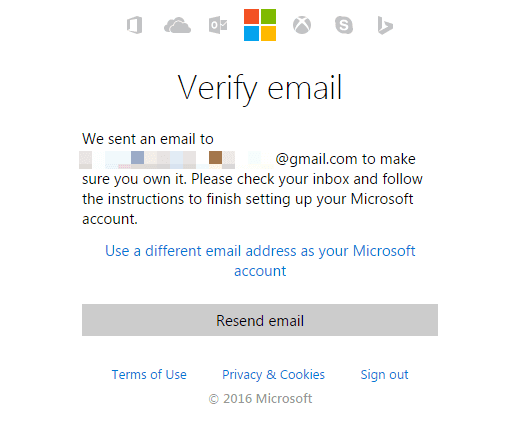
    2. Check your email inbox to verify your email address
    bing ads account email verify

    Image: Bing

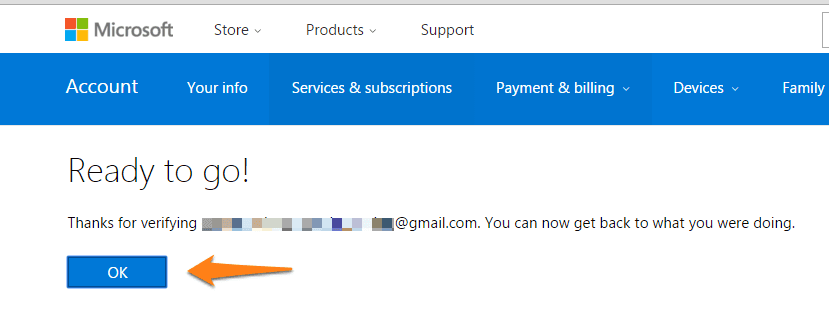
    After you verify your email you’ll be Ready to go!

    bing-ad-account-email-verification-after

    Image: Bing

    You’ll be taken to the Bing Ads Create Account page directly after creating your new Microsoft account and will already be signed in with your new account.

    bing-ad-account-first-step-in-campaign-creation

    Image: Bing

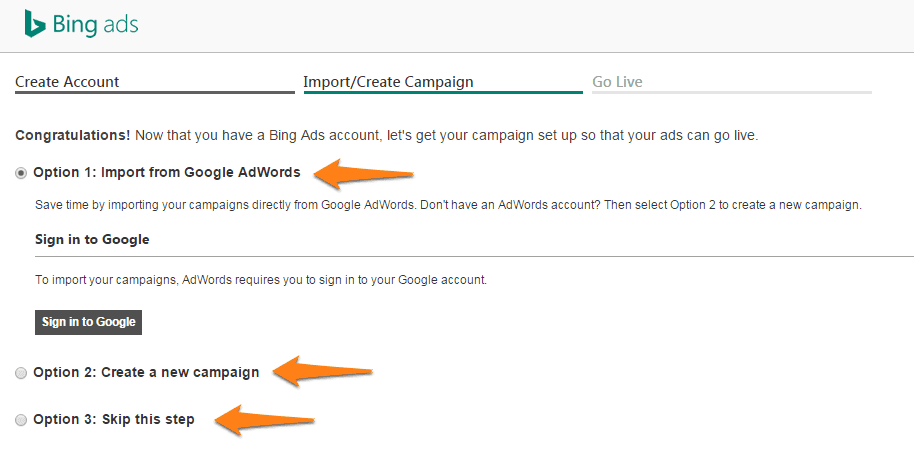
    After you’ve created your Bing Ads account, you can set up your campaign by importing from Google AdWords or by creating a new campaign. You can also Choose Option 3 to skip this step. Once you choose your desired option click Continue.

    bing-ad-account-second-step-in-campaign-creation

    Image: Bing

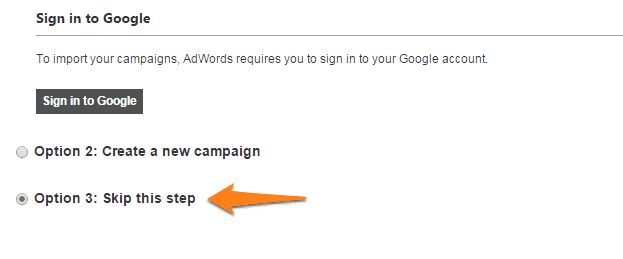
    Enter your billing and payment information and click Next. You can also skip this step and enter your billing and payment information later by clicking Skip.

    bing-ad-account-skip-this-step

    Image: Bing

    You’ll be directed to billing.

    bing-ad-billing-options

    Image: Bing

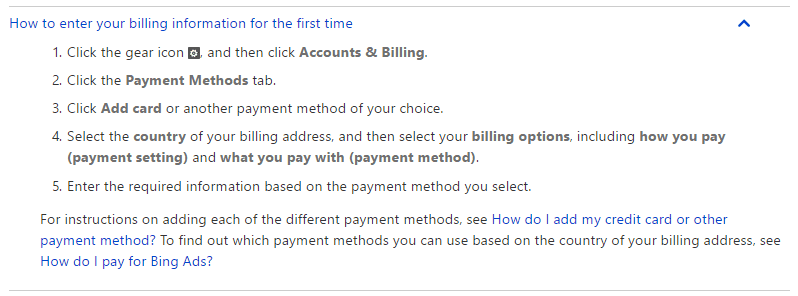
    Setting Up Your Billing Information

    When you’re ready to go live with your Bing Ads campaigns, you’ll need to set up your billing information.

    bing-ads-billing-information

    Image: Bing

    Import Your Existing AdWords Account

    In Bing Ads, click Import Campaigns, and then click Import from Google AdWords.

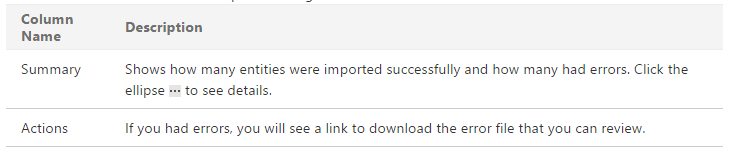
    If you have imported from Google AdWords in the past 90 days, you will see a table that tells you the data and AdWords account that was imported along with:

    bing-ads-adwords-import-1

    Image: Bing

    1. Click Sign into Google
    2. Enter your Google sign-in information, click Sign in and then Accept
    3. Select the Google campaigns you want to import, then click Continue

    Under Choose Bing Ads account & import options, do the following:

    1. Choose the Bing Ads account you want to import to
    2. Choose the appropriate time zone
    3. Choose the appropriate options for “What to import”
    4. Choose the options you want for bids and budgets
    5. Click Import

    All this PPC advertising stuff can seem complicated, but that’s what we’re here for. The initial setup of your first campaign is not nearly as important as the long-term optimization of your account. Hopefully, this piece will help you create your Bing Ads account with as little pain and suffering as possible.

    The small amount of effort it requires to create a Bing Ads for real estate account is small in comparison to the long-term benefits that Bing Ads advertising can offer in addition to AdWords as part of a comprehensive, sustainable, and above all, profitable, online marketing strategy. So what are you waiting for? Create a Bing Ads account, and let’s get to work!

    Create Your First Campaign

    Create your first Bing Ads campaign

    Have You Had Success With PPC Advertising?

    Facebook, AdWords, Bing, Craigslist… Shoot those success stories through the comments box below. We’d love to hear!

    Also… be sure to dive into our Carrot blog to get insights on attracting and converting more inbound leads for your real estate investing business.

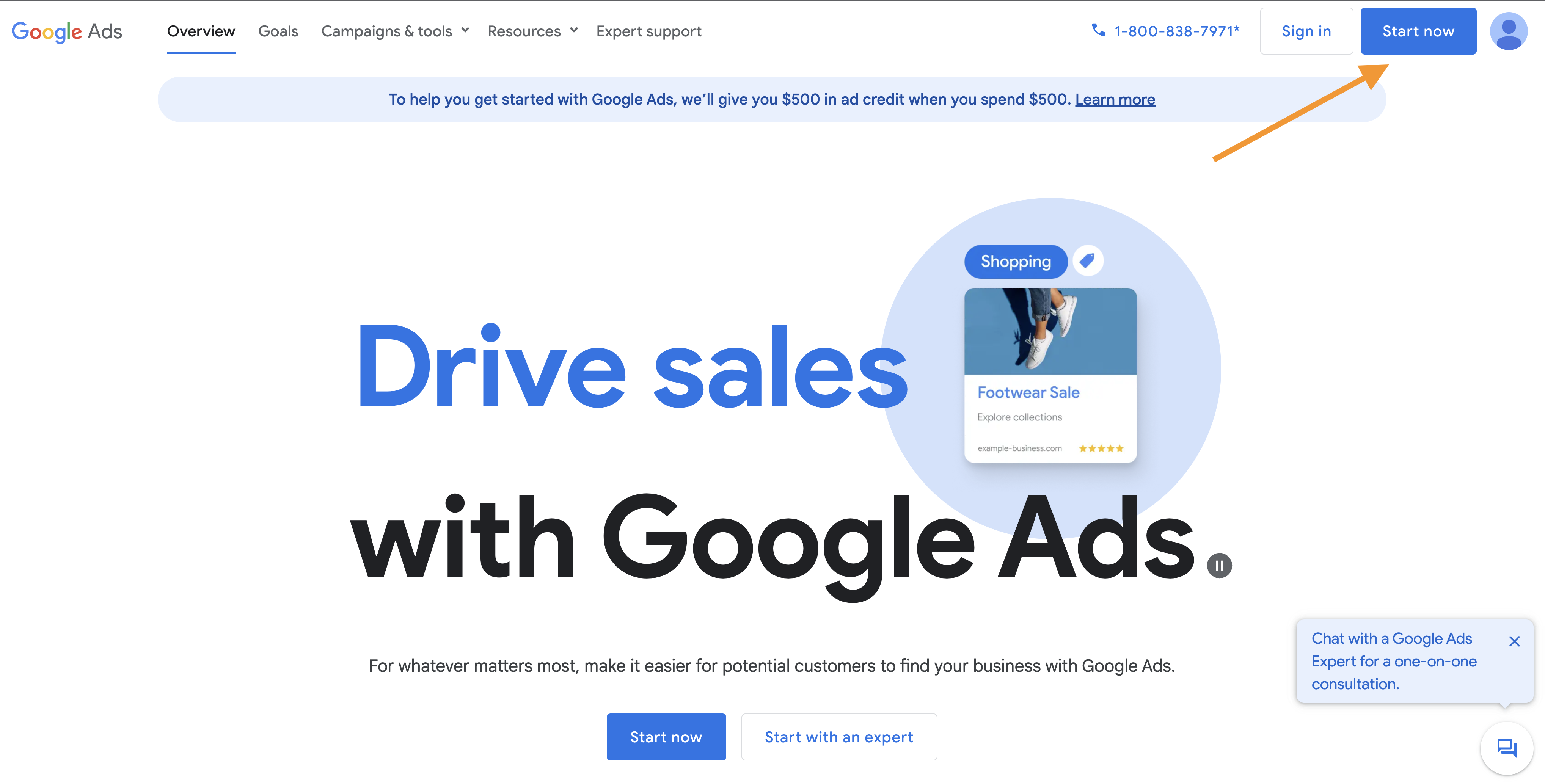
  • How to Create a Google Ads Account for Real Estate

    How to Create a Google Ads Account for Real Estate

    Are you ready to take the next step in your online real estate marketing? That step is creating a Google Ads account.

    Real estate investors face several challenges when it comes to generating leads. Traditional methods, such as direct mail and cold calling, can be time-consuming and yield low results. Even with a strong online presence, attracting qualified leads to your website can be tough.

    This is where Google Ads comes in.

    According to data, Google Ads can be a highly effective lead source for real estate investors. Without it, investors may struggle to compete in today’s crowded digital landscape. With Google Ads, investors can reach potential sellers and buyers actively searching for real estate solutions, resulting in a higher likelihood of conversion.

    Furthermore, without a strong online advertising strategy, investors may miss out on valuable leads. The data shows that 97% of consumers search for businesses online before making a decision. If real estate investors are not visible in these search results, they may be losing out on potential leads to their competitors.

    In addition to missing out on potential leads, not having a strong online presence can damage an investor’s credibility. With 78% of consumers saying they research a business before engaging with them, it’s crucial for investors to have a professional and user-friendly website. By using Google Ads to drive traffic to their website, investors can showcase their credibility and expertise to potential leads.

    Overall, real estate investors who neglect to utilize Google Ads may miss out on valuable leads, damaging their credibility and struggling to compete in today’s digital landscape.

    In preparation for creating a Google Ads account, there are a few important steps. While setting up the account itself is relatively straightforward, running effective Google Ads campaigns requires some groundwork.

    Before You Create a Google Ads Account

    First and foremost, ensuring that your website is relevant, user-friendly, and adds credibility is crucial. Your Google Ads account will drive traffic to your site, but once visitors arrive, it’s up to you to convince them to take action.

    To do so, you’ll need landing pages designed to motivate and engage visitors.

    Your advertising efforts will likely be wasted if your landing pages are disorganized, lack relevant information, or are otherwise not conducive to conversions.

    For guidance on creating effective landing pages that maximize the return on your PPC campaigns, we recommend checking out our land page best practices.

    Before Starting a Google Ads Account, You Need to Consider

    1. Planning. You need to have your real estate website dialed in with some personalization and credibility.

    Your Google Ads account (formerly known as AdWords) can help you to bring qualified visitors to your real estate website. Once they’ve made it to your website, it’s YOUR duty to convince them to convert.

    To make this happen, you must create pages that will compel your visitors to take action. If your pages are cluttered or lack relevant, credible information, you will have a leaky bucket and will likely be wasting money.

    Take the time to focus on customizing your website a bit, especially your “Testimonials” and “Our Company” pages. Check why these two pages are so important. Also, be sure your real estate website is mobile-optimized. All Carrot websites are mobile-friendly. Therefore you’re maximizing the potential of your Google ads account.

    2. Commitment. You must be willing to build Google Ads into your long-term financial and time plan.

    It’s practically impossible to see the full potential of your Google Ads account from the start. It’s essential to recognize that PPC is not a short-term venture. Establishing a strong structure, expanding your keyword lists, identifying negative keywords, and testing ads and landing pages takes time.

    Plus, you will likely start constantly changing keyword bids to fit your budget and keeping your ads in relevant, high-performing ad positions. Getting the first phase dialed in typically takes 1-3 months.

    3. Dedication. You must be willing to spend time or outsource your account.

    Your account is now up and running… you can sit back and relax. WRONG! There is still plenty of heavy lifting.

    If you haven’t managed a PPC account before, I recommend taking serious time to learn. You must be comfortable with the Google Ads dashboard and educated enough to make good decisions. Making the wrong choices can cost you money and cause your account to take a step back in productive data.

    Once you are comfortable to embark on the challenge, you must monitor your performance thoroughly. That hard work will well pay off in the end.

    Take time developing your strategy, identifying your goals, and calculating your cost per lead/deal. You must know how much you will spend on Google ads to close a deal. As we know, all market profits aren’t created equal. An investor in New York might need to spend more to get one deal closed over someone in Memphis. You must know your market.

    After you know your budget, you’ll need to have a solid keyword strategy in place. It’s a good idea, especially if you’re new to Google Ads, to start with highly targeted keywords and expand into broader terms as you get more comfortable.

    Creating a New Google Ads Account for Real Estate

    Step 1

    Head to www.ads.google.com to set up an account. When creating an account, you can create it under your existing Gmail account or set up a new one. I like to set up a new Gmail account ahead of time, which I use specifically for Google Ads management. This way, my personal email isn’t bombarded with emails from Google Ads.

    Step 2

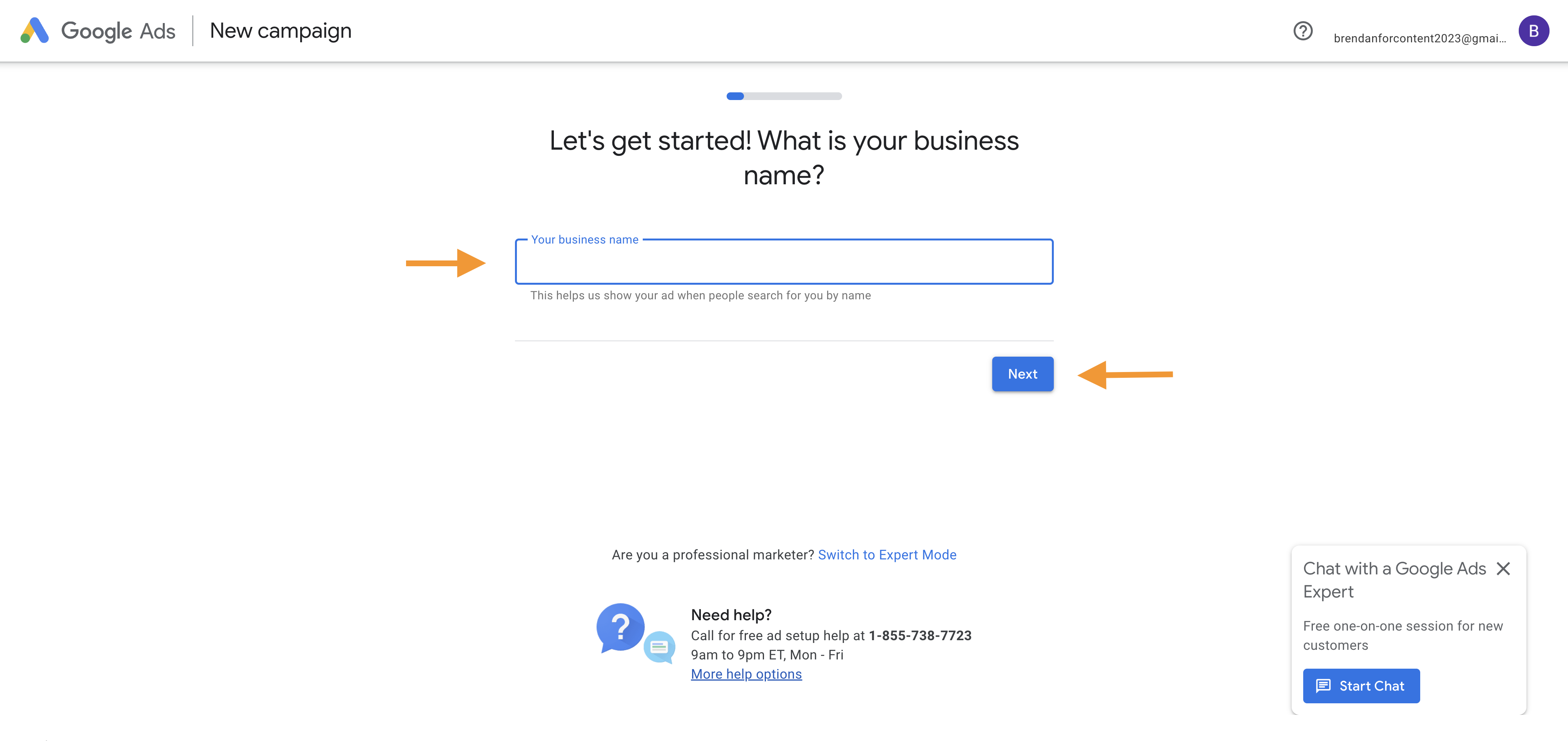
    Now that your account has been established, you must complete a few housekeeping items, such as entering your business name.

    Step 3

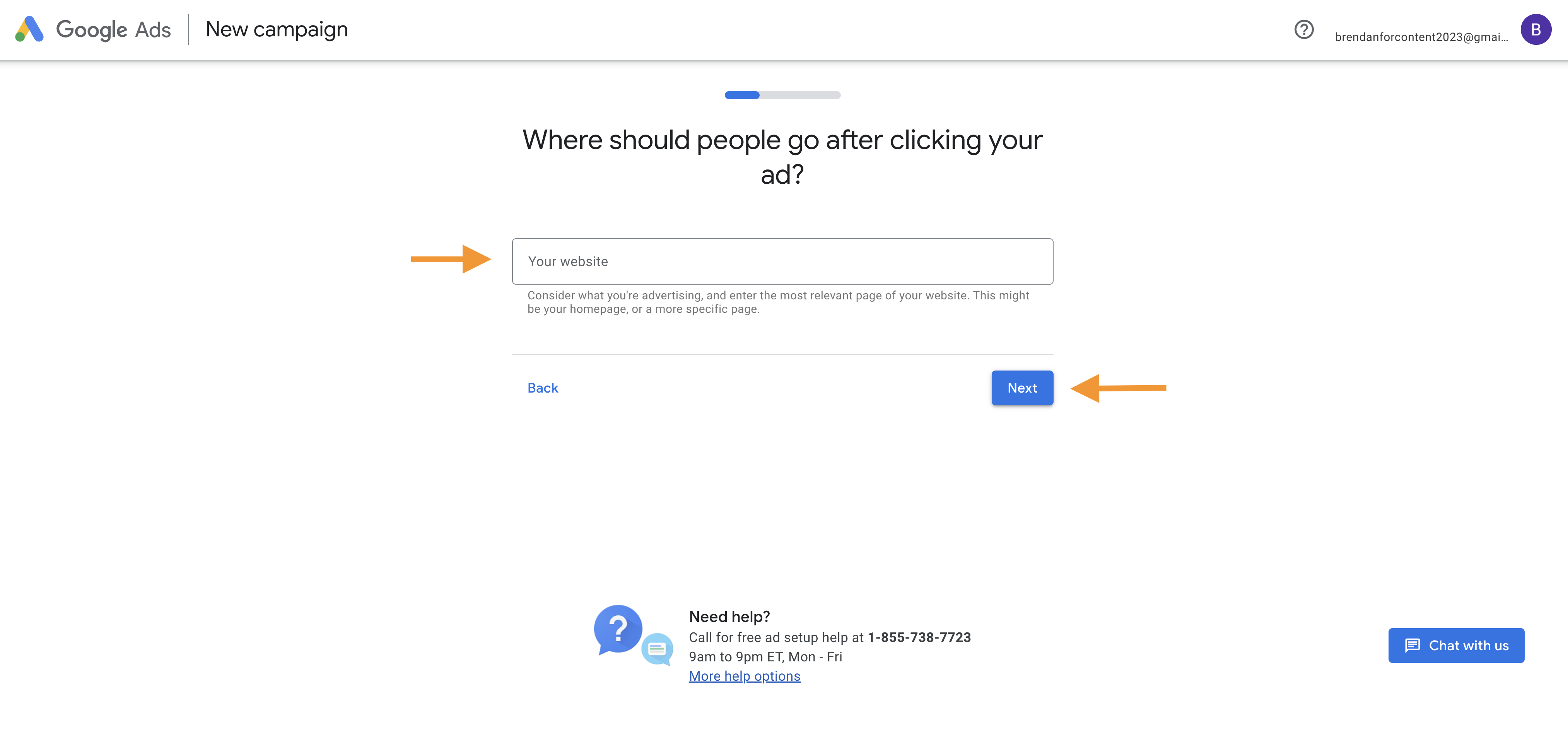
    Enter your website URL.

    Step 4

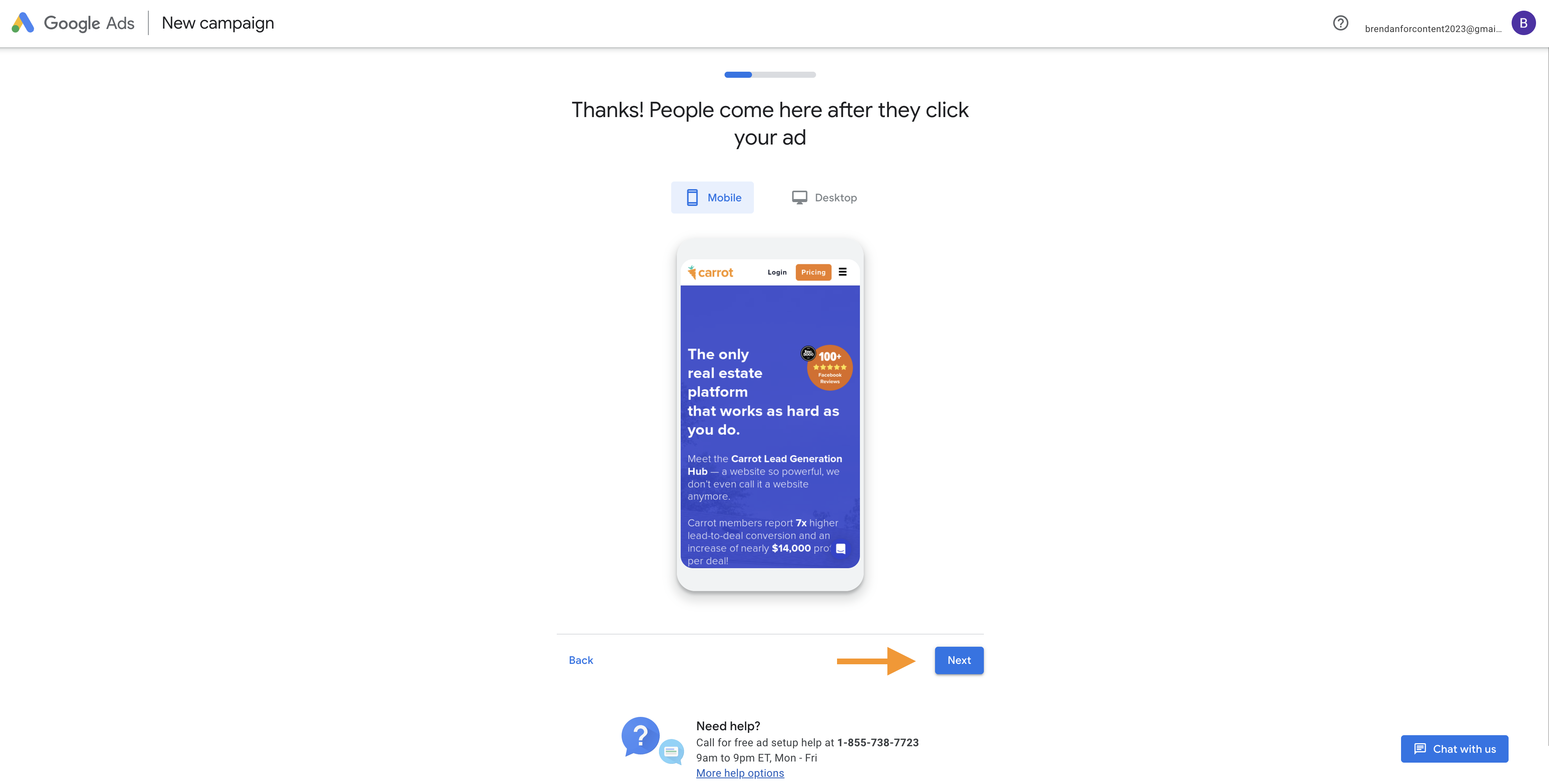
    Review your website visual on mobile and desktop devices.

    Step 5

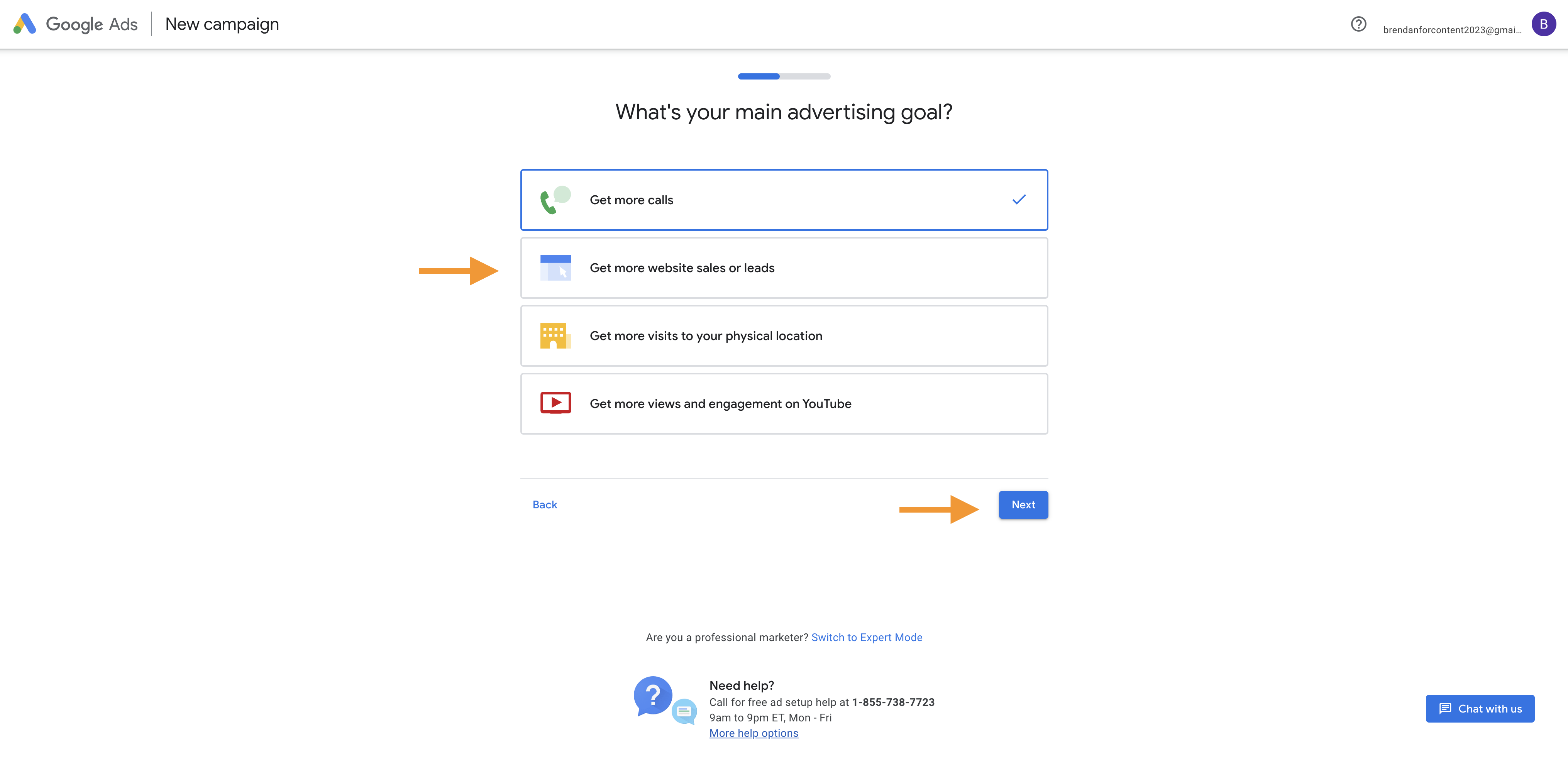
    Choose your main goal. For most real estate professionals, the goal will be to generate more leads.

    Step 6

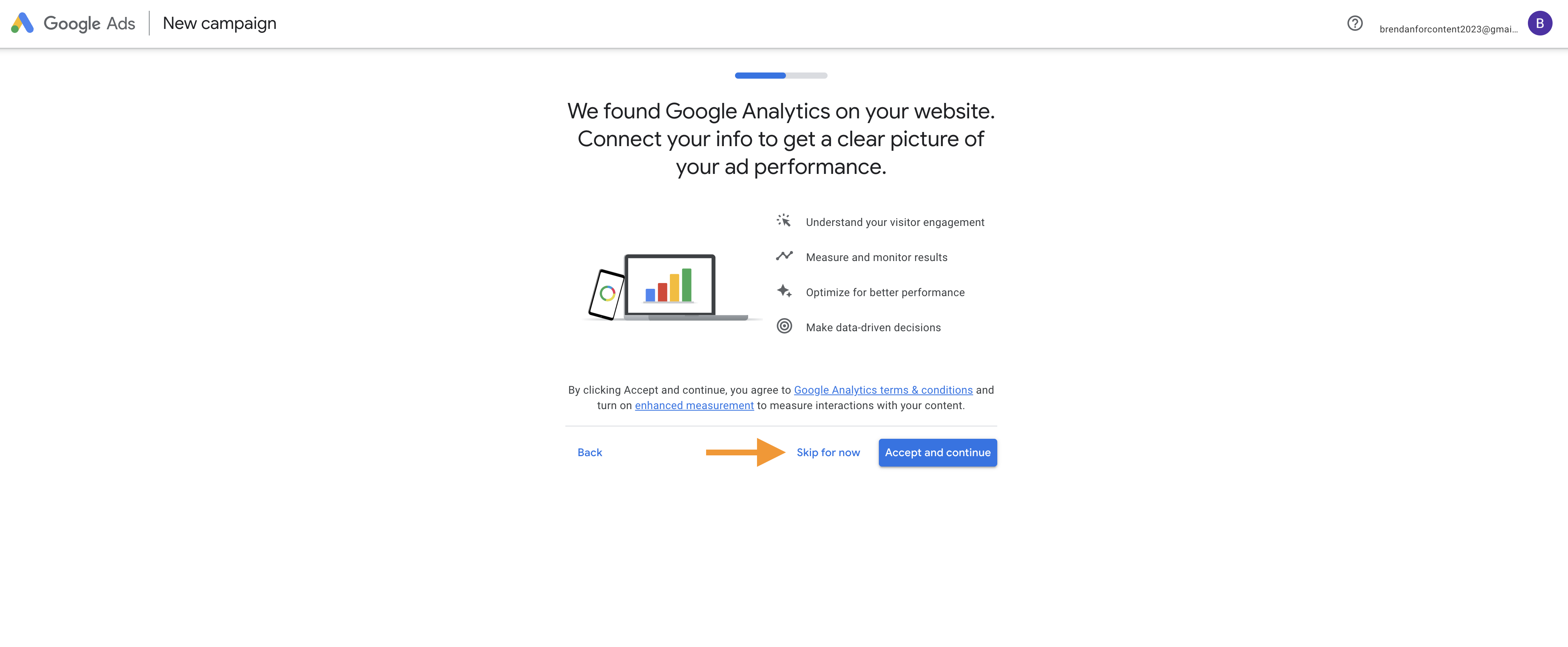
    Google offers the opportunity to connect your Google Analytics account. If you do not have a GA account, you can choose to “skip for now.”

    Step 7

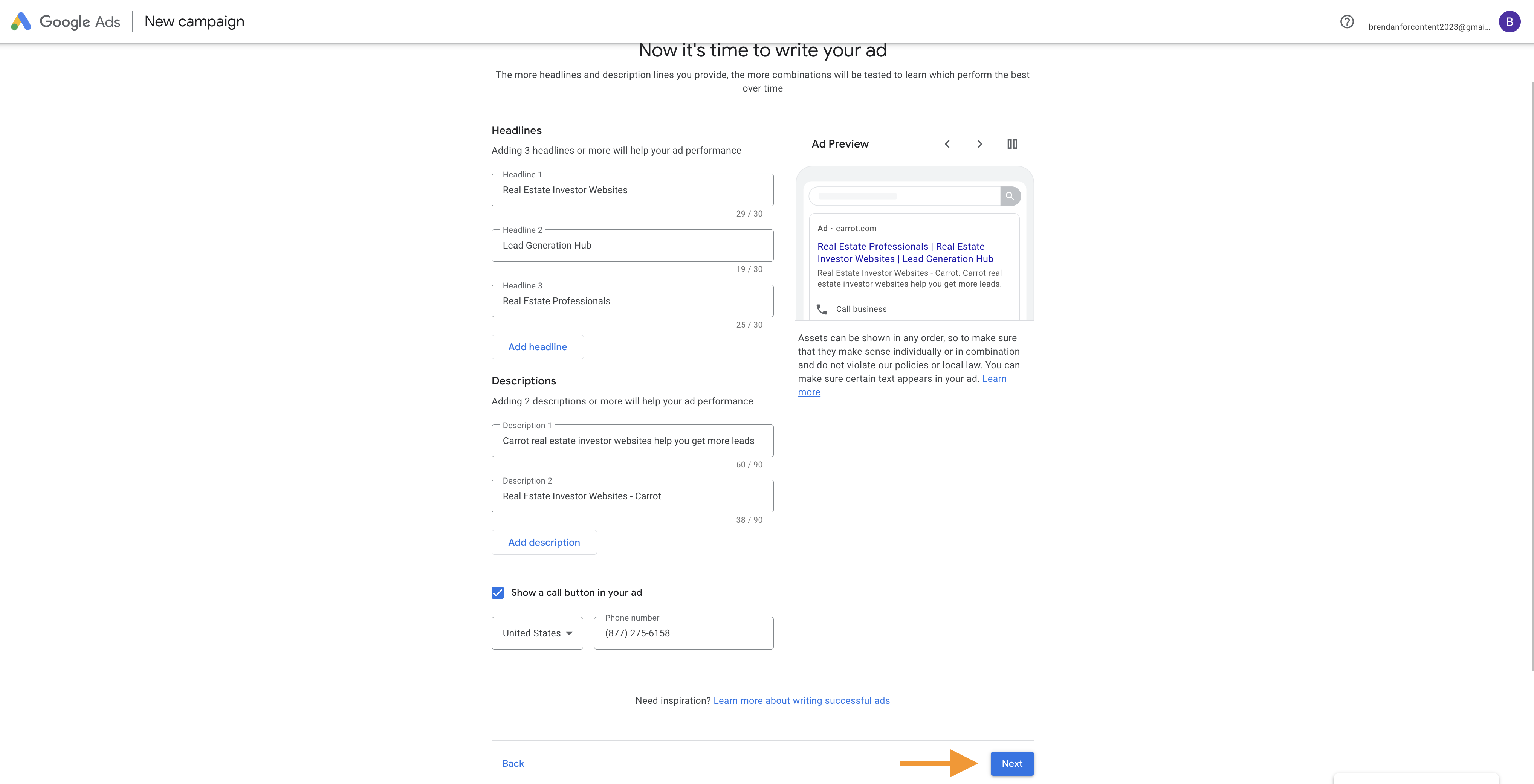
    Time to create an ad. Choose three headlines and two descriptions, and enter your phone number.

    Step 8

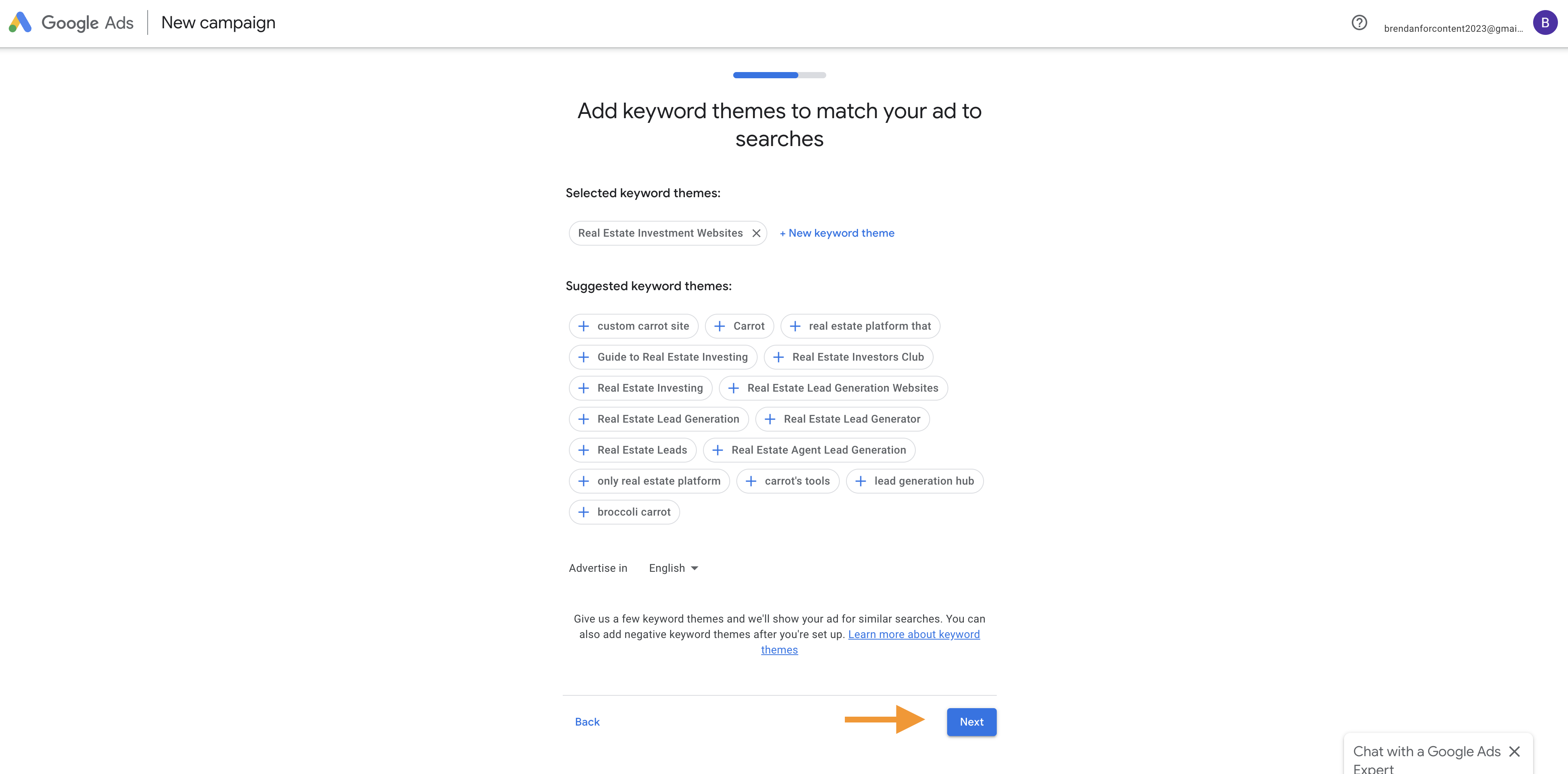
    Google will present different keywords based on a theme. You can always adjust your keywords later.

    Step 9

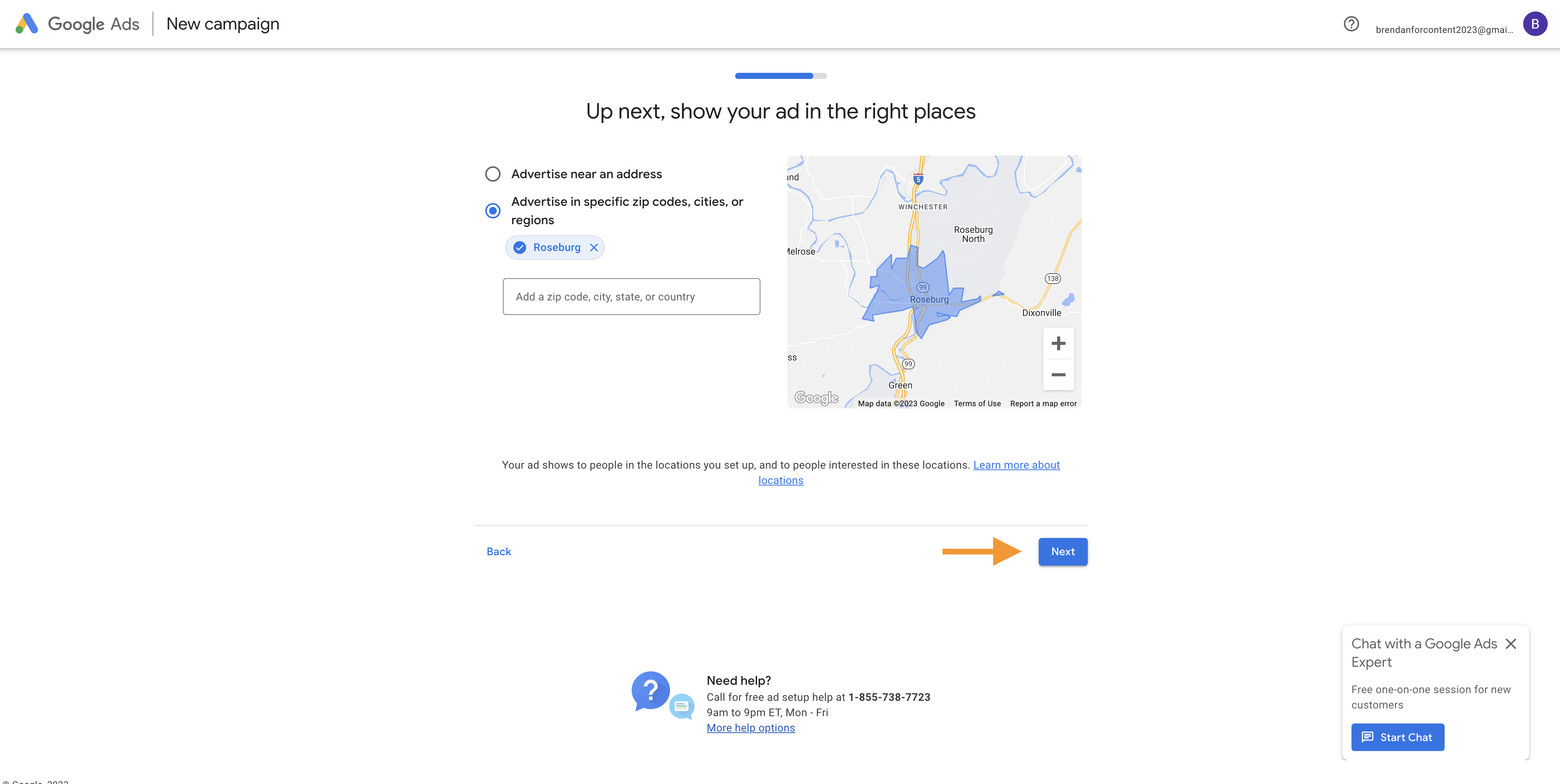
    Next, you’ll be asked to add your target locations.

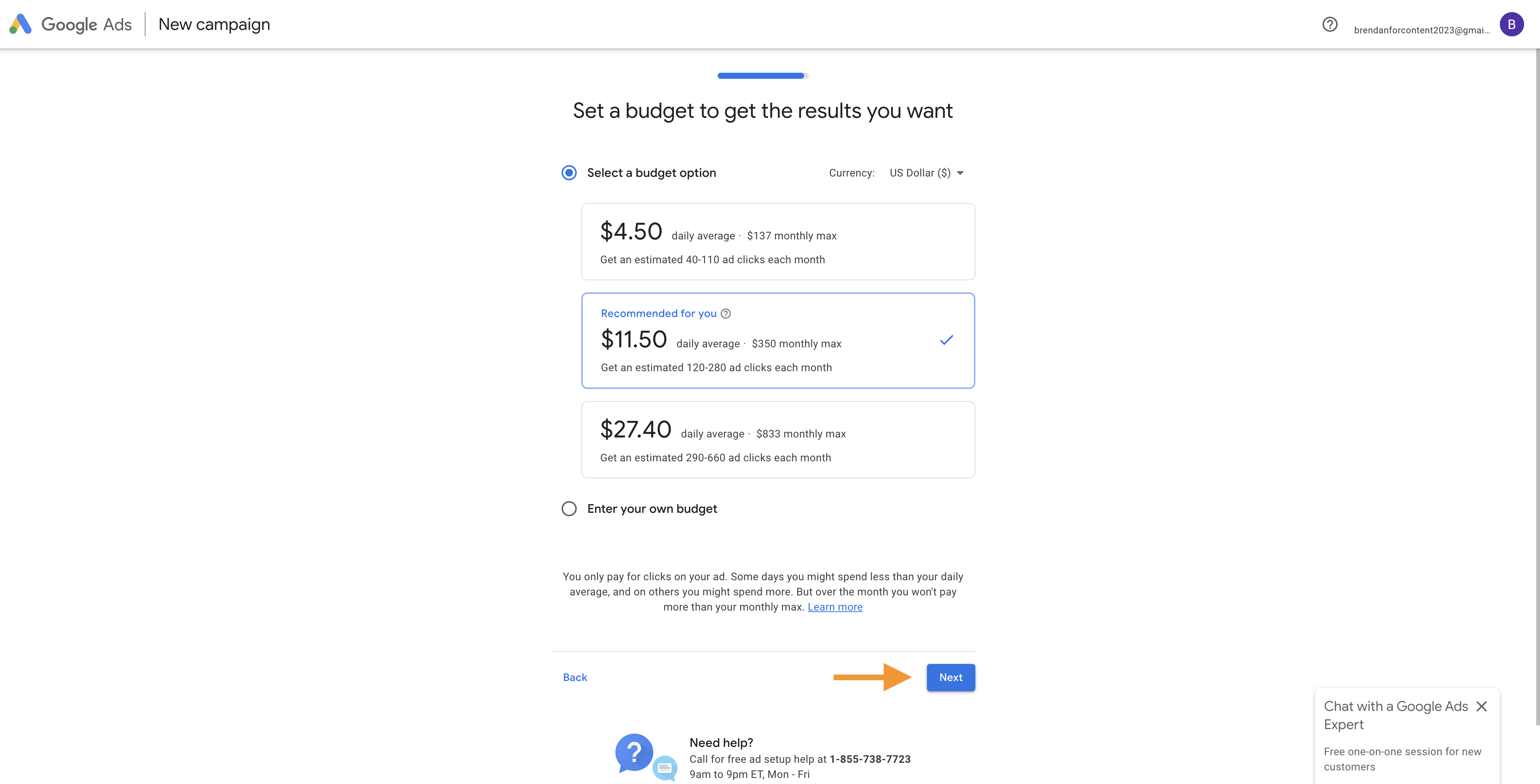
    Step 10

    Set your daily or monthly budget.

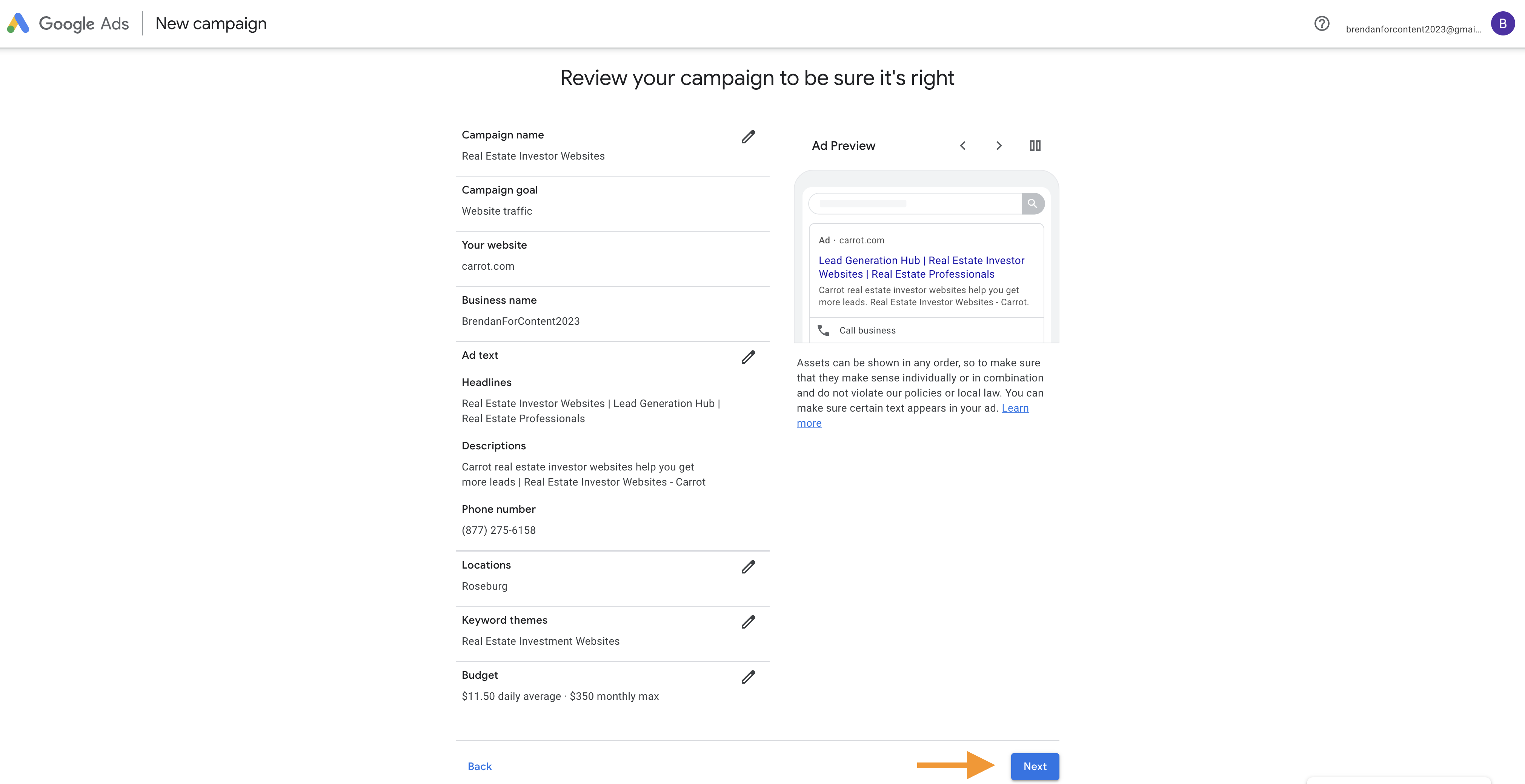
    Step 11

    Review your campaign.

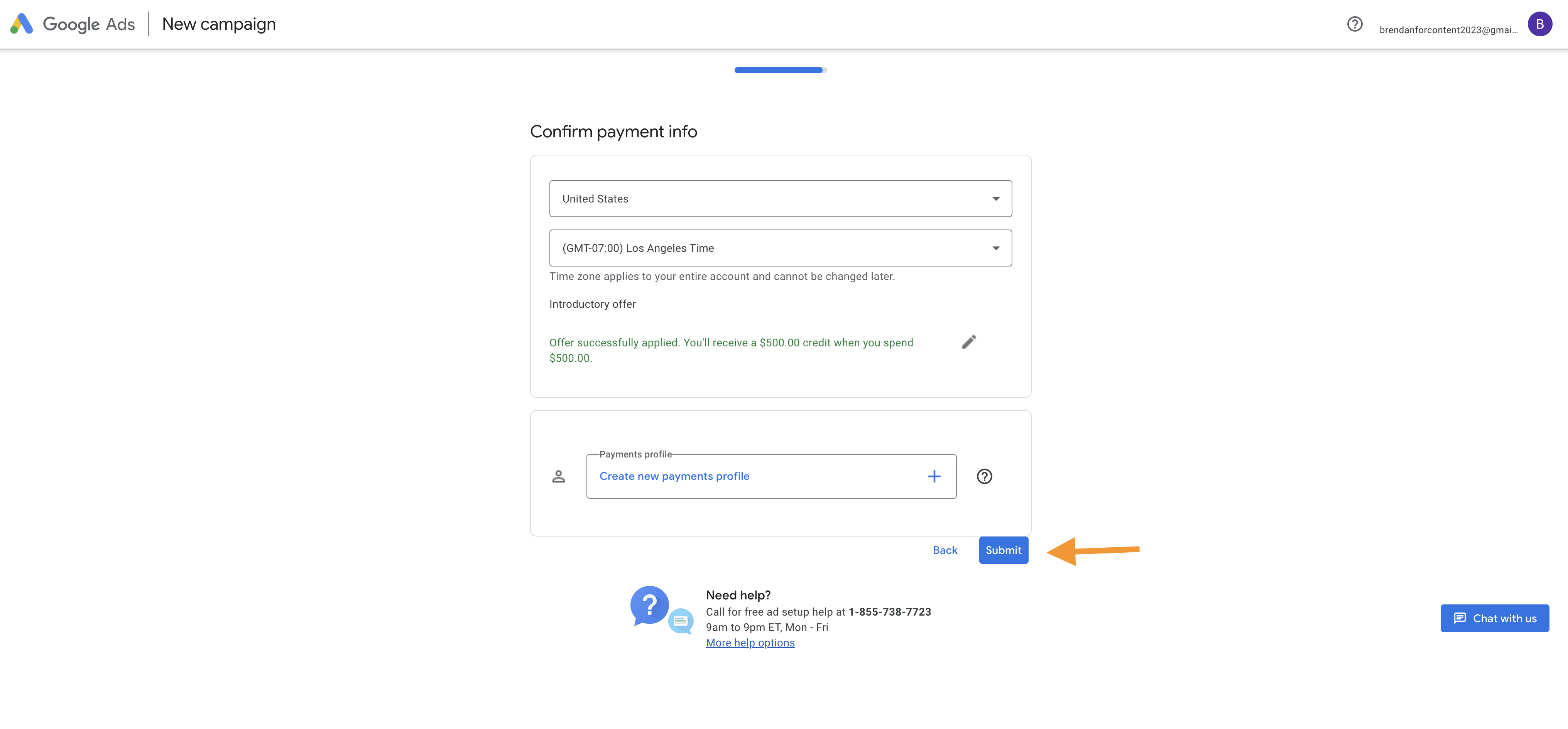
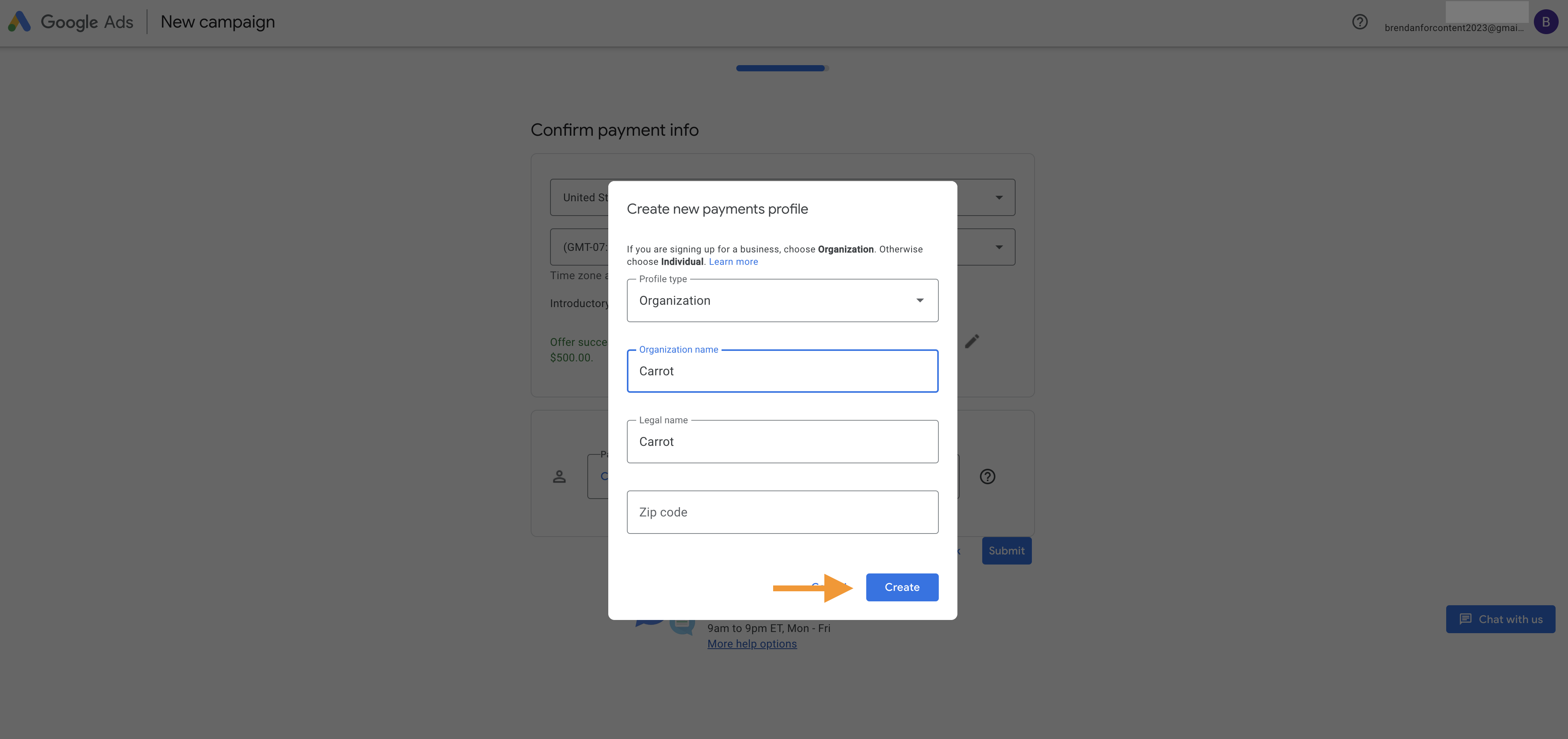
    Step 12

    Finally, you are prompted to set up billing information.

    Congratulations

    You are now ready to start creating your Google Ads campaigns for real estate.  We wish you the best of luck!

    Be sure to hit us up with questions in the comments section below. Also, if you’re a Carrot member, join us on our weekly Coaching Calls, where we cover many PPC topics, SEO, lead generation, website design, and much more!

    Not a Carrot member? What are you waiting for!? Check out our plans and get started today!
  • Introduction to Pay-Per-Click Advertising for Real Estate: A Beginner’s Guide

    Introduction to Pay-Per-Click Advertising for Real Estate: A Beginner’s Guide

     Intro to PPC for Real EstateIn 2018, PPC was the second highest lead generation medium for our members.

    Trying to rank on page one of Google can be a daunting task for some. It takes time and resources to invest in a full, all-out SEO strategy. Even then it could take months to notice.

    What can you do in the meantime?

    Well, many of our members make use of both PPC and SEO — using the former to generate short-term traffic and the latter to generate longterm traffic.

    In this intro to PPC for Real Estate, we run down what you need to understand if you’re considering this route. Including:

    • What is PPC for Real Estate?
    • How does PPC work?
    • What are the benefits of using PPC advertising for Real Estate?
    • Who should use PPC?
    • How to get started with PPC?

    Introduction To PPC For Real Estate

    What Is PPC For Real Estate?

    pay per click real estate advertising

    (Image Source)

    PPC is a broad term used for various cost-per-click platforms real estate professionals use to get in front of their target audience. These include Google Ads (AdWords), Bing Ads, Facebook Ads, and numerous retargeting options.

    Overall, PPC is a digital marketing strategy in which you advertise within a search engine’s sponsored results by bidding for the keywords, ad sets, and/or retargeting list connected to your real estate niche.

    Pay-per-click is exactly that… you pay each time your ad is clicked. Although, there are times you can be charged for impressions (number of times your ads are shown).

    Google Ads (Adwords) still reigns as PPC king for generating motivated seller leads. Facebook ads can also be an effective way to generate motivated sellers as well as buyer leads.

    Facebook cost-per-click is also considered a lesser amount compared to AdWords. It’s important that you understand where your leads are coming from and the value of your cost per lead to fully understand which platform works best for you.

    How Does PPC Work?

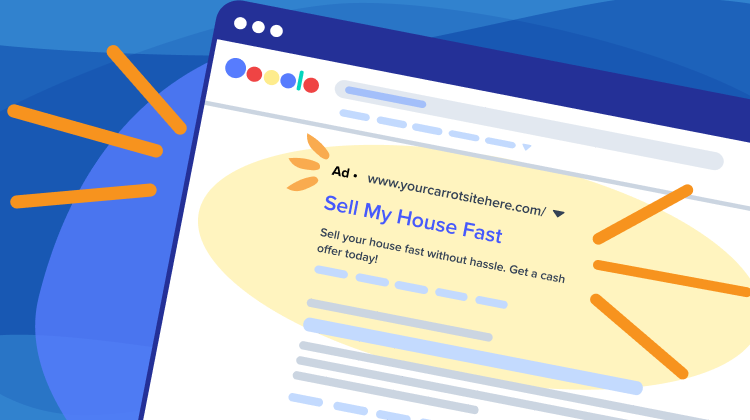
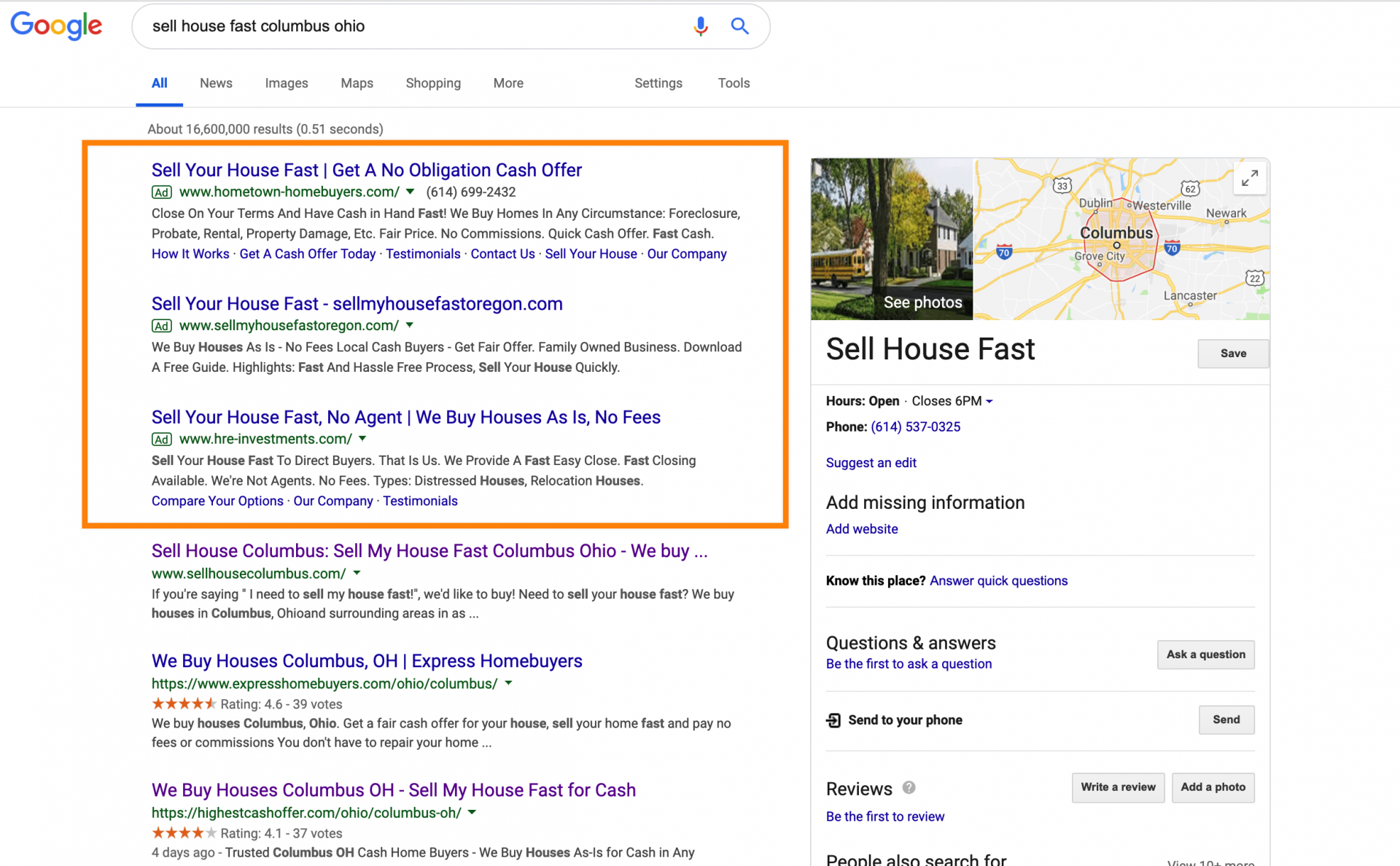
    Starting with the basics. When a motivated seller types a search query into Google, the search engines provide two sets of results: pay-per-click ads (sponsored) and organic results.

    As seen in the picture below, the first three results on top are sponsored ads (indicated by the green square around the word “Ad”).

    Google ads motivated seller search

    The other results below the ads are organic results. More than likely, the organic website results have climbed the rankings by executing a solid SEO strategy.

    With PPC, when the searcher clicks on one of the ads, you (the advertiser) is charged for that click.

    The price of that click will vary per the competition for that specific keyword as well as your target location(s).

    You can use specific tools to find keyword traffic estimates as well as the competition and cost-per-click estimates. Tools such as:

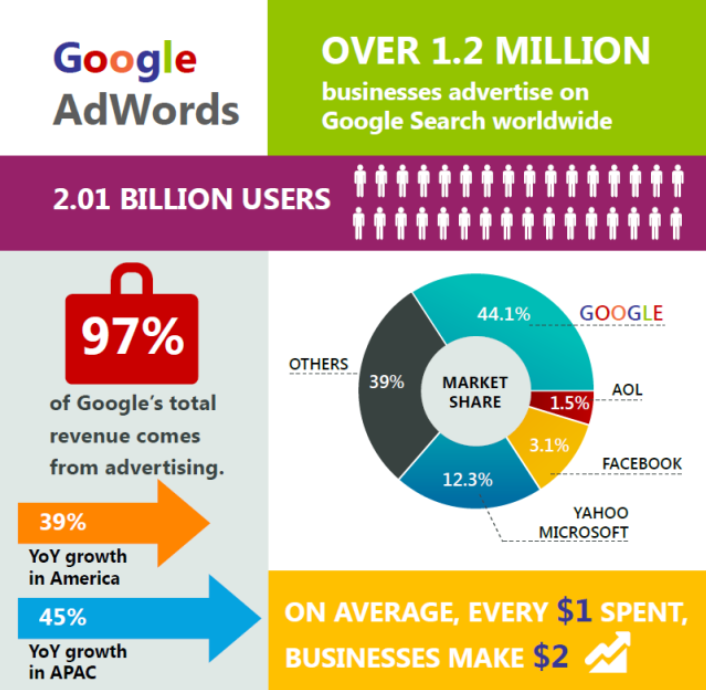
    What Are The Benefits Of Real Estate PPC?

    google adwords business infographic

    (Image Source)

    Advertising with PPC ads can have many benefits. Here are some of the top reasons you should consider using PPC as part of your online marketing strategy.

    1. You Have the Opportunity to Control Your Position on Page One of the Search Results

    PPC advertising allows you to gain the most valuable ad space on whichever PPC platform you choose to use. If that’s Google, then you have the ability to get on top of the first-page search results without having to dedicate the time and resources for SEO.

    Claiming ad space where most eyes will see them will increase your odds of getting solid lead generation and return on your investment.

    2. Place Your Ads in Front of YOUR Audience

    This is two-fold.

    First, you can use specific keywords in your PPC ads. This will allow you to reach a specific target audience based on your location. For example, using keywords such as…

    • “Sell my house fast in Baltimore”
    • “Sell my house in Chicago”
    • “We buy houses fast in Boston”

    This allows you to reach the local audience by choosing keywords that are targeting your audience location.

    Second, you have the ability to use geo-targeting to limit who can see your ads based on locations. For example, if you are searching for motivated sellers in Baltimore, it wouldn’t be smart to allow searchers in D.C to see your ads.

    You’d be would wasting your budget to allow searches from outside of your target areas to see and click on your ads.

    3. Control Your Budget

    Adverting with PPC ads offers you ultimate control of your money. You set your desired ad spend. If your budget runs low, platforms such as Google Ads will notify you that your budget is limited. This allows you to reassess your current PPC strategy and make the necessary adjustments to optimize your accounts.

    As mentioned above, the majority of your PPC campaigns will follow the model that you only pay when someone clicks on your ad.

    4. PPC is Immediate

    There’s no wait time! Unlike SEO, PPC is live the moment you decide to turn your campaigns live. If increasing your buyer list for your real estate website is your goal, PPC ads allow you to get in front of your target audience NOW rather than waiting the span of time it takes for an SEO campaign.
    5. Testing

    PPC ads are an excellent way to split test your website, ad copy, or images that resonate with your target audience.

    Using the A/B testing approach, you can test your ads and landing pages to see what form, color scheme, design… etc., are generating the best results. Once you gather enough date, you can use this information to make strategic moves to your campaigns to maximize your PPC ROI.

    6. Track Your Results to Maximize ROI

    Proving ROI is a major part of being a marketer today. Luckily, PPC ads allow you to track every aspect of your ad campaign to connect your efforts to your results.

    You can see how each keyword is performing. You can see how each ad is performing. And, you can see exactly where and when your leads are reaching you.

    You want to prove the worth of your PPC campaign. You’ll want to be sure your conversion tracking is linked to your website and for most of you, you’ll also want to be sure your lead source is relaying to your CRM.

    Then you’ll be able to track from click to deal to see your profits that have come from your PPC strategy.

    Who Should Use PPC?

    Google has more than 5 billion searches per day.

    Imagine how much traffic you’re missing out on!

    Plus, PPC website visitors are 50% more likely to purchase something than organic visitors (i.e. they’re more motivated).

    So, who should use PPC? Those who have the ability to plan, have patience, and are willing to spend money to get results.

    If you make well-informed decisions from the time you launch a PPC campaign, you will be able to increase traffic and leads to your website.

    However, PPC usually isn’t best suited for those who are looking to dabble. You need to have a mindset that provides enough strategy to sustain months and sometimes years. Those who have similar “go-get-em” attitudes have fared especially well with PPC advertising.

    Real estate also has a bigger advantage over other industries who utilize PPC. Profit margins can more than justify the costs associated with PPC.

    How To Get Started With PPC Advertising

    ppc advertising

    (Image Source)

    If you are looking for a simplified answer of how to get started with PPC advertising, it can be summed up into a relatively easy process.

    Here’s a simple look at how to plan your own PPC for real estate strategy:

    1. Conduct a competitor analysis.

    Identify the competitors who might be outranking you in your market. Analyze their search terms and search volumes using tools such as Google Keyword Planner and Ubersuggest as listed above.

    2. Choose the real estate keywords you want to advertise for.

    Conduct keyword research to learn how your target audience is searching for your real estate niche. If you’re looking for buyers for your agent website, then use such terms as, “new homes for sale” or “homes for sale in”.

    3. Create ads based on thorough research.

    Develop ad copy that will resonate with your target audience. Looking for motivated sellers? Use ad copy such as “We Buy House in Any Condition” or “Sell Your House As-Is Fast”.

    4. Split test ad copy and/or landing pages to compare how different aspects of your PPC campaigns perform.

    For ad copy testing, track metrics like click-through rate and cost per click. For landing page testing, track metrics such as conversion rates to determine the success of your PPC campaign.

    You’ll also need to continuously manage keyword bids based your results. This will help you get the most ROI from your efforts.

    5. Optimizing beyond your ads.

    Real estate PPC campaigns are created from many parts beyond keyword bids and the ad copy. It’s important to think beyond the landing page and start to think about optimizing other pages that will help build credibility and connection with the searchers.

    Three important pages to consider optimizing are your “Our company”, “Testimonials”, and the “How it works” pages.

    This heat map from specific PPC traffic, confirms the need to optimize these pages. PPC traffic is looking for confirmation.

    Conclusion

    Don’t feel overwhelmed by this PPC intro. By having a sound strategy, educating yourself and putting in some time, you’ll be off and running with a successful PPC account. Or, consider hiring a third-party to consult or manage your account.

    Overall, PPC can provide immediate results and be a lucrative piece of your online real estate marketing strategy.

    Be sure to hit us up with questions in the comments section below. Also, if you’re a Carrot member, join us on our weekly Coaching Calls where we cover many PPC topics as well as SEO, lead generation, website design, and much, much more!

    Not a Carrot member? Whatcha waiting for! Check out our plans and get started today!