Before I was writing with Google in mind in an effort to rank number one. I now focus on writing content that will convert people once they are on my website.
– Cristina Kudlock
Site Not Converting? Make These Tweaks to Your Site for More Traffic & Better Conversion with Cristina Kudlock
Cristina doesn’t come across as your usual home buyer. Her website has lots of pink, lots of smiling photos, and even some emojis tucked in there for good measure. But what the site doesn’t show is the massive amount of effort, learning, and trial and error that got her here.
Her website may not look like other Carrot sites you have seen in the past, and that is exactly why she is converting so well. She’s ranking in the number one spot for many keywords in both Los Angeles and Arizona because of her unique approach and high-quality content.
Today we are going to learn how she had built the perfect team, modified her marketing, and what she is doing to make herself even stronger.
Read the Full Show Notes Below…
I first met Cristina at our last CarrotCamp. She is a powerhouse when it comes to real estate wholesaling. She has tacked two highly competitive markets with her genuine ability to get things done.
She keeps it real, offering homeowners the information and services they need. While she is the force behind it all, she hasn’t done it alone. In fact, her business is a famly affair with everyone playing to their unique strengths and abilities.
Building the Team
Today Cristina’s mother, sister, and husband all play a role on the team, but it wasn’t always like this. When Cristina was first starting out, the first people she hired to help her were her team of VA’s.
Choosing the right VA can be difficult, especially if they are in a different county and you aren’t able to meet with them face to face. Cristina has two techniques she uses when vetting VA’s.
First, she will have them record themselves reading a script she provides. Cristina’s first two VAs were hired for cold calling, so she wanted to make sure they were easy to understand and had a big enough grasp of the language to be able to respond on the fly.
Next, she will have them do a small excel project such as mining agent information. This will help her see their skills while weeding out any unmotivated candidates. Hiring her Vas was a game-changer.
Instead of having to hit the phones, she was able to focus on managing leads, closing deals, and learning the art of SEO.
Making the Shift
When Cristina first started wholesaling houses, she hit the phones hard. Cold calling was her bread and butter, something she was good at, but she realized it wasn’t’ sustainable. When she expanded into Arizona, she realized people were so inundated with calls and offers for their homes, her VAs didn’t stand a chance on the phones.
Today, Cristina focuses on getting her leads through SEO. She took the time to learn it herself and with the help of her team, she s able to create eye-catching content that brings people to her site.
She doesn’t just write for Google, she writes with the goal to provide valuable content to her readers, converting them once they are on her site. Today, her website offers robust content that shows who she is, while tearing down any potential objections home sellers may have.
Challenging Herself
You may have heard me talk about 75 Hard in a previous episode. It is a program designed by Andy Frisella to challenge your mind and help you build healthy habits. I knew going into 2021 that if I wanted to be able to keep up with my team, that I would need to grow.
On January 1st, I went all-in with the program and I am already seeing growth from these challenges. Cristina is already well ahead of me on her journey and has learned a lot about herself on the way. To complete 75 hard, you must…
Take a progress photo
Drink a gallon of water everyday
Complete 2 45 minute workouts. One must be outside – rain or shine
Pick a diet, any diet, and sick to it for the duration of the program
No alcohol and no cheats
Read 10 pages of any self development book every day
The goal isn’t to get in the best shape of your life or learn something entirely new. The goal is to build healthy habits, while cutting out the bad ones. For Cristina, this was giving up TV for reading, something she has found sh enjoys much more. Working out twice a day will force you to look at how you are spending your time and will (as Cristina puts it) make you feel like a badass.
Reserve your spot at the next CarrotCamp mastermind at Carrotcamp.com
Testimonials: an element of any website which can build immediate trust and increase conversion rate. But we don’t just talk about it — we drink our own poison willingly…
Carrot homepage:
The truth is, those testimonials help convert more of our website visitors into leads (we’ve tested it). Remove them and our website’s conversion rate drops by several painful percentage points.
The same goes for your website.
But you don’t have to take my word for it.
Let’s talk about the data, but first watch our “Guide to Building Trust and Landing New Clients” to get some additional testimonial context.
Why are high-quality testimonials such a big deal?
If used correctly, testimonials do a few important things for website visitors (and for your conversion rate).
They can…
1. Completely eradicate concerns that prospects had about working with your business.
2. Build immediate trust for who you are and what you do.
And last but not least…
3. Convince prospects to convert (i.e. give you their information via an opt-in form or call you on the phone directly).
Consider that 85% of consumers claim that they read at least 10 reviews before deciding whether they can trust a company or not (and they have to trust you if they’re going to work with you) or that 88% of people trust online testimonials just as much as personal recommendations from a friend.
To prove just how powerful testimonials can be (at least the conversion rate side of things), Unbounce reports on an A/B test run on WikiJob’s website. Ideal for testing, Version A and Version B are identical save for one difference: Version B includes a testimonial above the opt-in form of the website.
In the end, Version B increased the conversion rate by 34%.
Let’s put that in perspective for a wholesalers website.
Imagine that you drive 1,000 website visits every month, generating 100 leads per month on your website (a 10% conversion rate — typical for Carrot websites) and that you close 1 in 25 leads. That means you’re doing about 4 deals per month, at, let’s assume, $10,000 profit per deal.
Boom — you add a glowing testimonial to your website and increase your conversion rate by 34%, from 10% to 13.4%.
Now, you’re going to get a little more than 130 leads per month with the same amount of traffic (1,000 website visits). And since you close 1 in 25 leads, you’ll now be doing a little more than 5 deals every month with the exact same amount of website traffic.
You just added $10,000 in monthly wholesale fees (from $40,000 per month to $50,000 per month) by putting a testimonial on your website.
And the same goes for real estate agents: you can increase your conversion rate and monthly income by adding awesome testimonials to your website.
Of course, I’m not promising that you’ll get exactly those results. I’m just trying to illustrate how powerful a small boost in your website’s conversion rate can be on your business revenue (at Carrot, we provide high converting websites out-of-the-box for our members)… and that testimonials can help you achieve that small, powerful boost.
But… all of this depends on using high-quality testimonials…
So what makes a testimonial great?
5 Qualities of a Great Testimonial
Here are five things that every testimonial should include:
1. It’s specific — Do not use painfully vague testimonials (i.e. “It was great!”). When a testimonial is ambiguous, it can work against building trust for your business and actually create unease in the prospect’s mind (If this testimonial is real, why isn’t it more specific?). Ask the testimonial-giver questions which will prompt answers specific to their situation and why they loved working with you. Just consider… what do you think is more powerful:
“Colby was a tremendous help!”
or
“Best Decision I’ve Ever Made!!! I was in a situation where I needed to get out of my house ASAP and Colby Hager came through for Me!!! Nobody else will ever beat his services and I’m relieved I don’t have the financial stress any longer!!! I will forever be grateful for what he did for me!!!”
2. It’s less than 100 words — If your testimonial is too long, there’s a good chance that website visitors won’t read it (especially if they’re on a mobile device). So try to aim for under 100 words and use ellipses to focus on the important parts if necessary.
3. It addresses one common objection — Going back to the importance of specificity, each testimonial should address one common objection of your target prospect. Ideally, each testimonial will address a different objection that is probably going through the prospect’s mind. A few common objections include:
Can I trust you?
How do I know you’re actually going to make me a fair offer?
How much work will I have to do to make this happen?
Can I sell even if my property is in terrible condition?
4. It’s authentic — I know. It’s tempting to just write your own testimonial under an alias name and throw it on your website to increase conversion rate. It sure would take a lot less time, and if you’re a great writer, it might even boost your conversion rate.
But chances are, the testimonial you’ll receive from someone who authentically loves your service will be far more powerful (and conversion-boosting) than something you throw together yourself. Plus, people can usually tell when a testimonial is fake.
5. It mentions your Unique Selling Proposition (USP) — Not every testimonial on your website needs to do this, but at least one should mention your Unique Selling Proposition; that is, whatever makes your business unique or better than the competition.
You can put your USP all over your website, but when it’s in a testimonial, it’s just a bit more powerful. Here’s an example:
“Not only did XYZ Real estate company help get my home sold, but they were kind and easy to work with. They answered the phone when I called and were attentive to my needs.”
5 Questions to Ask for Getting POWERFUL Testimonials
To get a high-quality testimonial, you must ask the right questions.
So here are a few questions that will pull gold from your client’s mouths. You can use these whether you’re doing a written testimonial or a video testimonial (both are powerful for increasing conversion rate). And remember, it’s better to get a ton of detailed information from your client now (and edit it down later) than to get such vague information that it’s practically worthless.
What was your situation before you worked with me? — You want to pull out the pain they were experiencing before working with you. What were they going through? Could they even sleep at night? What was the emotional pain like? How stressful was the situation?
Why did you choose to do work with us? — You want to now get a better understanding for what made them decide to solve their stressful situation by working with you. What was going through their head? What was the final straw that made them give you a call?
Why did you choose us instead of some other company? — Why not somebody else? Asking this question will help illustrate your USP and what sets you apart from other competitors within your market.
What did you enjoy the most about working with us? — Being on the other side of that stressful situation, what was the thing that the client most enjoyed during the process? How fast you closed? How helpful you were? How easy it was?
What surprised you about working with us? — Asking this question can get the client talking about the thing they loved about working with you that was the most unexpected (i.e. how you went above and beyond for them).
You can send these questions to happy clients over email, you can ask over the phone and record the call, or you can sit down and record their responses on video.
Whatever you decide, make sure you edit out unnecessary banter before putting the testimonial on your website. The trick is to take the most valuable pieces of information from their answers (the things that will convince other prospects to work with you) and put them into an easy-to-digest testimonial.
And… one final piece of advice…
Ultimately… work with what you have…
Let me tell you the truth about testimonials: they don’t have to be video, they don’t have to be written, they don’t even have to be 100% related to your business (when you’re starting out, you can just use general testimonial from people who know you and trust your character).
Ultimately, there are no rules.
Testimonials can increase conversion rate if you use them correctly and there are very few instances where a testimonial would actually hurt your conversion rate. So work with what you have.
If you’re not comfortable on video, then just email past clients the questions above and ask for their answers. If you can’t think of any clients who’d give you a testimonial, then call a friend and ask them to vouch for your character.
In time, and as your business grows, you’ll get better and better testimonials which will improve your conversion rate even further. But it’s a process.
So embrace it; go get some testimonials and add em’ to your website. Remember, a slight conversion rate increase could mean thousands of dollars more per month for your business. And I know you don’t hate money. ;-)
Not when it comes to optimizing your websites for conversion. ;-)
Constantly, we’re on the look-out for new ways to improve your (our member’s) website conversion rate. But we don’t just want to increase your conversion rate, we want to make it dead simple for you to make those conversion rate improvements.
In other words, we want to help you convert more visitors in less time.
The Carrot Credibility Bar
Here’s a look at what this credibility bar might end up looking like on your website. This is a version with a testimonial.
And here’s a version with logos.
If that ain’t enough for you, then we even have a custom version where you can add your own text and images to your heart’s desire – like we did with this block quote…
Or video…
Pretty awesome, right?
But this new feature isn’t just remarkable because the dev team here at Carrot did an amazing job designing it and making it easy for our members to use.
No. The feature is amazing for another, more important, reason.
It’s going to help you build more credibility on your website, instantly. But you don’t have to take my word for it.
ConversionXL ran an in-depth test to determine which type of social proof on a credibility bar is the most effective. They used testimonials with and without photos, logos, social sharing buttons, and a whole slew of other types of social proof.
Here’s one example.
Then, they had a control version that ran without any credibility bar.
In the end, one thing was for sure: every single variation of the page with some type of social proof performed better than the control.
And the reason is simple: when people arrive on your website for the first time, they have no reason to trust you. You have to show them that you’re trustworthy. Of course, you want to do that as quickly as possible to avoid them bouncing from your website.
This is why a front-and-center, top-of-the-page, no-scrolling-required credibility bar is so damn effective at building that necessary trust.
People see it the moment they arrive on your website and it confirms for the visitor that they can, indeed, trust you.
Just consider massive organizations like Opendoor, insurance.com, or ourselves ( :D ) that count on a credibility bar for building trust with visitors.
So, you’re probably wondering by now, What should I put on MY website’s credibility bar?
For that, there are a few different options.
Consider…
Displaying a compelling testimonial from a happy customer.
Displaying a series of logos from publications your business has been mentioned in.
Displaying a series of logos from other companies you’ve worked with.
Displaying awards your business has won.
The way you to choose to use this feature will depend on how you want to build credibility with website visitors and the kind of credibility builders you have access to.
But, to help you make an informed decision, here are the types of social proof that ConversionXL found (from the study I mentioned earlier) had the highest recall rate among participants, and thus (this part is conjecture) the highest impact.
As it turns out, testimonials were the most effective at generating website visitor recall.
Whatever type of social proof you choose, every single Carrot member should be able to make use of this feature – whether it’s through a testimonial or a series of company logos. This feature worked with our real estate agent websites as well!
Plus, a credibility bar can help you stand out from other websites online (i.e. the competition), giving you the extra edge you need in your market.
If you still don’t want to use the credibility bar, though, no worries. This feature is completely optional, so you can just leave your website as it is now if you’d rather.
We get this question from our members quite a lot: “My website is converting phenomenally, but how can I make it look different from other Carrot websites?”
Sure. We have several different high-converting website templates. Still, though, many of you want to be able to differentiate your website even further from other Carrot members.
So, in an effort to give you more customization freedom on your Carrot website without sacrificing ease of use and the highest conversion rates in the industry, we’ve officially launched our new Hero customizer…
Your New Hero Customizer
Let’s take a quick look at the new feature. You now have three options when customizing your website’s hero section…
Columns (the traditional Carrot style)…
Stacked…
And Inline…
Not bad, huh?
So why did we decide to give you these optional customizations on your website? Why not just give you a single option that converts better than the rest? Three reasons.
Choosing one of these options will help you differentiate your website from other Carrot members – something many of our clients have asked for.
These changes allow us, here at Carrot, to continue testing your websites and iterating based on what we find. With different people using different fields, we can continue to test and increase your website’s conversion rate through iteration.
We also want you to be able to test different form fields on your website. We’ve run lots of tests on these forms (more on that in a minute) and one overarching thing has revealed itself: different forms perform better in different markets.
Depending on the demographics, sophistication, population, and other market factors, one of these three forms will likely win the day. To help further, though, let’s chat about some of the data we collected before launching this feature.
Our Hero Customizer Experiment
Our test analyzed seven different Carrot websites. On each control version, the hero form was either stacked…
Or columned…
The variation for each website, on the other hand, was an inline form…
As you might have already guessed, we wanted to see what kind of impact an inline, single-field form would have on conversions. The results?
Ultimately, what we found was inconclusive. Some of the websites experienced as much as a 49% lift in conversion rate. Others saw a slight lift, between 10% and 20%. And one of the websites actually experienced a 25% decrease in conversions.
Regardless of which form you choose, you’re in good hands. Here at Carrot, we don’t publish a form-type unless it’ll drive a conversion rate that’s higher than the industry standard.
Ideally, you’ll do some testing of your own. Like I mentioned earlier, different forms work better in different markets. Play around, A/B test each different hero field, and see which one has the highest conversion rate for your market.
Maybe the best part about this new feature, though, is how easy the dev team has made it to adjust your hero field. I swear, we have the best nerds in the industry.
Literally, just a few clicks to make the change…
And if you want more details on how to adjust your hero field with just a few clicks, you can go here.
Happy customizing! And let us know what you think of this new feature in the comments!
A client of ours reached out and had dropped $5,000 in Google Ads costs over a few months on a campaign he was managing himself, but it wasn’t performing as he hoped, and he had no clue what parts of his PPC marketing were working and what factors were costing him money.
Ready To Get More Leads & Close Your Next Deal? Take Your Business To The Next Level
In this post, we’ll walk you through the simple action we had him take that turned things around from $5k in losses to over $30k in profits… and the #1 mistake most newbie PPC marketers make that prevents you from knowing if your PPC marketing is working for your real estate investing business.
I get asked this question all of the time…
“How do I know which keywords and ads are generating leads?“
Here’s my answer: if you don’t have the proper recording sources and/or analytic tools, you won’t know. Google Ads campaigns will become a frustrating guessing game that may drain your budget.
I also hear that Google Ads is an expensive waste of time and won’t generate leads. That may be true… if campaigns are not created using an optimized campaign structure. If your PPC campaign is optimized, chances are you’ll be in the right position to be successful.
PPC management can test the skills and patience of even the most experienced ad managers. You may be thinking, “My campaign is doing OK right now,”
But if you take a deeper look…
Is it as effective as it can be?
Is it efficient and structured in a way that isn’t confusing?
Are you continuously enhancing your return on ad spend?
Are you data-tracking keywords and ads?
Without proper data tracking, knowing if your PPC campaign is working won’t be easy.
Unlocking Profitability: 3 Powerful Tactics to Determine the Success and Failure of Your PPC Marketing Ads and Keywords
Is PPC Good For My Real Estate Investor Business?
How do you know? Here are a few ways to track your conversions so you know that your money is being invested wisely and not just thrown down into a black hole.
PPC Tracking Tactic #1: Google Ads (Conversion Tag)
The BEST WAY.
A no-brainer is to set up your campaign using the Google Ads conversion tag. Without implementing this tag on your site, you’re measuring keyword and ad effectiveness with a gut feeling.
You or your account manager must know how a searcher landed on your site and what happened after they clicked on your ad. Did they fill in your lead form? Which keyword, ad, and/or ad group triggered the conversion? Those questions will help you build and maintain a quality Google Ads campaign.
Here’s an example of a Google Ads campaign that does not use the Google Ads conversion tracking tag. It’s not that the Investor chooses not to because they choose to use a different company to host their website. This “other” web service prevents them from placing a conversion tag on their site. Carrot real estate investor websites are built with the high-achieving investor in mind, making it crazy easy to add your conversion tracking tags.
You can see there has been $2599 spent on 372 clicks and 0 conversions.
But… that’s not true. There have been 48 conversions (this Investor keeps track of conversions using their system)… $54 per motivated house seller lead! Not too shabby. But an account manager would have no idea which keywords have to lead to those 48 leads. We’re blindly leading the ship.
A Google PPC Campaign Without Conversion Tracking = Throwing Darts Blindfolded
This is what a campaign’s keywords should look like when the Google Ads conversion tag is properly implemented. An account manager knows exactly what keywords need to be adjusted and tested.
A Google PPC Campaign Using Conversion Tracking = Strategic ROI-Based Marketing
The benefits of recording data — you will know which ads, placements, and keywords lead to conversions and are worth bidding on. You’ll also know the reverse, which ad, placements, and keywords to pause.
Pros and Cons Of This Tracking Method:
Pro: Helps you find exactly which ads, keywords, and ad groups are performing the best and worst so you can make smart decisions to drive up your return on investment
Con: Nothing… really. This method is highly recommended as long as your tag is installed correctly on your website and you record unique leads.
Be sure to create a conversion tracking tag for your PPC leads.
For Carrot members, you can place a conversion tracking tag on your “step-2” page to ensure tracking on all potential clients who have filled out one of your website forms. Tags allow you to definitively know when traffic has come from your PPC campaign rather than from SEO, direct mail, etc… it also helps you drill down on exactly which keywords are producing profitable leads and which aren’t.
You can use the Google Tag Assistant to double check the tag is reading your step-2 page.
HOW CARROT MEMBERS CAN PLACE AN ADWORDS CONVERSION TAG ON THEIR CARROT SITE
PPC Tracking Tactic #2: Google Analytics
First… you’ll need to link your Google Ads account to your Google Analytics. While you will be able to track conversions in Analytics, you won’t be able to know for sure which keyword or ad generated the click. This isn’t the best way to monitor the performance of your PPC campaign but it can be used to track overall lead volume.
Pros and Cons Of This Tracking Method:
Pro: Gives you great aggregate data on the performance of your Adwords campaigns
Con: It doesn’t let you drill down too far into specific ads or, in some cases, specific keywords either, and doesn’t tell you exactly which leads came from where.
PPC Tracking Tactic #3: The Carrot Lead Source Feature
Like the information in Analytics, Carrot members can see which traffic source generated the lead, but again not a specific ad or keyword.
The Lead Source Tracking is automatically tracked for every single lead that comes into an InvestorCarrot site You don’t have to do anything to turn it on. Just head to view your leads, and it’s right there.
To find this info, log in to your Carrot site and view your leads. We’re currently working on a massive upgrade that will give more power and functionality to Campaign Tracking within your InvestorCarrot site. Keep an eye out for that release this spring!
Carrot Lead Source Tracking Built Right Into All Of Our Websites
Pros and Cons Of This Tracking Method:
Pro: This Lets you see exactly where each lead came from so you can track the true profitability of your marketing. This, combined with the Google Ads Conversion Tracking tag, is the ideal setup to give you the whole picture.
Con: This tracking doesn’t give you any data about the ad that drove the lead.
Key Strategies for Running a High-Quality Campaign and Positioning Your Ads for Maximum Impact
To measure the effectiveness of your advertising campaign, you should monitor your investor transactions, whether buyer or seller, and keep track of new customers, requests for information leads, phone inquiries, and even organic website traffic.
Here are some ideas that will help you not only determine the effectiveness of your ads but will also give you some new marketing ideas.
Additional PPC Marketing Optimization Tips
1. Compare your sales before, during, and after your ad campaign.
Keep in mind that internet advertising often has a delayed affect and can then grow steadily.
Transactions that result from your ads may not take place immediately. So be patient.
2. Use a dedicated phone number to track inquiries.
Create a phone call conversion tag for AdWords or other internet marketing options. Tags make it easy to identify and track phone leads positively.
3. Here are several more that will help squeeze out that extra profit and return on investment…
Set a PPC goal. This could be the number of leads per week, month, or even a cost-per-lead target amount. Whatever it is, though, write it down and constantly measure it.
Keep your campaign organized. A messy campaign can cause confusion, waste spending, and ultimately leave you unmotivated.
Target the right keywords and limit the number of keywords. Yes, you can have too many. The sound of 4,000 keywords might sound appealing. However, having too many keywords can lead to confusion and harm your campaign. Unless you are willing to create ad groups and ad text based around each keyword, AdWords potentially won’t give you a high enough quality score for ads to show in the highly regarded top three ad spots (41% of clicks come from the top 3 spots). You can also waste spending due to higher click costs and possible clicks from unrelated searchers.
Creating compelling ad copy. Make a searcher want to click your ad. Read our blog post here, where we write about that.
Testing…testing. Create numerous ads and be sure to test them to figure out which ones are more attractive. Even minor changes, such as removing or adding a word in the ad headline, can make all the difference.
Use quality landing pages. Landing page experience refers to the relevant, helpful, and original content. Read this post to learn how city-specific landing pages help you get more traffic. Landing pages must offer trustworthiness and be easy for customers to navigate. It also requires a quick loading page time and encourages customers to spend time on your site.
Make sure your call to action is clear. Tell the searcher what to do. Don’t make them guess.
Put the focus on your potential motivated seller or buyer lead. Let them know why you’re better than the competition.
Always implement a conversion tracking tag. Yes, you might be able to track lead sources, but if you look at your Google Ads account, you won’t know which keywords and ads generate ROI. It will become a guessing game as to which keywords to pause potentially and which to be more aggressive with.
Reasons Why You Should Start Conversion Tracking Today
You must start to gain insight into what’s working within your campaign. Without that knowledge, your Google Ads campaign won’t be completely optimized. This will limit you from being able to make the necessary changes to attract more leads.
You’ll also be able to improve your ROI.
Clicks are not valuable unless they are converting into leads that turn into profitable deals over time.
Tracking will reduce wasted ad spend, gain quality clicks, and improve ROI.
With the data gathered from tracking, you can perform a better test on your campaigns and grow them to get even more conversions.
Don’t Spend Another Dime On PPC If You Don’t Have Layers Of Conversion Tracking In Place
Once our client turned on conversion tracking, he could quickly see which ads and keywords were a complete waste of money and which were bringing him solid leads. He trimmed off the stuff that wasn’t effective and ramped up the stuff that was. Within four months, he closed several deals that have brought in over $30,000.
He possibly would have closed those deals without the tracking in place, but his profit would be far less because of the wasted marketing dollars he was spending before he had tracking in place.
Tracking is essential… not just a “luxury.”
Implement the Google Conversion Tag + make sure you’re using a website system that helps track your leads and tell you where each lead came from. That information alone could save you tens of thousands of dollars per year.
There are a lot of factors, including time of the year, the state of the economy, and geographic location, which can make it difficult to accurately measure the success of your ads if you don’t use the proper tracking techniques.
Compare the before and after advertising traffic from your Carrot website. Also, your PPC manager should be able to provide you with weekly and/or monthly PPC reports.
You can also be proactive. When talking with your leads, don’t forget to ask them the obvious question.
How did they find your website?
PPC might not be a cost-effective alternative in very competitive markets unless you can ensure a large enough marketing budget or be willing to limit your traffic if you’re using Bing… but either way… putting in place what you learned in this blog post is essential in competitive markets. Let your PPC be a great compliment to your SEO campaign.
PPC data tracking is one of the most important parts of your PPC campaign.
Interested in switching to Carrot so you can take hold of your online marketing once and for all and ramp up your ROI? Awesome!Take a demo and reach out if you have any questions!
Question: If you’re doing paid marketing, are you using conversion tracking? Let me know below in the comments section!
When it comes to online real estate marketing, your website’s visibility on search engines like Google can make or break your lead generation efforts. But visibility alone isn’t enough—you need to convince users to actually click on your listing in the search results. This is where your SEO title and meta description come into play.
These two elements are your first—and sometimes only—opportunity to make a strong impression. In just a few words, they have to convey the value you offer, speak directly to the needs of potential sellers or buyers, and drive them to take action. For real estate investors, who often rely on capturing the attention of motivated sellers, mastering this art can lead to a consistent stream of high-quality leads.
Why Meta Tags Matter in Real Estate
Meta descriptions and SEO titles are not just placeholders for keywords. They act as the “ad copy” for your search engine results. Well-written tags can directly influence Click-Through Rate (CTR), which is the percentage of users who click on your result when it appears on the search engine results page (SERP).
How Meta Tags Influence Click-Through Rates (CTR)
First Impression: Your SEO title and meta description are often the first things a potential lead sees. They set the tone for the user’s decision-making process. A compelling title can grab attention, while a clear, concise meta description can reassure users that your page has what they’re looking for.
Keyword Relevance: Search engines like Google bold the keywords in your title and description that match the user’s search query. This increases visibility and signals relevance, making it more likely that users will click on your listing over a competitor’s.
Trust and Transparency: A well-crafted meta description lets the user know what to expect when they click through. If they’re searching for “sell my house fast in ,” and your description promises a simple process with no fees, they’re more likely to feel confident that they’ve found a solution to their problem.
For real estate investors, your leads often come from sellers in distress or urgency, whether it’s due to foreclosure, repairs, or financial issues. The more targeted and reassuring your title and description are, the higher your chances of converting that curiosity into a lead.
What You’ll Learn
In this blog, we’ll break down the steps to craft high-converting SEO titles and meta descriptions that:
Use relevant keywords without overstuffing.
Appeal directly to the pain points and needs of motivated sellers and buyers.
Include clear calls to action that drive clicks and leads.
Reflect the local nature of your real estate business to attract the right audience.
By following these tactics, you’ll be able to create optimized meta tags that not only improve your search rankings but also increase CTR, leading to a steady stream of motivated leads ready to sell or invest in real estate. Let’s dive in!
Understanding SEO Titles and Meta Descriptions
What is an SEO Title?
An SEO title is the clickable headline of your webpage that appears on search engine results pages (SERPs). It serves two major purposes:
Telling search engines what your page is about.
Enticing users to click on your listing.
SEO titles are a crucial ranking factor because they give search engines important clues about the content of your page. However, they also play a pivotal role in determining your Click-Through Rate (CTR). A well-crafted title that aligns with a user’s search intent can convince them to choose your result over others, regardless of where it ranks.
For example, a user searching for “sell my house fast in ” is more likely to click a title that addresses their exact need, such as:
“Sell Your House Fast in | No Fees, No Hassles”
This title speaks directly to their problem and offers a solution upfront.
Connection Between SEO Titles, Rankings, and CTR
SEO titles influence rankings by incorporating target keywords that search engines use to understand your page’s relevance to a search query. While rankings are important, a high ranking without a compelling title won’t generate clicks. In the real estate investing space, where competition is fierce, your title must capture the urgency and pain points of motivated sellers to stand out.
For instance, a title like:
“We Buy Houses in Fast | Get a Cash Offer Today”
not only ranks well for keyword searches like “we buy houses,” but also appeals to homeowners who need to sell quickly.
How SEO Titles Are Shown on SERPs (Example)
Let’s look at an example of a real estate-related search:
Search Query: “Sell my house fast in Dallas”
SEO Title Example: Sell Your House Fast in Dallas | No Repairs, No Fees, Cash Offers
This title uses important keywords—”Sell Your House Fast in Dallas”—while also offering solutions like “No Repairs, No Fees,” which address common seller concerns.
What is a Meta Description?
A meta description is the short snippet of text that appears under your SEO title on the SERP. While meta descriptions are not a direct ranking factor, they are incredibly important for influencing user behavior. A well-crafted meta description reassures potential leads that your page provides the solution they’re searching for, even if your ranking is lower on the page.
Meta descriptions should focus on being informative, clear, and action-driven. They can directly affect CTR, turning impressions into clicks.
Importance of a Well-Crafted Meta Description
Even if your ranking isn’t in the top spot, a compelling meta description can help you compete with higher-ranked pages. This is particularly important in real estate, where motivated sellers often choose the most convenient and promising option from the search results.
For example, consider these two meta descriptions for the same query:
Good Meta Description:
Need to sell your house fast in ? At we make cash offers and close in as little as 7 days.
This description is clear, concise, and offers a solution directly relevant to motivated sellers.
Bad Meta Description: We buy houses. Contact us today for a free consultation about your property.
The second description lacks specificity and urgency and doesn’t differentiate the service.
How Search Engines Display Your SEO Title and Meta Description
Search engines display the SEO title and meta description as the first impression a user sees. If you optimize these two elements correctly, you increase the likelihood of driving clicks.
Here’s how they look on a SERP:
SEO Title Example: Sell Your House Fast in | No Fees, Cash Offers in 24 Hours
Meta Description Example: Need to sell your home quickly? We offer no-obligation cash offers in and can close in as little as 7 days. Contact us for a quick sale.
Word Limits for SEO Titles and Meta Descriptions
SEO Titles: Should be kept between 50-60 characters. Any longer, and search engines may cut off part of your title.
Meta Descriptions: Aim for 150-160 characters. This ensures your message is displayed in full without being truncated.
For real estate investors, keeping within these limits helps convey your message clearly and completely, increasing your chances of capturing clicks from motivated sellers.
By understanding how SEO titles and meta descriptions work together, you can better optimize your real estate website to attract more motivated leads and convert them into deals. Next, we’ll dive into how to actually craft these elements to maximize your online presence.
Section 2: Crafting a High-Converting SEO Title
An SEO title serves as the first point of contact between your website and a potential motivated seller. To maximize your click-through rate (CTR), you must create a title that not only includes relevant keywords but also speaks directly to your target audience’s needs and pain points. Here’s how to do it step-by-step.
Step 1: Keyword Research
Identify the Most Relevant Real Estate Keywords for Your Title
The first step to crafting a high-converting SEO title is conducting thorough keyword research. You need to find out exactly what your potential leads are typing into search engines when they’re looking to sell their homes. The goal is to identify keywords that not only align with your services but also attract motivated sellers in your target market.
How to find the best keywords:
Google Keyword Planner: A free tool that shows search volumes and keyword competition. Use this to discover terms such as “Sell my house fast in ” or “Cash home buyers in [market city].”
Carrot’s Keyword Explorer Tool: This tool helps you find real estate-specific keywords based on what’s already driving traffic for other Carrot users. It’s especially useful for uncovering long-tail keywords like “sell my inherited house fast in [market city].”
Real estate-specific keyword examples:
Sell My House Fast in Dallas
Cash Home Buyers in Austin
Avoid Foreclosure in Minneapolis
The focus should be on finding keywords that both match search intent and address urgent needs, like selling a house quickly or getting a cash offer.
Step 2: Writing the SEO Title
Use of Primary and Secondary Keywords Without Keyword Stuffing
Once you’ve identified your primary keyword (e.g., Sell My House Fast in Dallas), you want to seamlessly incorporate it into your SEO title. However, avoid keyword stuffing—which is the practice of cramming too many keywords into one title. Search engines penalize titles that look unnatural, and they can turn off potential leads.
Example of keyword-stuffed title (what not to do): Sell My House Fast Dallas | Cash Buyers in Dallas | Sell My Home Quickly in Dallas
Instead, focus on integrating primary and secondary keywords into a readable, actionable title. Secondary keywords could be variations like “cash buyers” or “no fees.”
Example of a well-crafted title: Sell My House Fast in Dallas | Cash Buyers, No Fees, Close in 7 Days
Here, the primary keyword (Sell My House Fast in Dallas) is paired with additional value points—”cash buyers,” “no fees,” and “close in 7 days.” This not only incorporates a secondary keyword, but it also speaks directly to the concerns of motivated sellers.
Incorporate Emotional Triggers and Urgency
For real estate investors, the SEO title should inspire urgency and action. Motivated sellers often want a quick solution to their problem—whether that’s foreclosure, a looming divorce, or an inherited property they need to offload.
To drive clicks, add emotional triggers like:
Speed: “Fast,” “Quick”
Financial relief: “Cash Offer,” “No Fees”
Simplicity: “Hassle-Free,” “No Repairs Needed”
Example: We Buy Houses Fast in Dallas – Get a Cash Offer Today!
This title combines urgency (“Fast”) and simplicity (“Cash Offer Today”), pushing the lead to click through and learn more.
Balance Between Keyword Optimization and Readability
Remember, your SEO title should always prioritize readability. Titles that are too keyword-focused can look spammy and untrustworthy to users. Strike a balance between placing your keywords naturally and writing a title that reads well and addresses the user’s intent.
Step 3: Use Unique Selling Points (USPs)
Why Highlighting a Competitive Advantage Increases CTR
Unique Selling Points (USPs) set your business apart from the competition and give potential sellers a reason to choose you. In the real estate investing space, motivated sellers care about speed, convenience, and costs. Make sure your SEO title highlights your most compelling advantages.
Some common real estate-specific USPs include:
No Fees: Many motivated sellers are dealing with financial difficulties, so the idea of avoiding costly agent fees is very appealing.
Quick Closings: Sellers who are facing foreclosure or other urgent situations need reassurance that you can buy their home quickly.
No Repairs Needed: Many sellers don’t want to spend time or money fixing up their home, so offering a hassle-free sale can make a big difference.
Real estate-specific examples of USPs:
Sell Your Home Fast in Dallas – No Repairs, No Fees, Close in 7 Days
We Buy Houses in Austin – Cash Offers in 24 Hours, Close Quickly
Avoid Foreclosure in Minneapolis – Get a Cash Offer, No Commissions
Emphasize USPs Alongside Keywords
Including USPs in your SEO title can dramatically improve your CTR because they address the most pressing concerns of motivated sellers. In the example below, note how the USP (“No Fees, No Repairs”) is paired with the primary keyword (“Sell Your Home Fast”).
Example: Sell Your Home Fast in Dallas – No Fees, No Repairs, Cash Offers in 24 Hours
This title not only optimizes for search engines by including the primary keyword but also drives clicks by showcasing the unique benefits you offer.
By following these steps to craft a high-converting SEO title, you’ll optimize your page for search engines and increase your chances of attracting motivated leads. Next, we’ll move on to creating equally powerful meta descriptions that reinforce your SEO title and further compel users to click.
Section 3: Writing a Compelling Meta Description
Your meta description is the second point of contact after the SEO title that convinces a user to click on your website link. It acts as a brief, yet powerful sales pitch, summarizing why the user should choose your site. Crafting an effective meta description involves understanding user intent, including a clear call-to-action (CTA), and addressing the pain points of motivated sellers. Here’s how you can write one that converts.
Step 1: Understand User Intent
The key to writing a high-performing meta description is understanding the user’s intent—what they want when they type their search query. In real estate, users generally fall into three categories: sellers, buyers, or investors. Knowing which audience you’re targeting will change how you craft the meta description.
Example: A seller searching for “Sell my house fast in ” is motivated by speed and convenience, while an investor searching for “Best real estate investments in ” wants profit potential and market insights.
Your meta description should match that intent. For instance:
Seller-focused: “Get a cash offer for your house today. We buy houses in with no repairs or fees!”
Buyer-focused: “Find your dream home in . Browse homes for sale, schedule a viewing today!”
Investor-focused: “Discover top real estate investment opportunities in . Maximize your ROI with expert guidance.”
Tactical Tip: Before writing the meta description, consider the user’s goal and the specific action they are looking to take. This will guide your messaging to better align with their intent, which increases the likelihood of a click.
Step 2: Include a Clear Call-to-Action (CTA)
Real estate is all about action, and adding a strong call-to-action (CTA) in your meta description is essential for increasing click-through rates. The CTA prompts the user to take the next step, whether it’s getting a cash offer, scheduling a consultation, or browsing available properties. Without a clear CTA, you risk losing the user’s attention even if your description grabs their interest.
Examples of strong real estate CTAs:
“Request a Free Cash Offer”
“Call Now for a Free Consultation”
“Get a Cash Offer in 24 Hours”
CTAs work best when they’re placed near the end of your meta description. This way, users first see the benefit or solution you’re offering and are then prompted to take action.
Example of CTA placement within the character limit (150-160 characters): “Need to sell fast? We buy houses in with no fees or repairs. Get your cash offer within 24 hours—Call Now!”
This meta description tells the user:
Their pain point (speed of sale) will be solved.
There are no additional fees or repair costs.
The next step is clearly outlined with the CTA “Call Now.”
Step 3: Address Pain Points and Solutions
One of the most effective ways to increase clicks is by addressing the user’s pain points directly in your meta description. Sellers looking for quick solutions to issues like foreclosure, unwanted repairs, or relocation are motivated by how quickly you can solve their problems. When your meta description speaks to these concerns and offers a solution, users are more likely to click through to your site.
Common real estate seller pain points:
Foreclosure: Financial distress may force sellers to seek quick solutions to avoid foreclosure.
Repairs: Sellers may not have the time, money, or energy to fix up a house before selling.
Relocation: Moving quickly due to a job or personal situation often requires a fast home sale.
Example of addressing a pain point:“Need to sell fast? Avoid foreclosure and get a cash offer within 24 hours. No repairs needed—sell your house as-is!”
This meta description tackles multiple concerns:
The user is reassured they can avoid foreclosure.
They don’t need to worry about repairs.
They are offered a quick solution—cash in 24 hours.
By solving the problem in the meta description, you’re positioning yourself as the go-to solution for sellers in distress.
By following these three steps—understanding user intent, including a clear CTA, and addressing pain points—you’ll write meta descriptions that not only capture attention but also drive conversions. The ultimate goal is to get motivated sellers, buyers, or investors to click through to your site, bringing them one step closer to becoming a lead.
Section 4: A/B Testing and Analyzing Results
Once you’ve written your SEO titles and meta descriptions, it’s crucial to track their performance and make adjustments for improvement. A/B testing and performance analysis will help you discover what resonates with your target audience and leads to more clicks and conversions. In this section, we’ll walk you through monitoring your click-through rate (CTR), running A/B tests, and optimizing your meta tags based on real data.
Step 1: Monitor CTR in Google Search Console
The first step in optimizing your SEO titles and meta descriptions is to monitor your click-through rate (CTR). CTR shows how often people click your link after seeing it on a search engine results page (SERP). Monitoring this data gives you insights into how effective your titles and descriptions are at attracting clicks.
How to Track CTR:
Log into your Carrot Dashboard. Carrot members can integrate Google Search Console directly with their dashboard, making it easy to track performance.
Access the “Search Performance” Report. In Google Search Console, navigate to the “Search Performance” section. Here, you’ll find valuable data on how your website is performing, including impressions, clicks, and CTR for specific pages. You can monitor this directly from your Carrot dashboard.
CTR Benchmarks for Real Estate Websites: The CTR for real estate websites can vary, but a healthy target CTR is between 2-5%. If your CTR is lower, it may be time to revisit your SEO titles and meta descriptions to make them more engaging.
Step 2: A/B Testing Different Titles and Descriptions
A/B testing, also known as split testing, allows you to compare two variations of your SEO titles or meta descriptions to see which performs better. For real estate websites, this is a powerful strategy to fine-tune your messaging and increase your CTR and conversions.
How to Run A/B Tests:
Choose the Elements to Test. Start by selecting one variable at a time—either the SEO title or the meta description. This helps you clearly see which element is driving any changes in performance. For example, you might test adding urgency to your title:
Version A: “We Buy Houses Fast in – No Repairs Needed”
Version B: “Sell Your House for Cash in – Quick Closing!”
Use Tools for A/B Testing. Tools like Google Optimize or plugins like Yoast SEO Premium allow you to easily set up A/B tests for meta descriptions and SEO titles. These tools track how each version performs over time, so you can confidently pick the best option.
Set a Testing Timeline. Run each test for a sufficient amount of time, usually a minimum of 2 weeks or until you have a statistically significant amount of data. The longer the test runs, the more reliable your results will be.
Step 3: Optimize for Performance
After collecting data from your A/B tests, it’s time to analyze and optimize your SEO titles and meta descriptions to boost performance. Small tweaks can make a big difference, especially when you incorporate elements that address user pain points or highlight unique selling propositions.
Key Optimization Tips:
Review CTR Data. If one variation outperforms the other, consider what made it more effective. For example, did adding urgency or highlighting “cash offers” result in more clicks? Continue to revise based on what you learn.
Tweak Based on User Behavior. If you notice that certain keywords or phrases perform well, apply them to similar pages. For example, if you test “Sell Your Home As-Is” and it increases CTR, roll out this phrase to other listings targeting motivated sellers.
Take Action: Implement these A/B testing strategies to refine your SEO titles and meta descriptions. Track your CTR regularly through Google Search Console and always be ready to optimize based on performance. With the right testing and analysis, you can turn small changes into big results!
Section 5: Common Pitfalls to Avoid
While crafting SEO titles and meta descriptions can significantly improve your website’s performance, there are several common mistakes you need to avoid. Missteps like keyword stuffing, vague messaging, and neglecting local SEO can undermine your efforts, leading to poor CTR and fewer conversions. Here’s how to steer clear of these pitfalls.
Keyword Stuffing in Titles and Descriptions
Many real estate investors mistakenly believe that cramming as many keywords as possible into their SEO titles and meta descriptions will improve their rankings. However, keyword stuffing can hurt both your rankings and user experience.
Why Overusing Keywords is Harmful:
Hinders Readability. Keyword-stuffed titles and descriptions sound unnatural and may confuse or frustrate users. Remember, your meta description is often the first impression a potential lead has of your business. If it feels robotic or clunky, they are less likely to click.
Hurts SEO. Search engines like Google have become much better at recognizing and penalizing keyword stuffing. Your title or description could be flagged as spammy, which could cause your rankings to drop.
Example of Keyword Stuffing (Avoid This):
“Cash Home Buyers | Sell My House Fast in | No Realtor Fees | Cash Home Buyers in | We Buy Houses Fast in ” This example overloads the title with repetitive keywords, sacrificing clarity and professionalism.
How to Fix It:
Focus on one or two primary keywords and ensure the title flows naturally: “Sell Your House Fast for Cash in – No Repairs, No Fees!” This is clear, concise, and targets relevant keywords without sacrificing readability.
Vague or Misleading Titles/Descriptions
Another common mistake is crafting titles or descriptions that are either too vague or misleading. Setting clear, realistic expectations is crucial for building trust with motivated sellers and buyers.
Why Vague or Misleading Copy Hurts Conversions:
Decreases Trust. If a potential lead clicks on your link expecting one thing but finds something different on the page, they will likely bounce (leave the page immediately). This not only results in a lost lead but can negatively impact your SEO through higher bounce rates.
Undermines Your Authority. Real estate is a trust-driven business. Your SEO titles and meta descriptions need to reflect your services honestly and accurately, otherwise, you risk losing credibility with your audience.
Example of a Misleading Title (Avoid This):
“Sell Your House for Cash Fast – Guaranteed Offer in 24 Hours!” While this may sound appealing, guaranteeing an offer within 24 hours is not always feasible or honest for most real estate investors.
How to Fix It:
Be truthful about what you can offer: “Sell Your Home Fast for Cash – Get an Offer in 24-48 Hours!” This sets a more realistic expectation, building trust without overselling.
Ignoring Local SEO Best Practices
In real estate, local SEO is paramount. Ignoring the use of location-specific keywords in your titles and descriptions can cause you to miss out on highly targeted traffic. Motivated sellers and buyers are searching for local solutions, and your meta tags need to reflect that.
Why Location-Based Keywords Matter:
More Targeted Leads. Sellers are typically looking to offload properties in a specific location. By including location-based keywords, you ensure that your website appears for relevant searches like “sell my house fast in ” or “cash home buyers in .”
Higher CTR and Conversion Rates. Users are much more likely to click on listings that match their location. By adding local keywords, you increase the relevance of your site to the searcher, which improves both CTR and conversion rates.
Example of Ignoring Local SEO (Avoid This):
“We Buy Houses Fast – Get a Cash Offer Today” While this headline might generate some interest, it lacks a local focus, making it harder for people in your target market to find you.
How to Fix It:
Always include your city or region in the title: “We Buy Houses in – Fast Cash Offers with No Repairs!” This version includes the city name, immediately signaling to the searcher that you operate in their area.
Take Action: To improve your click-through rates and attract more motivated leads, avoid these common mistakes. Use keywords naturally, set clear expectations, and always focus on local SEO. By fine-tuning these details, you’ll see more qualified traffic and ultimately more conversions!
Conclusion
Optimizing your SEO titles and meta descriptions is one of the most effective ways to increase your click-through rates and generate motivated leads. By following the tactical steps outlined in this guide, you can craft compelling titles and descriptions that attract more clicks and convert more users into leads.
For further guidance on real estate SEO, consider signing up for Carrot’s SEO tools or schedule a demo with our team to see how we can help you optimize your website for success.
So much in fact that during any given week we’re setting up multiple tests on our Carrot customers’ websites based on our “data dives” that our team does into the data we’re tracking to help improve the effectiveness of our system each and every week.
We’ve have had our heads down the last couple months getting some big projects pushed through, and frankly, have a backlog of test data that we haven’t made blog posts on yet.
And, thanks to all of you who answered our Customer Survey a few weeks back and who said, “I want to see more test data on the blog!”… we’re going to start rolling out some results of our conversion tests here on the blog on a more consistent basis.
One Of The Most Important Parts Of A High Converting Real Estate Investor Website Is…
… the Call to Action area.
The Call to Action area is the part on your website that guides the reader of your website (a motivated house seller, cash buyer, note seller, agent, etc) to take a certain action that you want them to take.
This could be joining your Discount Property List… getting an offer on their house… or even just a free market report.
But there are 3 core elements to a great Call to Action form…
1. The “ask” headline:
This is the spot that grabs their attention and hopefully spells out in a few short words the benefit they’re going to get OR simply asks them a question to get them to mentally say, “Yes, that’s me. What do I do next?”.
2. The opt-in form:
This is the actual form that people put their information into. We’ve tested variations of forms, numbers of form fields, size of form fields, type of information we collect on form fields… and have found a pretty darn good structure that has increased the conversion rate on our members’ websites dramatically.
3. The action button (or “submit” button):
This is often overlooked by people. Lots of people just assume that a person on your website is either going to click that button or not if they’re a motivated seller.
But, that’s just not the case. We’ve tested variation after variation of different sizes, colors, positions, and words on the “submit” buttons and in many cases found dramatic differences in conversion rate.
The Submit Button Change That Boosted Conversions 49.5%
This isn’t the first time we’ve run this exact test… and won’t be the last.
But this latest round of tests on the submit button on the main opt-in form on a motivated seller website had some really interesting results.
The Hypothesis in this test:
Will changing the words on the submit button from a “descriptor” (“Click to Continue” or “Submit”) to a “mental commitment” increase conversions?
Every single time we’ve run this test on a real estate investor website we’ve seen an improvement in the conversion rate when we got rid of the “Submit” or “Click to Continue” buttons in place of something that said something like… “See Available Properties” or “Get My Fair Offer Today!”
Below are a few shots of the actual tests and heat maps showing the results.
Test #1: Motivated Seller Website – Making Button Copy More Relevant
We Added Value To The Button Copy… and made it more relevant with giving them what they want, a “fair cash offer today”… not to “continue”
This test is actually still an active test but is currently at a 95% statistical chance to produce a winner (which is pretty darn good. We shoot for at least 97% to call it 100% conclusive.)
But as you can see in the heat map image above, all we changed was the words inside that red button. All of the “hot spots” on the pictures are the places visitors to that website during the test were clicking on and interacting on.
The Control is the button that said “Click here to Continue <<<<“… which is what we call a descriptor. It just tells you want to do.
The Variation 1 button says “Get My Fair Cash Offer <<“… which is what we call a mental commitment. It meets the web visitor in the same mental mode that they’re in when they’re on that site… and mentally guides them toward the benefit they want (a fair cash offer on their house, today).
The Results: Out of 569 total sellers who landed on this InvestorCarrot motivated seller website, 59 converted as a lead (a 10.37% average).
The Variation with the mental commitment phrase… “Get My Fair Cash Offer <<” showed an improvement in 49.5% at a 12.55% conversion rate on SEO and PPC traffic… which is pretty darn solid for the home page of a website.
What Does That Mean? Out of every 100 visitors who land on your website, you’d get 12.5 leads rather than 8.3. Doesn’t sound like a huge deal.
But when those numbers add up it gets exciting. At 1,000 visitors to your website (assuming these numbers hold true) that would be 40 extra motivated seller leads.
If you close 1 out of every 20 leads into a deal (which is a low percentage for many of our customers) and you net on average $7.5k (which is much lower than many of our customers net per deal)… that’s $15,000 in extra revenue without having to generate any more traffic to your website. Free money assuming your close ratio per lead stays true.
Test #2: Rent to Own Website – Making Button Copy More Relevant
We Added Value To The Button Copy… and made it more relevant. It helps the person visualize what’s on the other side of the button.
This test was a very similar change to test #1. On this InvestorCarrot members rent to own website we simply changed the button copy from a basic descriptor, “Submit Here >” (which the customer changed the button to that text away from our default text of “Let Me See Available Homes >”… so we wanted to test it again just to prove why it was there in the first place ;-).
A rent to own real estate investing website is going to get a much higher conversion rate than a motivated seller website is just because of the nature of the type of lead.
But the concept still held up in this instance with a completely different type of website and type of lead.
Why? It’s baked into us as humans to want to take the easiest path… the one with the least amount of resistance. If I landed on this website because I did a Google search to find local rent to own homes… and this button reinforces exactly what I want… to see “available homes” right now, I can’t help but follow that path and make my brain happy.
This conversion psychology is built into all of our InvestorCarrot websites and we’re continually testing and improving every single month.
The Results: The variation that had the button copy that was more relevant to what the website visitor was thinking performed higher by 9.63%.
What Does This Mean? Out of every 100 visitors to your website you’d get 3 more “free” leads. Over 1,000 visitors to your website you’d get an extra 30 leads. If you were able to put just 1 out of every 30 qualified leads into a deal that made you $10k… that’s an extra $10,000 in profits per 1,000 visitors without adding any more traffic to your website. Free money.
We’ve run this exact same test on a number of other websites (both InvestorCarrot sites and non-Carrot sites) and results have been similar.
So make sure to update the call to action text on your submit buttons to add more value to your website visitor.
How To Change The Submit Button Text On Carrot Websites In Under 10 Seconds
If you’re an InvestorCarrot member reading this and have set up your website within the last 5 months, this change is already the default setting on all of your websites. Yay! As we find things that perform better, we automatically build them into the system… and in some cases make those changes across the board for our members.
But here’s how you can change your submit button text quickly if yours says “Continue” or “Submit”.
1. Go to the “Forms” tab and click the “Settings” button on the form you want to change.
2. Go to the “Form Button” section and update the “Button Text” box. Done!
Done!
3 Other Call To Action Button Conversion Boosting Ideas
This article is only walking through this one hypothesis… that changing from basic “descriptor” submit button copy to submit button copy that adds more value to the visitor and talks about the benefit they want to get, increases conversion rates and leads.
But, we’ve tested (and are currently testing) many many other elements of the opt-in box.
But here’s some things you may test if you want to get all geeky like us and work on improving the conversion rate of your websites (if you don’t want to fiddle with it and would rather have us do it, we include our conversion testing assistance for any InvestorCarrot customer who is generating at least 100 visitors to their website a month. Why? Simply because we’re dedicated to continually improving the effectiveness of our Inbound Online Marketing System and websites for real estate investors. We don’t just try to make pretty websites. Our members are pulling in over 13,000 leads a month because of the combination between our innovative websites and SEO benefits, our conversion optimization focus, our training, and our hands-on high-level strategy help. )
Change the “possessive” noun from 2nd person to 1st person: “Get Your Fair Cash Offer!” to “Get My Fair Cash Offer!” . We’ve shown this to improve conversions in many cases and has been shown to do the same in test after test in other industries.
Button Size And Position: I see too many real estate investors websites have their call to action button too small… or it blends in to the rest of the page. We’ve found choosing a button color that stands out on the page (contrasts ideally) and is as large as the form fields have improved conversion rates by a measurable amount. We’re running a button size test right now on the website of one of the largest investors in California… and it’s showing a 200%+ improvement so far (it’s early). And it’s no accident that the call to action button on InvestorCarrot websites is wide, large, and the same width as the form fields (we’ve tested it many many times).
Form Fields: Form fields can make one of the biggest differences in your call to action area. We’ve tested it and settled on about 3-4 form fields on your front end form (the form your visitors see first) is ideal for conversions. Then, feed them to an effective “step 2” to further qualify them (it works like gangbusters on InvestorCarrot websites). But don’t take our word for it, here, here, here, and here also tested the same thing and found the same results. It’s human psychology in action.
ImageCredit: Hubspot
So if you are making any of those mistakes or just want to test them on your own website, put that in your action plan this week and get to work!
We Think About Conversion So You Don’t Have To
60,000 Leads Per Month (2020) And Climbing – Gotta Love That
Here at Carrot we get emails and live chat messages every week from members who say that their Carrot website performs better than their old website.
Not just in the search rankings (which Carrot sites hold more page 1 rankings for search phrases that matter than any other website platform for investors) but also on the conversion rate.
Now, let us get real here for a second.
Do we have a magic potion that makes our websites convert more visitors into leads? Nope.
You can learn to do your own conversion testing just like we have over the past 7 years… testing millions of visitors to our pages and well over 1,000 individual tests over the years.
Over time you get good at figuring out what works and what doesn’t.
And when a customer emails us saying “I didn’t tweak hardly anything and my Carrot website converts 4x more visitors into leads than my other website”… that makes us giddy like a rabbit in a… well… carrot patch ;-)
So if you just want to focus on doing more of what makes your heart sing (the stuff you love to do in your business) and less of the techie and marketing stuff you don’t like or just flat out don’t have the time for… that’s why some of the top investors around the country work with us.
We’re not the cheapest monthly rate on the block… but like we showed in this post… we’re dedicated to making your real estate investing websites more effective to generate more real estate investing leads for motivated sellers, cash buyers, private lenders, rent to own tenant buyers, note sellers, and more.
And if you close only 1 extra deal because of our commitment to results over all else over the lifetime of your account with us… that alone will pay for 10-15 years of InvestorCarrot service in that extra “found” revenue.
And heck, if you liked this post, hit the Facebook “Share” button and Linkedin button on this page. I’d appreciate it a ton. It keeps us motivated to keep putting out great content like this you can’t get anywhere else in the real estate investment industry.
Welcome to another edition of the Carrot Test Kitchen… where we break down our recipes and show you how to create insanely great lead generation sites for your real estate business.
Our sites get insanely high conversion rates… you just have to customize them to your business and your local market, then send traffic to them! (Don’t worry, we’ll show you how – it’s easier than you think. :)
(Of course, this stuff is baked right into our sites, and our prices are so low that it’s impossible to do it cheaper yourself… if you’re not already a member, head over and check out our demo right now).
Today we’re gonna show ya the exact trick that improved conversions by 46% right when we started implementing it years ago.
It’s so simple that once you learn it, you get it… in fact, I bet you’ve seen versions of it used before. While we didn’t invent it, we’re perfecting it for real estate investors.
It’s called the 2 Step Opt-In Process, and I’ll tell you how it works and what you need to know to make money from it.
The first step of the opt-in process happens on the Lead Page – there are many lead pages built into every InvestorCarrot website, and you can create unlimited additional Lead Pages. It’s super cool.
Step 1: Research Shows A Form With 4 Or Fewer Opt-In Fields Increases Opt-Ins On The Front End
Below is an example of a lead page on a Cash Buyer site on the InvestorCarrot system. It’s a great landing page for advertisements on Craiglist, Backpage, Zillow, Google, Adroll or many other sites and converts consistently high across our member’s sites too. :
COPYRIGHT NOTICE: All of the content on our websites are 100% Copyright protected and owned by our company. Only active paying InvestorCarrot members can use the content on our websites. If we find people copying our content off of our customer’s websites or from our images on this page, we will pursue violators for copyright infringement.
As you can see, there are only a few quick questions to answer – name, email, phone and type of investor.
Lots of testing has shown that 3-4 form fields are ideal for conversions – any more or less actually drops the rate of performance. This graph from HubSpot’s research on over 70,000 forms shows why 3 is the magic number for conversions:
Want to Increase Your Leads? Make your first opt in form have 4 or fewer fields. – Source for Graph: HubSpot
We’ve tested the number of things our forms ask for on the first opt in box for both buyers and sellers… and once you start to get past 3-4 on your first form… your conversion rates go way down.
You’ll see lots of real estate investor websites that are killing their conversions by asking for way too much information on the first chance.
Like this one…
Too Many Fields Kills Conversion: This particular form we found on a random real estate investor motivated seller website has 13 fields. How many does yours have?
Can you imagine being a motivated seller who really needs to sell… but just isn’t ready to give up all of your info quite yet on this first form… yet almost every field on that form is required for you to get to the next step?
However, when a motivated seller does submit this form… you know that they’re VERY QUALIFIED.
Long forms are terrible for conversion… but increase the quality of your leads.
So we melded the two into…
Step 2: The Best Of Both Worlds – High Conversions AND Qualified Leads
A short-form upfront to increase lead conversion… and a long-form on the second step to increase your lead quality.
To get the highest conversion and the most qualified leads (the ultimate goal), the key in the 2-step opt-in process is a short and sweet “Step 1” form… that leads to a longer more qualifying “Step 2” form.
Once the buyer (or seller) completes the first form… the shorter form, he or she will see a more detailed Buyer Profile to fill out before seeing the properties. This Buyer Profile Form further qualifies the buyers. The same goes on our motivated seller websites… we have a short form upfront that gets the lead… then a longer form on the back that qualifies the lead further:
Hidden Elements: There are many “under the radar” strategies being used on this form that you probably don’t even notice that further qualify the lead and increase conversions. For instance, notice that we’ve strategically made some fields “required” and some not required. Why? We reveal this kind of deep strategy to our InvestorCarrot members on our weekly LIVE coaching calls with our CEO Trevor. Not a member? Join :-)
COPYRIGHT NOTE: Again, please be creative and write your own content. The content above is owned and written by InvestorCarrot… and only available for use by our active paying members. We actively monitor the internet to find people infringing on our copyright and pursue action. We have to do this to protect our active members and the investment they and we have made. If you’d like to leverage our system, our content, see our pricing and plans and come aboard, we’d love to have ya!
Do People Actually Fill Out A Form This Long You Ask?
We get pushback from many InvestorCarrot members who want to change this step 2 form because they think it asks for too much info and the buyers and sellers won’t fill it out.
Our answer to that is this… we’ve tested it… and it works.
Here’s real-life data to prove the way we’ve set up OUR Step 2 forms (every word and every line on our forms and the other words on the page that the forms sit on… which isn’t shown above… are crafted and tested to increase conversions… and your leads).
93% Of Cash Buyers Filled Out The “Step 2” Form
93% of Buyers Filled Out The Step 2 Form: In this screenshot on an Carrot members cash buyer website 93% of every cash buyer who filled out the first form went on to also fill out the 2nd longer form. It’s no accident… the way we craft our 2 step opt-in process plain works.
99% Of Motivated Sellers Filled Out The “Step 2” Form
99% Of Motivated Sellers Filled It Out: It works even better with motivated sellers.
Again, it’s not just the fact of having 2 steps that’ll optimize your conversions and quality of your leads… it’s what you ask for on your forms and how you frame that “Step 2” form on your page that makes it work.
If you’re an InvestorCarrot member, rest assured… this is already built right into all of your websites (your seller websites, cash buyer, rent to own, apartment rental, main company, etc.).
Years ago, we found that the 2-Step Opt-In Process improved conversions by 46%… with dramatically improved lead quality.
We’ve been using 2-Step Opt-Ins on all of our sites ever since.
If you’re trying to build a real estate investing websitefrom scratch to capture seller and buyer leads for your real estate investment business, you’re probably missing a few other key aspects of the formula that allows us to get insanely high lead capture rates for our members.
Want to just leverage our research and our platform and save time and money?
Join InvestorCarrot below… all of our websites come pre-built with the “2 Step Opt-In Process”.
AI Search Visibility and Readiness Scorecard & Training
What you’ll learn: How to audit your site for AI visibility and fix the gaps, so your business gets recommended by Google, ChatGPT, and others, and starts generating more leads.
Turn Your Website Into One AI Recommends
If your business isn’t being recommended in AI search, you’re invisible to a fast-growing stream of motivated seller leads.
More people are turning to ChatGPT, Google AI, and tools like Perplexity to find who they should trust, and those platforms don’t just rank websites… they choose winners.
This scorecard and video training shows you exactly how to become one of them.
In minutes, you’ll see where your site is losing trust, visibility, and opportunities, and what to fix, so your business gets surfaced, recommended, and sent leads directly from AI search.
By the end, you’ll have a plug-and-play tool that helps you: • Identify why your site isn’t being mentioned in AI search • Pinpoint the exact gaps across your foundation, credibility, and content • Know exactly what to fix next to improve rankings and visibility • Start positioning your business as the one AI tools actually recommend
What’s Inside?
AI Search Visibility Scorecard
Technical Foundation Checklist
Authority & Credibility Audit
Content & Optimization Framework
AI Visibility Test
Full Video Training to Improve Fast
Get your free Scorecard & Training
Download the AI Visibility Scorecard
I wish I would have done it a long time ago. My conversion as compared to before is unbelievable.
Steve Londeau
Steve Buys Houses Fast
All other marketing channels are just tactics; Carrot is the big chunk in the middle that was just missing.




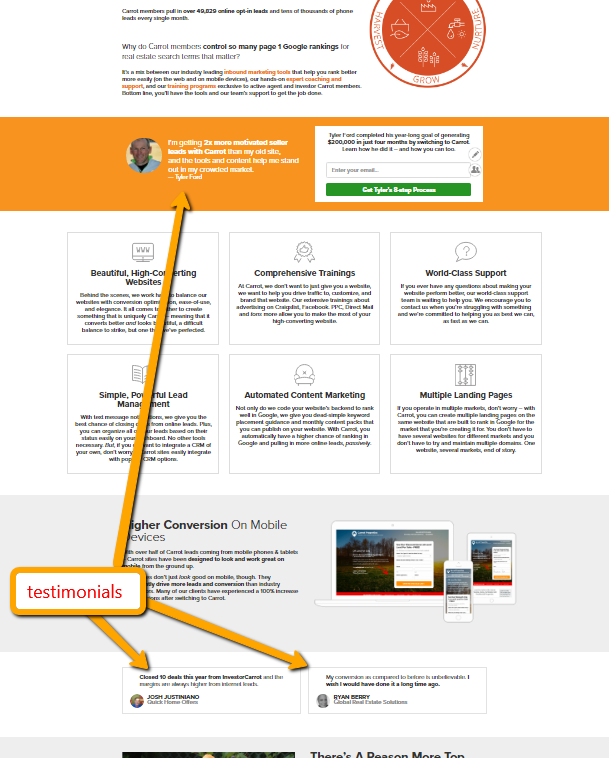

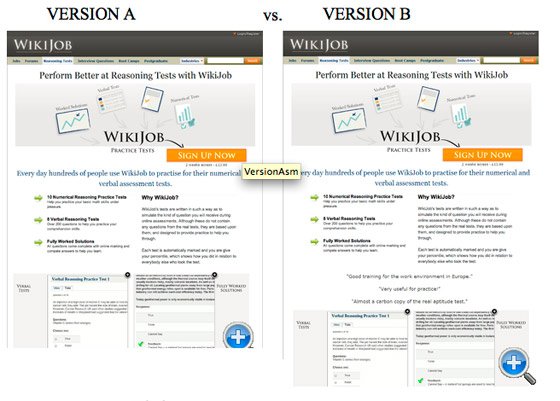


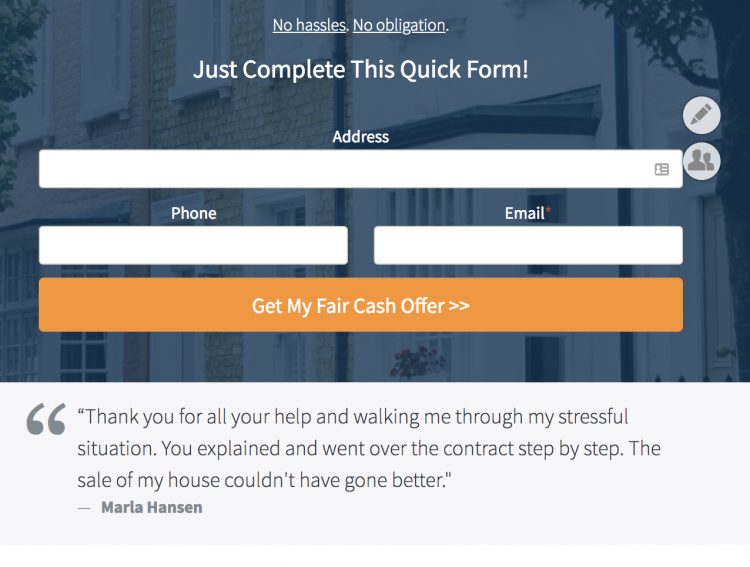
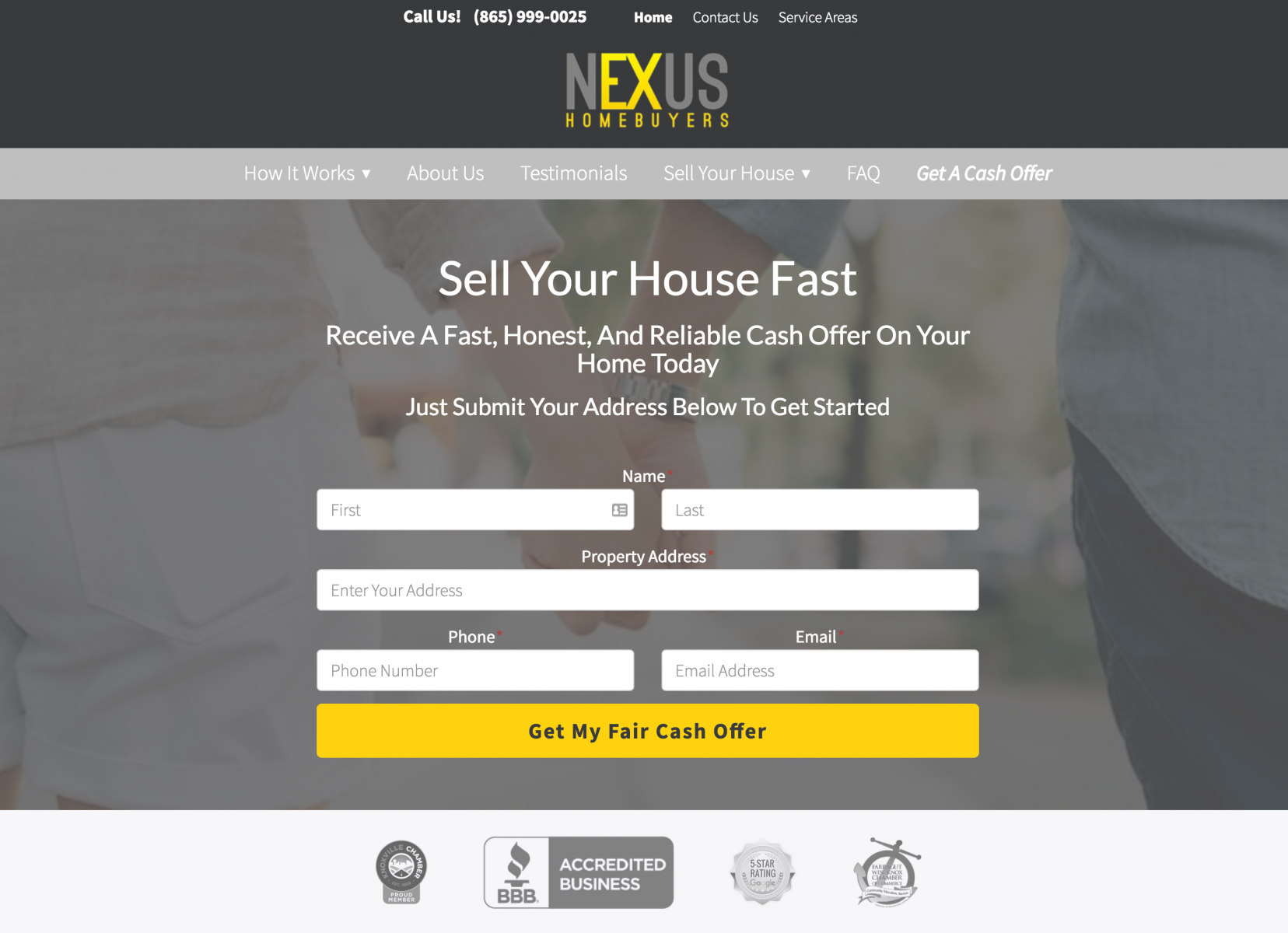
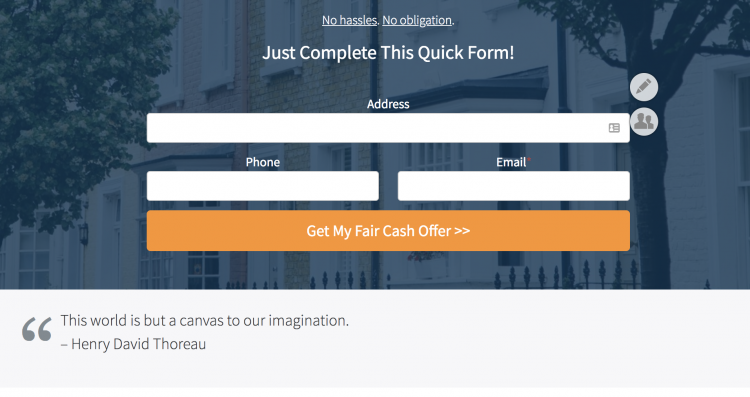
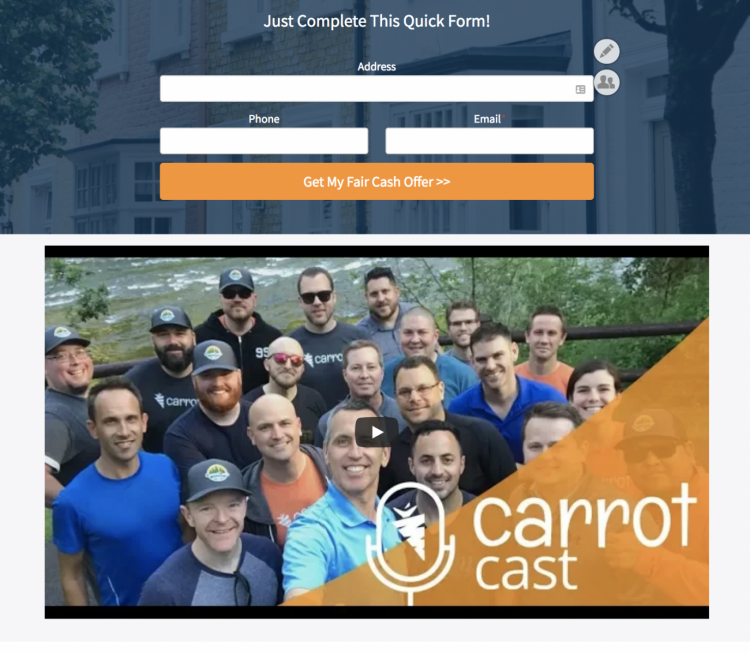
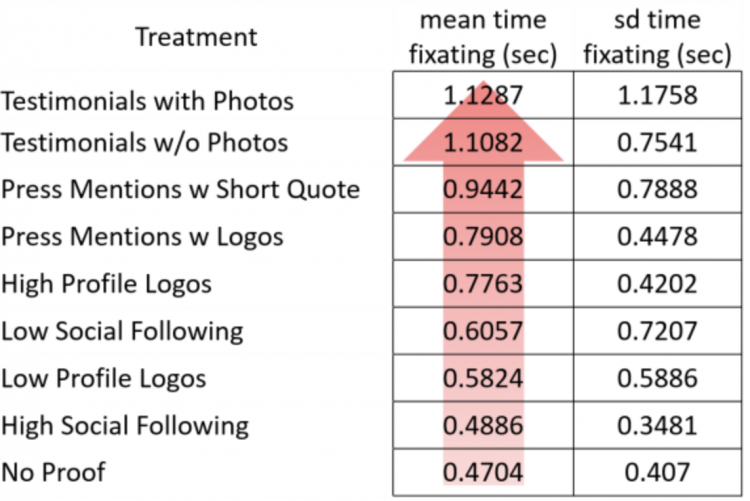
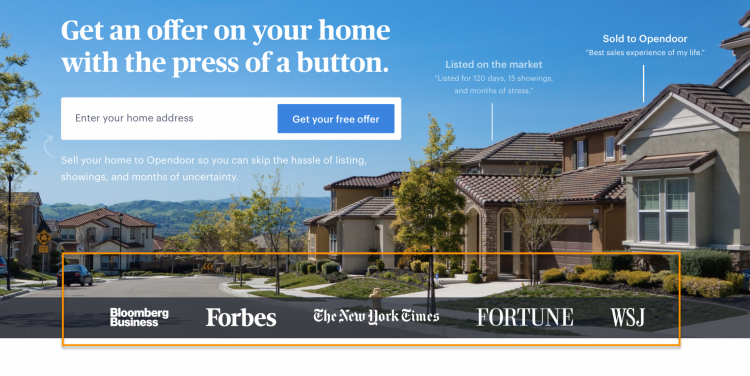
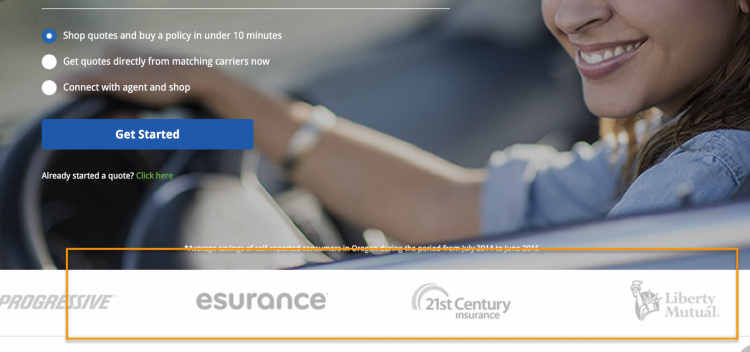
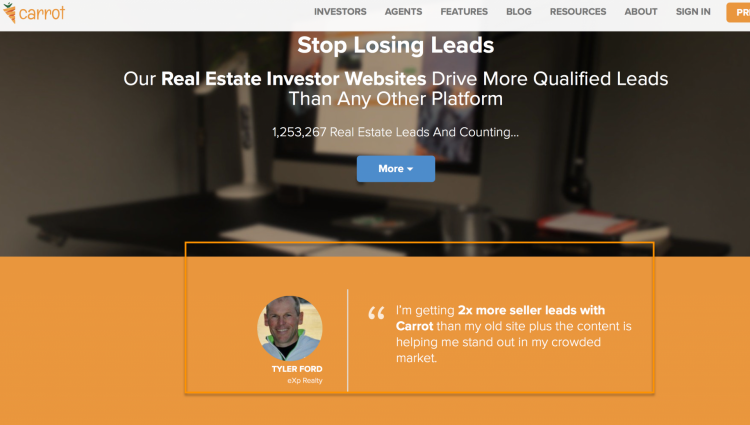


![[New Feature] Use This Hero Customizer To Differentiate your Website and Increase Conversions](https://image-cdn.carrot.com/uploads/Featured-Image-102.png)
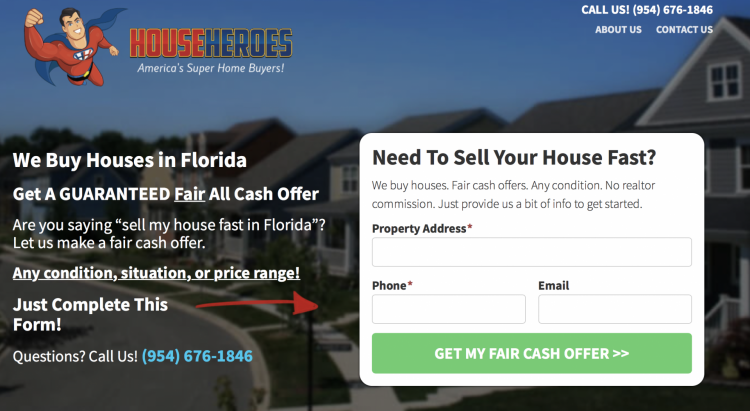
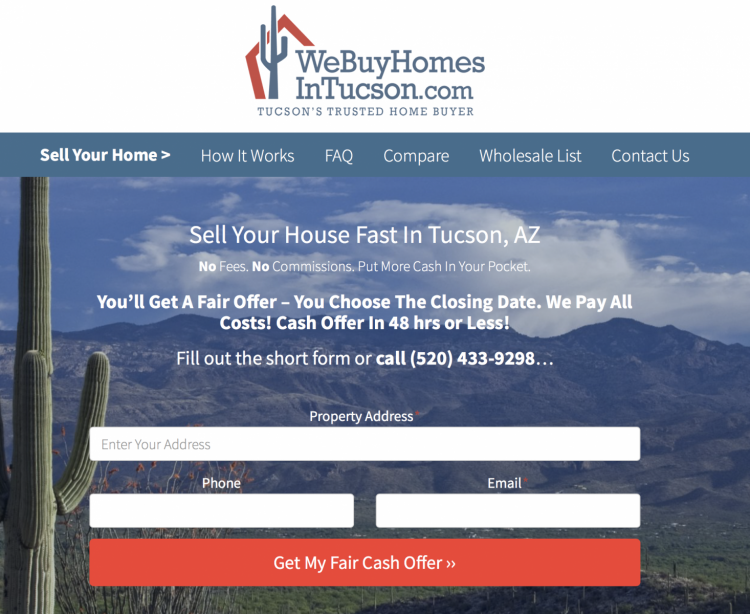
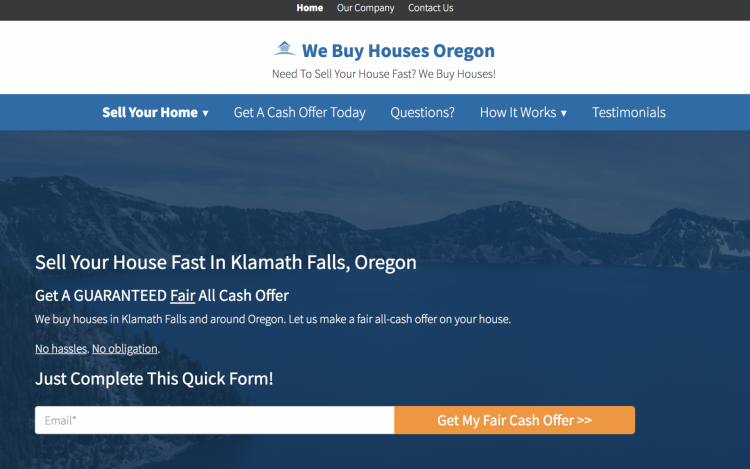
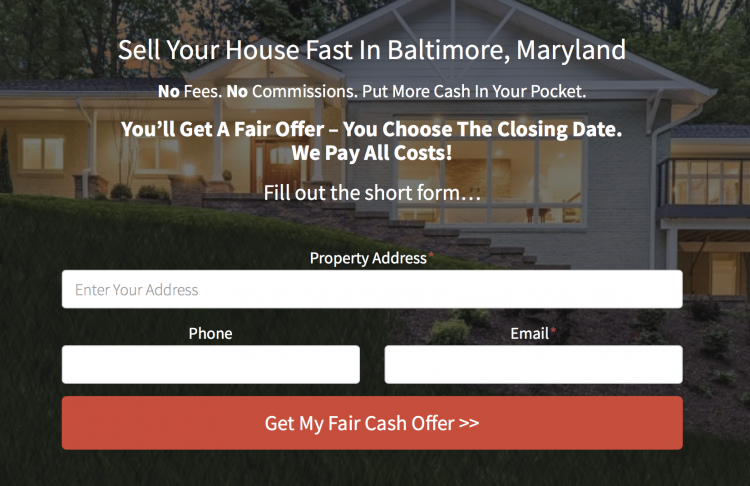
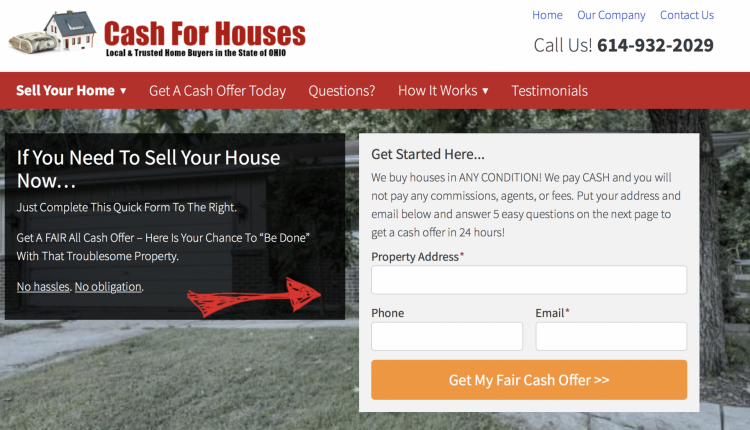
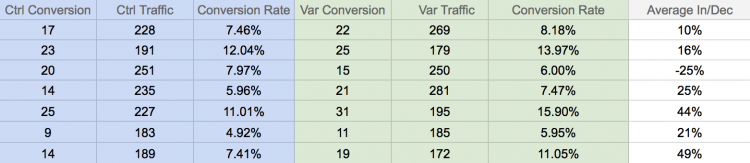
![[New Feature] Use This Hero Customizer To Differentiate your Website and Increase Conversions](https://i.ytimg.com/vi/k6H0SLVQ0QI/maxresdefault.jpg)
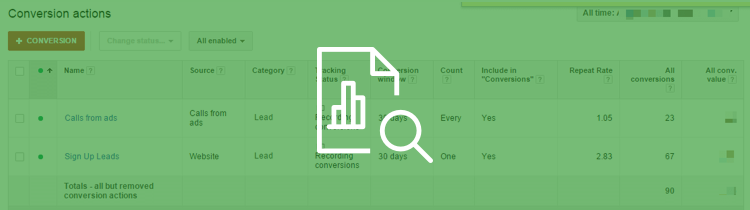

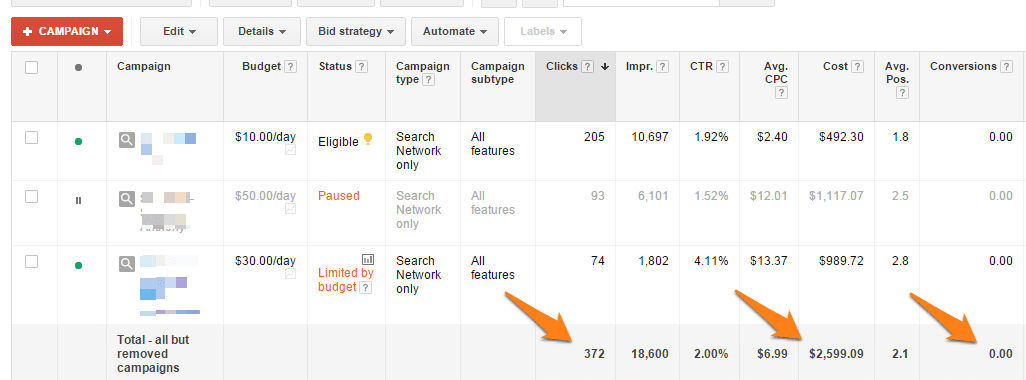
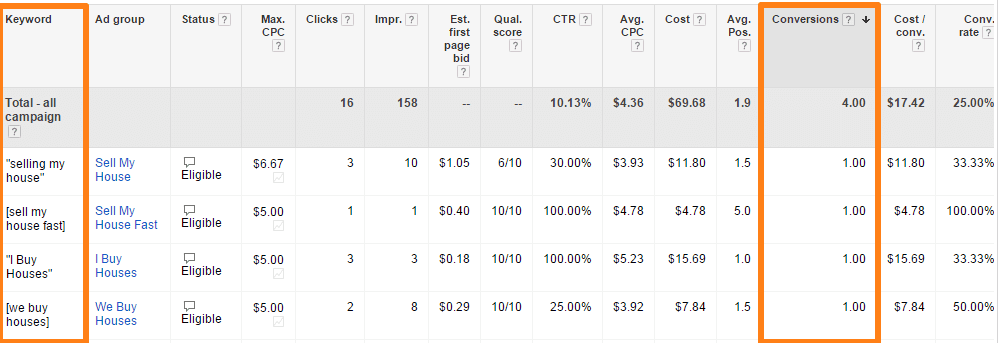
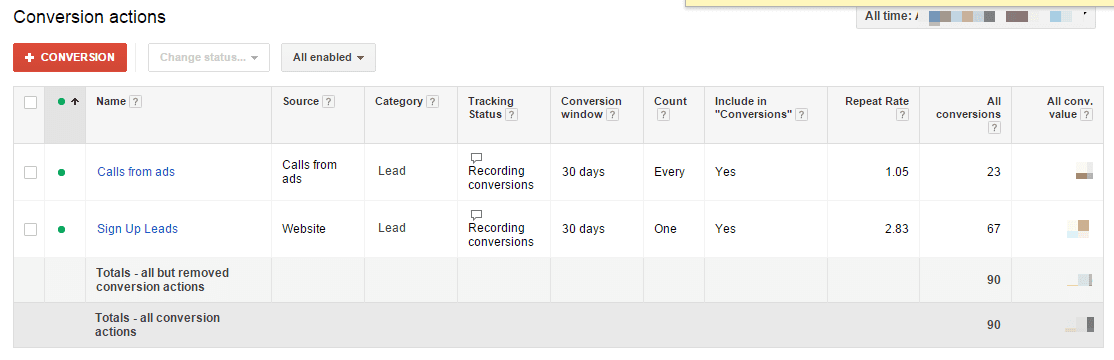
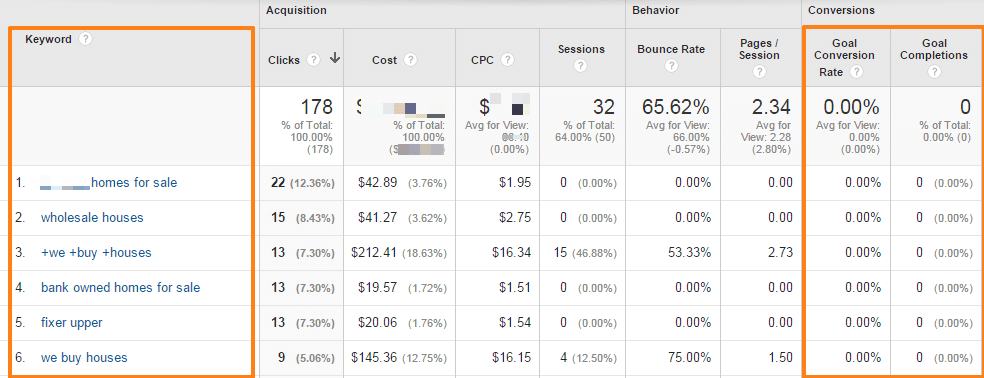
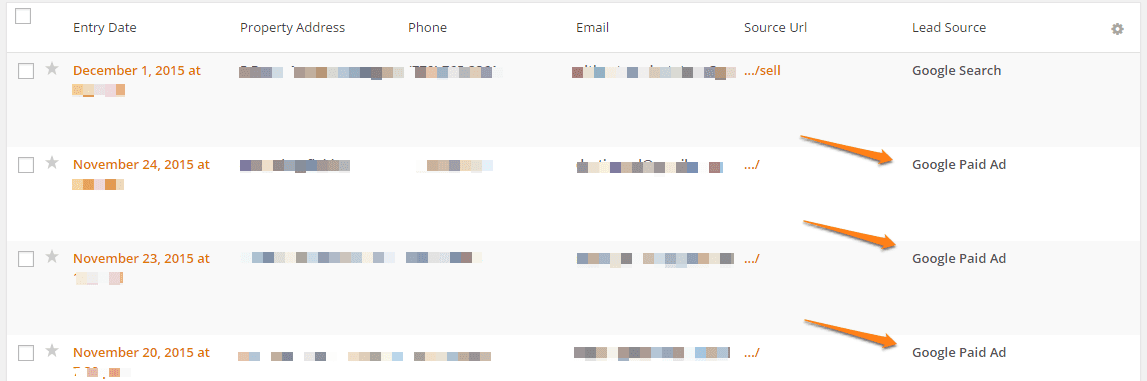



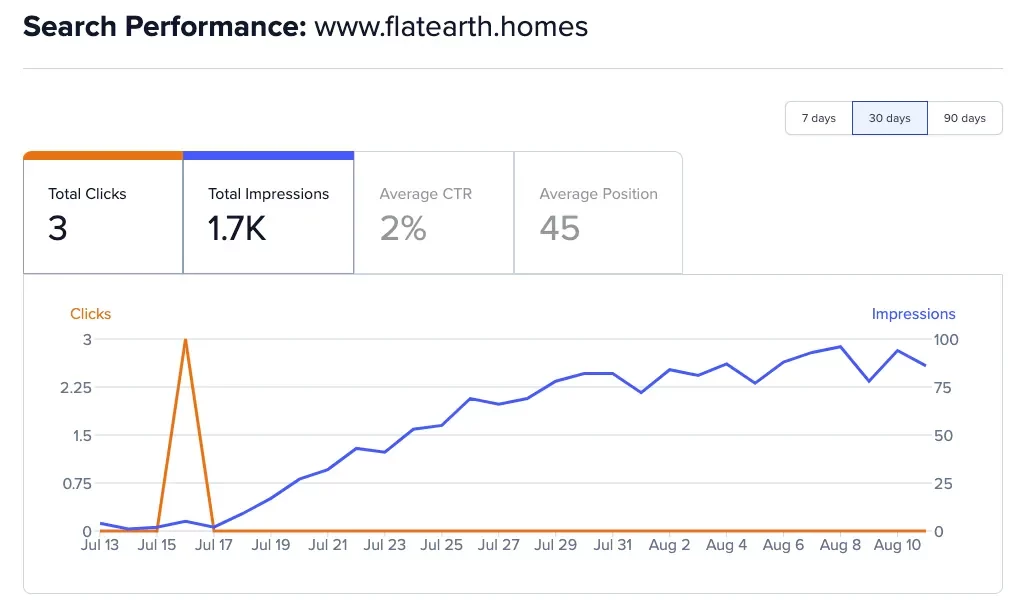
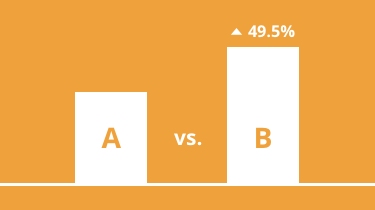
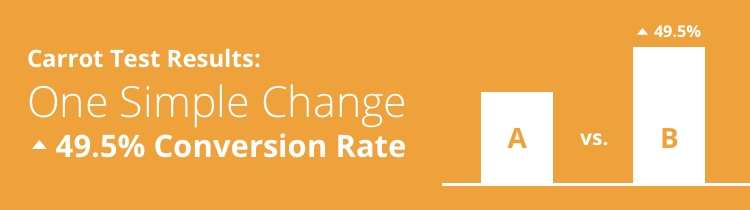
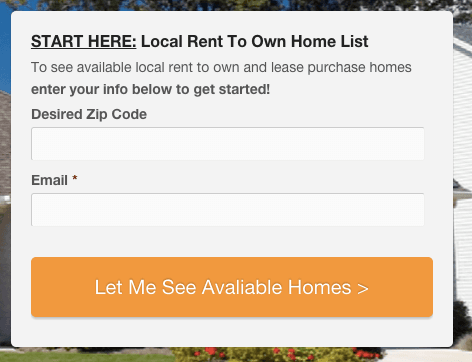
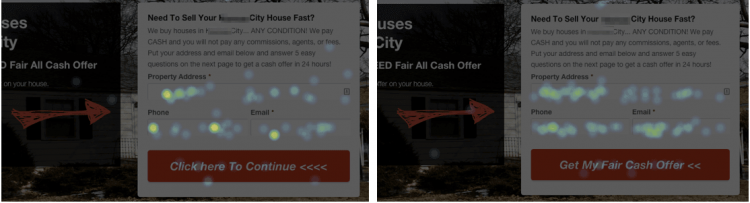
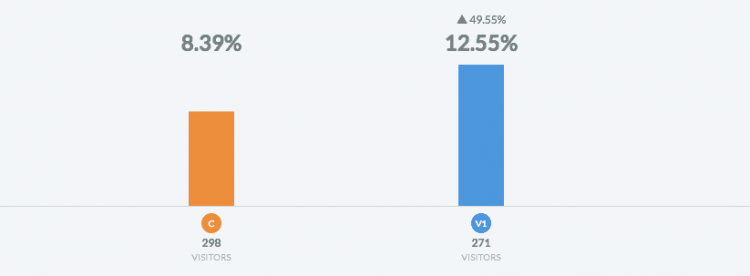
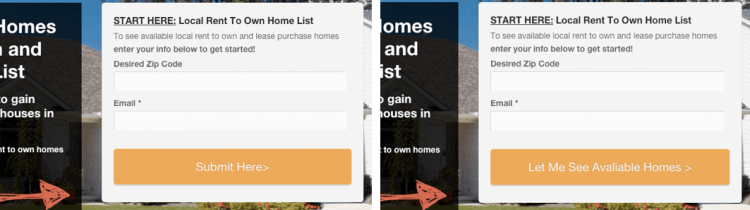
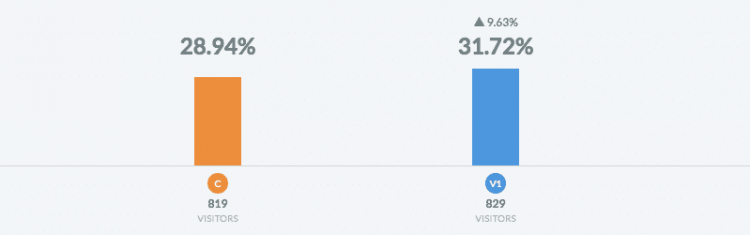
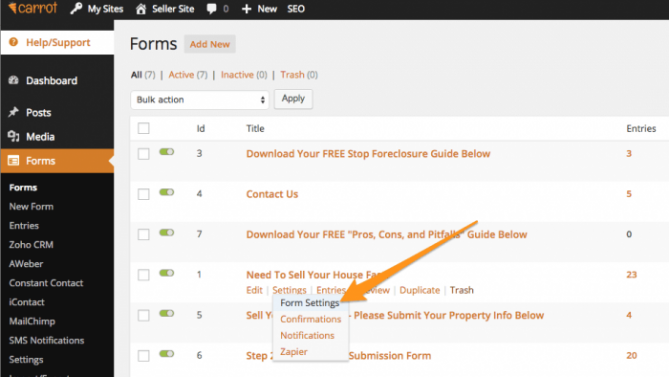
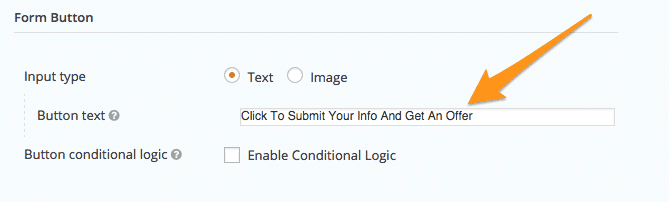
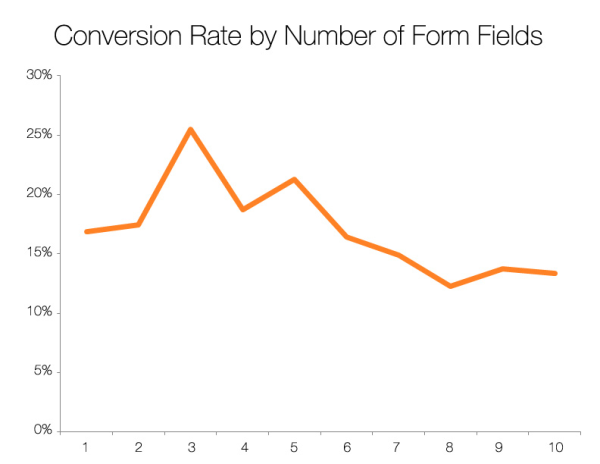

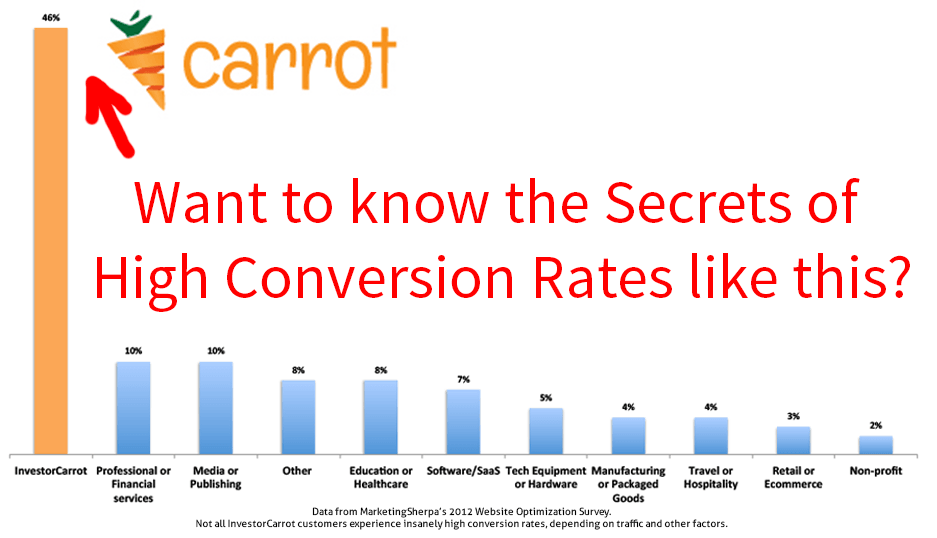

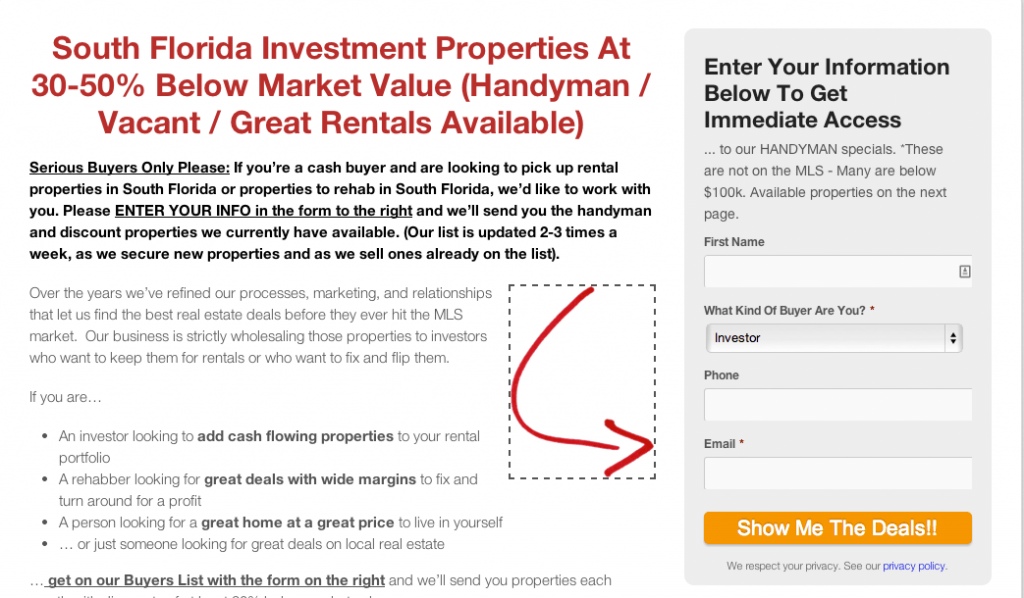
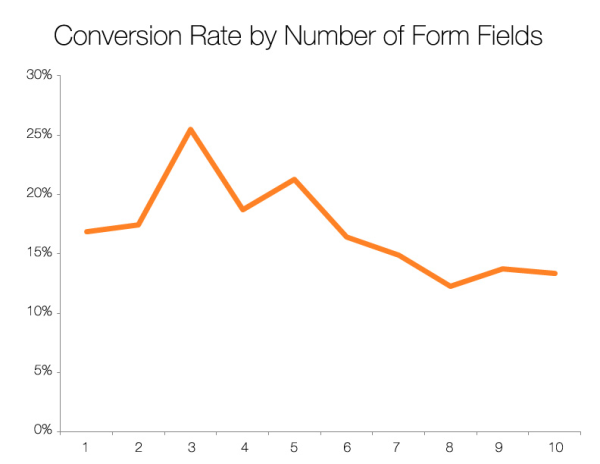
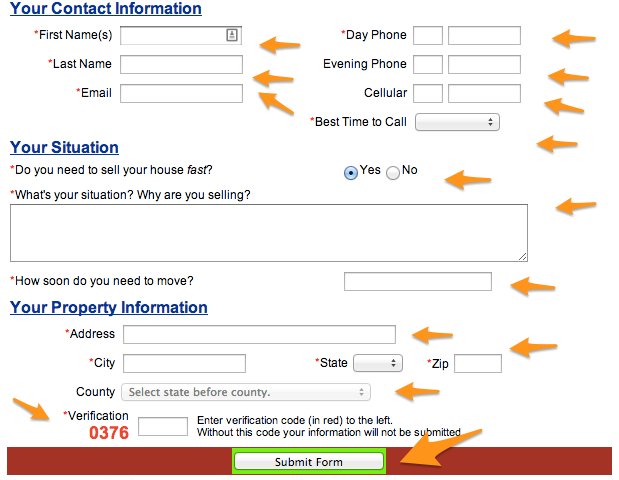
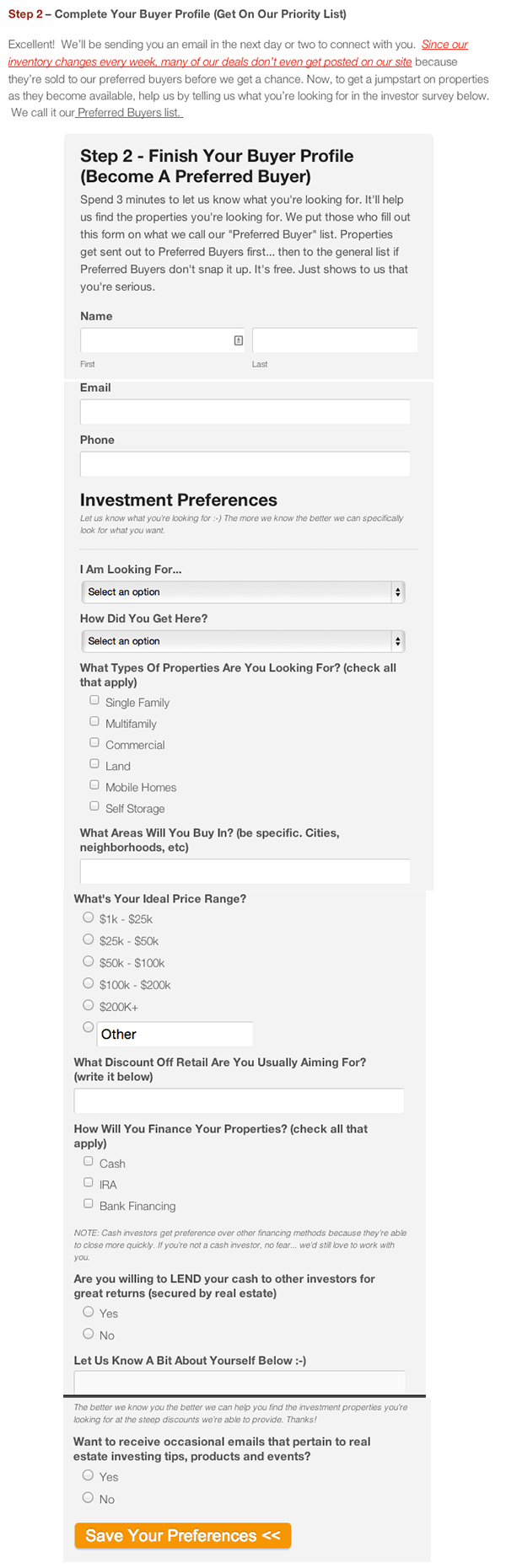
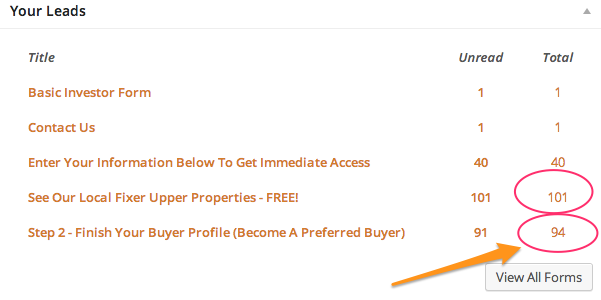
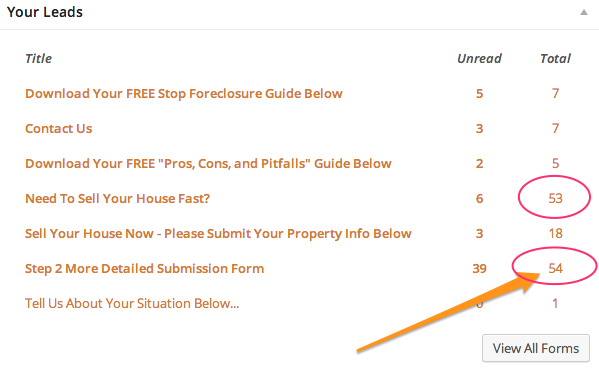

 AI Search Visibility Scorecard