People ask me what the next big thing is in marketing. If you’re already doing marketing, the next greatest thing is to build up your credibility, so you can stop losing deals.
Trevor Mauch, CEO of Carrot
Christian went from Firefighter to an employee at a house flipping business making money for his boss, to going it alone (and failing the first time)… and finally made things click and over 2 years went from $0 to $1.4M in revenue. Hear his journey, what made wholesaling finally work for him in a big way, and why he didn’t quit when he burned through his whole marketing budget with no results.
Listen to the CarrotCast Podcast:
[podcast-subscribe]
The Conversation
3:04 – A look at Christian’s business: wholesaling since 2014, recently launched a private lending arm and property management arm, and plans to launch a full-service investment firm in 2019.
5:11 – How to turn a dead lead into $14,200 of commissions.
6:33 – Growing from $330 gross revenue during his first year to $1.4 million in gross revenue in 2018.
8:12 – From firefighting to real estate: how he made the transition and who helped him on his journey.
11:09 – “My girlfriend found a Groupon deal for real estate license”.
15:31 – Making an incredible comeback from failing as a real estate agent.
16:32 – How to talk with sellers and study the various personality types.
21:01 – How being transparent in your business can get you more deals.
22:45 – Why owning your credibility and reputation will ultimately help you close more deals.
27:34 – Christian’s marketing plan for hitting $3 million in revenue this year + His current ROI and cost per deal.
34:31 – What to do when your online leads aren’t converting.
36:31 – Christians unique strategy for finding buyers.
46:35 – What’s changing with MLS?
55:03 – How to make more money on the same deals you’re already closing.
58:35 – The one thing you should be focusing on as an entrepreneur.
EP 103: Forgot To Have Fun? Lost Touch With Your Passions? This 7 Minutes Can Change It All For You: CarrotCast
EP 101: I Hung Out With 6 People Each Worth $300M+ This Month… 6 KEY Lessons I Learned: CarrotCast
EP 36: What’s Your Credibility Score? The Top 5% Of Earners Are Doing These “Simple” Things To Build More Credibility In A Cluttered Market w/ Trevor Mauch: CarrotCast
We want to hear your thoughts on the podcast! Drop them in the comments section below or hit us up on Facebook or Instagram
EP 103: Forgot To Have Fun? Lost Touch With Your Passions? This 7 Minutes Can Change It All For You: CarrotCast
EP 101: I Hung Out With 6 People Each Worth $300M+ This Month… 6 KEY Lessons I Learned: CarrotCast
EP 36: What’s Your Credibility Score? The Top 5% Of Earners Are Doing These “Simple” Things To Build More Credibility In A Cluttered Market w/ Trevor Mauch: CarrotCast
We want to hear your thoughts on the podcast! Drop them in the comments section below or hit us up on Facebook or Instagram
The real estate market thrives on movement, and in today’s digital age, that movement starts with a click. Gone are the days of relying solely on yard signs and classified ads. For real estate professionals in 2024, a strong online presence is no longer a luxury; it’s a necessity.
Real Estate SEO Bible: The Ultimate SEO Keywords Guide
Here’s the reality: over 93% of homebuyers utilize online resources while searching for a perfect property. But the online world isn’t just for buyers. Motivated sellers, eager to sell fast and streamline the process, are also turning to the web in ever-increasing numbers.
This digital landscape presents a golden opportunity for real estate investors and agents: a platform to connect with motivated sellers looking for a trustworthy investor and eager homebuyers ready to move with the right agent. However, with countless real estate investors and agents for online attention, simply having a website isn’t enough. To truly stand out and capture valuable leads, you need a strategic approach to search engine optimization (SEO).
This blog post dives into the 16 best practices for on-page SEO specifically tailored for the real estate market in 2024. By implementing these actionable strategies, you can ensure your website surfaces at the top of search results, attracting potential buyers and motivated sellers, ultimately propelling your real estate business forward in the ever-evolving digital landscape.
You know how powerful SEO can be for your real estate business. With over 15 million users on our Carrot member’s websites and over 45,000 leads per month right now (as of the update of this post), there is a huge hunk from SEO.
On-page SEO for Real Estate: 16 Steps for Optimized Websites
Understanding the Importance of On-Page SEO for Real Estate
Imagine a beautifully staged property with a “For Sale” sign hidden behind a giant, opaque billboard. That’s essentially what a real estate website without strong on-page SEO is like. Potential buyers and sellers can’t see it, can’t find it, and can’t connect with the valuable resource you offer.
On-page SEO is the art and science of optimizing the elements within your website to improve its ranking in search engine results. In the competitive world of real estate, ranking higher means more visibility. More visibility translates into more qualified leads, client conversions, and a thriving real estate business.
Here’s a breakdown of the magic on-page SEO works for real estate professionals:
Attract Housebuyers: When potential buyers search for homes in your area, optimized keywords and content ensure your website appears at the top of search results. This positions you as a trusted resource, attracting buyers actively looking for properties.
Engage Motivated Sellers: Sellers seeking to list their property also search online. By targeting relevant keywords related to selling a home, your website becomes a beacon, attracting motivated sellers seeking top-notch agents to guide them through the process.
Boost Credibility and Expertise: High-quality, informative content showcases your knowledge of the local market and establishes you as a valuable resource for both buyers and sellers. This builds trust and positions you as the go-to agent in your area.
Drive Organic Traffic: Effective on-page SEO helps your website rank organically, meaning you don’t have to rely solely on paid advertising. This translates into cost-effective lead generation, attracting potential clients who are actively searching for real estate solutions.
By investing in on-page SEO, you’re essentially investing in the foundation of your online presence. It’s the key to unlocking the full potential of your website, transforming it from a hidden gem to a lead-generating powerhouse in the ever-competitive world of real estate.
Keyword Research: Unlocking the Language of Your Audience in Real Estate
In the dynamic world of SEO, understanding user intent is the Rosetta Stone to crafting a website that resonates with your target audience. This is especially true in the real estate market, where homebuyers and motivated sellers navigate the online landscape with distinct goals.
Moving Beyond Search Volume: Traditionally, SEO focused on keyword volume – finding the most commonly searched terms. However, modern SEO delves deeper, prioritizing keywords that reflect user intent. This means understanding the “why” behind user searches and what potential buyers and sellers are truly looking for when they type their queries into search engines.
Homebuyer Focus: A Journey of Discovery
For homebuyers, the search journey often involves a mix of informational and transactional keywords:
Informational Keywords: These keywords reveal buyers in the research phase, gathering information and understanding the market. Examples include:
“Best school districts in [your city]”
“ cost of living”
“Tips for first-time homebuyers”
Transactional Keywords: These keywords signal a buyer is nearing a decision and ready to connect with an agent. Examples include:
“[Your city] homes for sale under $300,000”
“Open houses this weekend near [landmark]”
“Find a real estate agent in [your zip code]”
By targeting both informational and transactional keywords, your website caters to buyers throughout their search journey, establishing you as a valuable resource and trusted guide from start to finish.
Motivated Seller Focus: Selling Smart, Selling Fast
Motivated sellers also have distinct search intent. They might be looking for:
“How to sell my house fast in [year]” (e.g., “How to sell my house fast in 2024”)
“Free cash offer”
“Top cash house buyers in [your area]”
These keywords reveal sellers seeking guidance and expertise to navigate the selling process effectively and get their property sold as quickly as possible.
Keyword Research Tools: Your Partners in Discovery
There are numerous tools available to help you conduct real estate-specific keyword research. These tools can be your partners in uncovering valuable insights:
High-volume, Relevant Keywords: Tools like Google Keyword Planner and SEMrush can provide data on search volume and competition for various keywords.
Long-tail Keywords: Targeting long-tail keywords with lower competition can be a goldmine for attracting qualified leads, especially for local markets. Tools like Ahrefs and Moz can help you discover these long-tail gems.
Local Keyword Targeting: By incorporating local keywords like your city or neighborhood, your website becomes more visible to potential buyers and sellers in your specific area. Tools like Google Trends can be helpful for identifying local search trends and capitalizing on them.
By leveraging keyword research and understanding user intent, you can craft a website that speaks directly to homebuyers’ and motivated sellers’ needs and desires. This strategic approach will attract valuable leads, propel your real estate business forward, and position you as a trusted advisor in the online space.
Optimizing Meta Titles and Descriptions for Listings: Crafting Click-Worthy Snippets
First impressions are everything in the competitive world of real estate online searches. This is where meta titles and descriptions for your listings come into play. These crucial elements are essentially the billboards for your properties on search engine result pages (SERPs). Compelling meta titles and descriptions can distinguish between a potential buyer clicking through to your website or scrolling right past.
Here’s why optimizing these elements is essential for real estate websites:
Increased Click-Through Rates (CTR): Well-crafted meta titles and descriptions entice users to click on your listing, driving valuable traffic to your website.
Improved Search Ranking: Search engines consider metadata when ranking websites. You can improve your listing’s visibility in search results by strategically incorporating relevant keywords.
Targeted Audience Attraction: Effective meta descriptions allow you to highlight the unique selling points of your listings, attracting the right kind of buyers searching for specific features or locations.
Crafting Click-Worthy Snippets:
Keep it Concise: There’s a limited character count for titles and descriptions (typically around 60 characters for titles and 160 characters for descriptions). Focus on including the most crucial information within these limits.
Keyword Integration: Strategically incorporate relevant keywords that potential buyers are searching for. However, avoid keyword stuffing as it can appear unnatural.
Actionable Language: Use strong verbs and calls to action (CTAs) to encourage users to visit your website and learn more about the property.
Highlight Unique Selling Points: What makes your listing stand out? Is it a stunning view, a spacious backyard, or a modern renovation? Briefly mention these features in your meta descriptions to grab attention.
Location, Location, Location: For local SEO, include the city, neighborhood, or zip code in both titles and descriptions to target local searches.
Pro Tip: Leverage Structured Data Markup: To optimize your optimization further, consider implementing structured data markup for your listings. This schema markup provides search engines with even richer information about your properties, potentially enhancing your listing’s appearance in SERPs with features like star ratings or virtual tours.
By following these best practices and crafting compelling meta titles and descriptions, you can transform your real estate listings from overlooked entries to click magnets, attracting qualified buyers and generating leads for your business.
Creating High-Quality, Engaging Content for Housebuyers and Sellers: Content is King (and Queen) in Real Estate
In today’s digital age, content is no longer just an afterthought – it’s the cornerstone of a successful real estate website. High-quality, informative content catering to housebuyers and sellers is essential for attracting leads, building trust, and establishing yourself as a local market expert.
Think Beyond Listings: While showcasing properties is crucial, your website should offer more than just listings. Creating a diverse content library positions yourself as a valuable resource, attracting visitors at various stages of their real estate journey.
Content for Housebuyers:
Local Area Guides: Craft informative guides that showcase your area’s best neighborhoods, schools, and amenities. This positions you as a knowledgeable local expert and attracts buyers interested in specific communities.
Hyperlocal Virtual Tours: Go beyond static photos with engaging virtual tours that allow potential buyers to experience properties virtually. Highlight unique features and layouts to create a truly immersive experience.
First-Time Homebuyer Resources: Provide informative content specifically tailored to first-time homebuyers. This could include guides on navigating the mortgage process, understanding down payments, determining how much house you can afford based on your financial situation, and homeownership basics.
Cost-of-Living Comparisons: Help potential buyers understand the financial landscape by creating content that compares the cost of living in your area to other cities or regions.
Content for Motivated Sellers:
Free Foreclosure Guides: Empower sellers with the knowledge and options to navigate foreclosure more confidently.
Guides for Selling Fast in [Year]: Create timely content that addresses current market trends and seller concerns. For example, “Top Tips for Selling Your House Fast in 2024” can attract motivated sellers seeking a quick and efficient sale.
A Smooth Path to Selling a Probate Property: Inheriting a house presents both sentimental value and the opportunity to generate financial gain. This guide equips sellers with the knowledge to navigate the probate process and prepare the property for a successful sale.
Focus on Expertise, Authoritativeness, and Trustworthiness (E-A-T):
When crafting content, prioritize E-A-T. Showcase your real estate expertise by incorporating data-driven insights on local market trends. Leverage your experience and knowledge to provide valuable advice and resources for buyers and sellers. Building trust is key, so ensure your content is accurate, well-researched, and up-to-date.
By creating a comprehensive content library that caters to housebuyers and sellers, you’re not just attracting visitors but nurturing leads and establishing yourself as a trusted advisor in the real estate market. Remember, informative content is an investment that reaps long-term rewards for your business.
Optimizing Image Alt Text for Visual SEO: Descriptive Text Meets Search Engine Power
Images are a powerful tool in real estate websites, showcasing properties and capturing the imagination of potential buyers. But in the world of SEO, images alone aren’t enough. Optimizing image alt text is a crucial on-page SEO strategy that unlocks the full potential of your visuals and enhances accessibility for all users.
What is Alt Text?
Alt text, short for alternative text, is a hidden description attached to an image. It acts as a substitute for the image itself, displayed when the image fails to load or when using a screen reader for visually impaired users.
Why is Alt Text Important for SEO?
Search Engines See the World Differently: Search engine crawlers can’t “see” images as humans do. Alt text provides a crucial description, helping search engines understand the content of your images and their relevance to your web pages.
Boosts Image Ranking: Optimized alt text with relevant keywords can contribute to your images ranking higher in image search results. This increases the visibility of your properties and potentially drives organic traffic to your website.
Accessibility Matters: For users who rely on screen readers, alt text provides an audio description of the image, ensuring everyone has access to the full content on your website.
Crafting Effective Alt Text for Real Estate Images:
Be Descriptive, Not Decorative: Avoid generic alt text like “Image of a house.” Instead, describe the key elements of the image: “ living room with fireplace and modern furniture.”
Target Relevant Keywords: While keyword stuffing is a no-no, strategically incorporating relevant keywords can improve image searchability.
Keep it Concise: Aim for clear and concise descriptions while providing enough detail, ideally under 125 characters.
Focus on User Intent: Consider what a potential buyer might look for when viewing the image. Is it a spacious backyard perfect for entertaining? Mention that in the alt text!
Optimizing alt text is a simple yet powerful on-page SEO strategy. By providing informative descriptions for your images, you cater to search engines and users with visual impairments. This translates to a more accessible website, improved image searchability, and a stronger online presence for your real estate business.
Incorporating Location-Based Keywords Strategically: Supercharge Your Local SEO
In today’s digital age, where people increasingly search for real estate online, location is everything. Potential buyers and sellers are specifically looking for properties in their desired areas. This is where location-based keywords come into play, acting as powerful tools to attract qualified leads to your real estate website.
Understanding Location-Based Keywords:
Location-based keywords are search terms that incorporate geographic locations, like cities, neighborhoods, zip codes, or landmarks. Here are some examples of location-based keywords for real estate:
“ homes for sale”
“Best school districts in [neighborhood name]”
“Open houses this weekend near [landmark]”
“How to sell my house fast in “
Why are Location-Based Keywords Important?
Target Local Audience: By strategically using location-based keywords, you ensure your website appears in search results by people specifically interested in your area. This translates to attracting highly qualified leads – potential buyers and sellers actively searching for properties in your local market.
Boost Local SEO Ranking: Search engines prioritize local results for users with location-based queries. By incorporating these keywords throughout your website content, from meta descriptions to blog posts, you signal to search engines the local focus of your business, potentially improving your local SEO ranking.
Stand Out from the Crowd: In the competitive world of real estate, location-based keywords can help you cut through the noise. Targeting local searches allows you to compete with other agents in your specific area rather than facing nationwide competition.
Strategic Use of Location-Based Keywords:
Don’t Just Focus on City Name: While “ house” is a good starting point, delve deeper. Consider incorporating specific neighborhoods or zip codes to attract even more targeted leads.
Content is Key: Weave location-based keywords naturally throughout your website content. Create blog posts about local market trends, highlight properties in specific neighborhoods, or offer guides for navigating your area’s buying or selling process.
Local Landing Pages: Create dedicated landing pages for specific neighborhoods or property types. This lets you showcase your expertise in various local markets and target even more granular searches.
Go Beyond the Website: Incorporate location-based keywords in your online marketing efforts beyond your website. Utilize them in social media posts, online directories, and even paid advertising campaigns to maximize your local online presence.
By strategically incorporating location-based keywords, you transform your real estate website from a generic online presence to a powerful local lead generation machine. This targeted approach ensures you connect with the right audience, potential buyers, and sellers actively searching for properties in your specific market. Remember, location is key, and using location-based keywords strategically puts you on the map for real estate success.
Mobile Optimization: Ensuring Your Website Works Seamlessly on the Go
In today’s mobile-driven world, how your website appears on smartphones and tablets is no longer an afterthought; it’s a necessity. The majority of real estate searches now happen on mobile devices. Imagine a potential buyer scrolling through listings on their phone, only to be met with a clunky website, slow-loading or requiring zooming and pinching to navigate. Frustration sets in, and they move on to a competitor with a mobile-friendly website. Don’t let this be you!
Here’s why mobile optimization is crucial for real estate websites:
The Mobile-First Mindset: Statistics show that many real estate searches happen on mobile devices. A website that isn’t optimized for mobile is invisible to many potential buyers and sellers.
Enhanced User Experience: Mobile users expect a seamless experience. A website that’s easy to navigate, loads quickly, and displays beautifully on smaller screens keeps visitors engaged and fosters trust in your brand.
Improved Conversion Rates: A user-friendly mobile website makes it easier for potential clients to contact you or request a showing. This translates to higher conversion rates, ultimately leading to more business for you.
Search Engine Optimization Boost: Mobile-friendliness is now a significant ranking factor for search engines. A website that performs well on mobile devices is more likely to rank higher in search results, both on mobile and desktop searches.
Making Your Website Mobile-Friendly:
Responsive Design is Key: A responsive design ensures your website automatically adjusts its layout and content to fit any screen size, be it a desktop computer, a tablet, or a smartphone.
Prioritize Fast Loading Speeds: Mobile users are impatient. A website that takes too long to load will be abandoned. Optimize your images, minimize redirects, and consider using a content delivery network (CDN) for faster loading times.
Make Sure Everything is Tappable: Buttons, links, and CTAs (calls to action) should be large enough for easy tapping on a mobile screen. Ensure forms are also mobile-friendly and avoid requiring excessive typing.
Test, Test, Test: Don’t just assume your website is mobile-friendly. Use Google’s Mobile-Friendly Test tool and test your website on various mobile devices to identify and fix any potential issues.
By prioritizing mobile optimization, you ensure your real estate website caters to the modern, on-the-go user. A seamless mobile experience translates to happy visitors, more leads, and ultimately, a thriving real estate business in the age of mobile dominance.
Improving Page Load Speed: Keeping Your Website Speedy for Satisfied Users (and Search Engines)
In the fast-paced world of online real estate, first impressions are made in milliseconds. Website loading speed plays a crucial role in user experience – a slow website frustrates potential buyers and sellers, causing them to bounce before they see your listings. But it’s not just about user happiness; page load speed is also a significant ranking factor for search engines.
Here’s why optimizing page load speed is essential for your real estate website:
Enhanced User Experience: Nobody enjoys waiting for a website to load. A speedy website keeps visitors engaged, allowing them to browse listings, explore your services, and contact you for real estate needs.
Reduced Bounce Rate: Bounce rate refers to the percentage of visitors who leave your website after viewing only one page. A slow website leads to high bounce rates, essentially losing potential leads before they even get a chance to explore your offerings.
Improved Conversion Rates: Faster loading times translate into a smoother user experience, which can lead to higher conversion rates. When visitors can easily navigate your website and find the information they need quickly, they’re more likely to contact you or request a showing.
SEO Benefits: Search engines prioritize websites that deliver a positive user experience. Faster loading speeds signal a well-optimized website, potentially boosting your ranking in search results and increasing organic traffic.
Strategies for a Speedy Website:
Image Optimization: Images are often the biggest culprits behind slow loading times. Resize images to fit your website layout and compress them for the web without sacrificing quality. Consider using tools like TinyPNG or ShortPixel for efficient image optimization.
Minimize Code: Clean and efficient code ensures your website loads quickly. Remove unnecessary code, minify existing code (reducing its file size), and leverage browser caching to store frequently accessed elements for faster loading on future visits.
Leverage a Content Delivery Network (CDN): A CDN stores copies of your website’s static content (like images and scripts) on servers around the world. This allows content to be delivered to users from the closest server, significantly improving website loading speed, especially for visitors from different locations.
Prioritize High-Quality Hosting: The server where your website resides plays a big role in performance. Choose a reliable hosting provider with a good reputation for speed and uptime to ensure your website is always accessible and delivers content quickly.
By implementing these strategies, you can transform your real estate website from a sluggish snail to a website that loads in a blink. This translates to a positive user experience, happy visitors, and ultimately, a website that works hard to generate leads and grow your real estate business.
Creating Informative Neighborhood Pages: Becoming the Local Real Estate Authority
In today’s digital age, potential homebuyers often embark on their search journey online. This presents a golden opportunity for real estate agents: the chance to establish themselves as local market experts by creating informative neighborhood pages on their websites.
Beyond Listings: Building Trust with Local Expertise
Simply showcasing listings isn’t enough. High-quality neighborhood pages provide valuable information to potential buyers, positioning you as a trusted resource and advisor. This content goes beyond basic demographics and delves into each neighborhood’s unique character and lifestyle.
Content that Captures Local Flavor:
Area Overview: Provide a comprehensive overview of the neighborhood, including its history, architectural styles, and overall vibe (family-friendly, trendy, artistic, etc.)
Local Amenities: Highlight the neighborhood’s key attractions: parks, restaurants, cafes, schools, shopping centers, entertainment options, etc.
Transportation Options: Is the neighborhood walkable? Does it have easy access to public transportation? Outline commute times to major employment hubs.
Community Life: Showcase the neighborhood’s community spirit. Are there farmers’ markets, local festivals, or community events?
School Information: For families, school quality is a top priority. Provide information on the public and private schools within the neighborhood, including ratings and academic performance.
Cost of Living: Offer insights into the average cost of living in the neighborhood, including housing costs, groceries, utilities, etc.
Visual Appeal: Complement your informative content with high-quality photos and videos that capture the essence of the neighborhood.
Optimizing Neighborhood Pages for Local SEO:
Target Local Keywords: Integrate relevant local keywords throughout your content, including neighborhood names, nearby landmarks, and specific amenities.
Internal Linking: Link your neighborhood pages to relevant listings within that area and vice versa. This creates a user-friendly experience and helps search engines understand the connection between your neighborhoods and properties.
Promote Your Local Expertise: Showcase your knowledge of the area by offering insights and highlighting unique aspects of each neighborhood. This positions you as the go-to agent for buyers seeking expertise in specific locations.
By creating informative neighborhood pages, you achieve several key goals:
Attract Local Buyers: Targeted content attracts potential buyers actively searching for homes in specific areas.
Establish Local Expertise: High-quality content positions you as a trusted advisor with deep local market knowledge.
Drive Organic Traffic: Optimized neighborhood pages improve your website’s local SEO ranking, leading to more organic traffic from potential buyers searching for information online.
Investing time and effort in crafting informative neighborhood pages is an investment in your local online presence. It’s a strategic approach that allows you to connect with the right audience, build trust, and ultimately generate leads from qualified buyers seeking their perfect home in your local market.
Utilizing Internal Linking: Weaving a User-Friendly Web for SEO Success
Imagine a well-organized library. Books on similar topics are shelved together, and clear pathways guide you from section to section. This organization makes finding information effortless. Your website should function the same way. Internal linking, the strategic practice of linking website pages to each other, is the architect behind this user-friendly structure, and it also plays a crucial role in SEO.
Weaving User-Friendly Pathways:
Enhanced Navigation: Strategic internal linking creates a clear hierarchy and connects relevant content, making it easier for users to navigate your website and find the information they seek.
Improved User Experience: A user who can seamlessly flow through relevant content is likelier to stay engaged and explore your website further. This translates to a more positive user experience, a key ranking factor for search engines.
SEO Benefits of Internal Linking:
Distributing Link Equity: Search engines consider the quality and quantity of links pointing to a webpage when determining its ranking. By strategically linking high-authority pages (pages that already rank well) to other relevant pages on your website, you distribute “link equity” throughout your site. This can potentially boost the overall SEO of all your pages.
Signaling Relevance to Search Engines: Internal links act like breadcrumbs for search engine crawlers, helping them discover and index your website’s valuable content. How you link your pages tells search engines which content on your site is most relevant to each other, providing valuable insights for ranking purposes.
Improved Organic Traffic: When users can easily find relevant content through internal links, they will likely stay on your website and explore more pages. This leads to increased organic traffic, a key metric for website success.
Strategies for Effective Internal Linking:
Link Relevant Content: Don’t just link for the sake of linking. Focus on connecting content that is thematically relevant and provides a natural flow of information for users. For example, link a blog post about “First-Time Homebuyer Tips” to relevant neighborhood pages on your website.
Anchor Text Matters: The text you use to link to another page (anchor text) should be descriptive and relevant to the content it leads to. Avoid generic text like “click here.” Instead, use an anchor text that entices users to click, like “ Real Estate Market Trends.”
Utilize Breadcrumb Navigation: Breadcrumb navigation allows users to see their location within your website’s hierarchy, making it easier to navigate back to previous pages.
Link From High-Authority Pages: Pages that already rank well on search engines hold more “link equity.” Linking to other pages from these high-authority pages can spread that value and potentially improve their ranking as well.
By implementing a well-thought-out internal linking strategy, you create a user-friendly website that keeps visitors engaged and helps search engines understand the structure and value of your content. This translates to a more positive user experience and potentially improved search engine ranking for your real estate website. Remember, internal linking is all about creating a web of relevant connections that benefits both users and search engines.
Optimizing URL Structures for Clarity and SEO Advantage
In the competitive world of real estate online searches, first impressions matter – and that includes your website’s URLs. Beyond simply directing users to the right page, well-structured URLs offer a glimpse into the content’s purpose and can even provide a slight SEO boost.
Balancing User-Friendliness with SEO:
Clarity for Users: Strive for clear and informative URLs for human visitors. Imagine someone scanning a list of search results – a descriptive URL can entice them to click through, knowing exactly what content awaits.
SEO Considerations: While user-friendliness is key, don’t neglect SEO best practices. Incorporate relevant keywords strategically throughout the URL structure, but avoid keyword stuffing which can appear unnatural.
Crafting Effective Real Estate URLs:
Keep it Descriptive: Instead of generic URLs like “page1.html” or “propertyID=123,” opt for descriptive structures that reflect the content. For example, “[city-name]/[neighborhood-name]/[property-type]/[unique-identifier]” provides valuable information for both users and search engines.
Incorporate Keywords: Strategically include relevant keywords within the URL structure. This can be the city name, property type (house, condo, etc.), or even a specific neighborhood.
Use Hyphens for Separation: Separate words within the URL using hyphens (-) for better readability. This makes the URL structure easier to understand for both users and search engines.
Keep it Concise: While informative, aim for relatively concise URLs. Ideally, keep them under 60 characters to ensure they display fully in search engine results pages (SERPs).
Optimizing Existing URLs:
If you already have a website, don’t despair! Consider implementing 301 redirects to update your existing URL structures. A 301 redirect signals to search engines that a page has permanently moved, ensuring your SEO value isn’t lost.
The Benefits of Clear and SEO-Friendly URLs:
Improved User Experience: Clear URLs make it easier for users to understand the content they’re about to access, leading to a more positive browsing experience.
Enhanced Click-Through Rates (CTR): Descriptive URLs in search results can entice users to click through, knowing exactly what content awaits.
Potential SEO Boost: While not a major ranking factor, well-structured URLs with relevant keywords can contribute to a positive SEO impact.
By prioritizing clear and SEO-friendly URLs, you create a website that’s not only user-friendly but also optimized for search engine visibility. This translates to a more positive user experience, potentially increased click-through rates, and a website that works hard to attract qualified leads and grow your real estate business.
Craft Compelling CTAs: Turning Website Visitors into Motivated Sellers
In today’s real estate market, a strong call to action (CTA) can be the difference between a website visitor browsing listings and a motivated seller contacting you. Effective CTAs for house sellers go beyond a simple “Contact Us.” They should be clear, concise, and speak directly to the seller’s needs and desires. Here’s how to craft CTAs that convert:
Understanding Seller Motivations:
Highlight the Benefits: People sell houses for various reasons. Focus on the benefits that resonate most with your target audience. Do they want a fast sale? Top dollar for their property? A stress-free experience? Tailor your CTAs to address these specific desires.
Examples of Compelling CTAs for House Sellers:
“Get a Free Home Valuation Now!” This CTA is clear, actionable, and speaks directly to a seller’s desire to understand their home’s market value.
“Sell Your House Fast & Hassle-Free. Get a Free Consultation Today!” This CTA focuses on two key benefits – speed and convenience – that are often priorities for sellers.
“Thinking About Selling? Learn How to Maximize Your Home’s Value!” This CTA targets sellers who may be in the early stages of considering a sale. It offers valuable information while positioning you as a knowledgeable resource.
“Ready to Cash In on Your Investment? Request a Personalized Selling Strategy!” This CTA speaks to sellers who view their home as an investment and want to maximize their profit.
Crafting Effective CTAs:
Keep it Short and Sweet: Your CTA should be clear, concise, and easy to understand. Aim for a few words that pack a punch.
Action-Oriented Language: Use strong verbs that encourage immediate action. Words like “Get,” “Request,” or “Start” motivate visitors to take the next step.
Highlight Urgency (Optional): In some cases, creating a sense of urgency can incentivize action. Consider CTAs like “Limited Spots Available: Schedule Your Free Consultation Today!”
Visually Appealing Design: Make sure your website’s CTA buttons are visually distinct and easy to find. Use contrasting colors and clear calls to action.
By crafting CTAs that are clear, benefit-driven, and action-oriented, you can transform website visitors into motivated sellers ready to connect with you and discuss their real estate needs. Remember, a strong CTA is a powerful tool for generating leads and growing your real estate business.
Addressing Concerns Upfront: The Power of FAQ Sections for Real Estate Websites
Imagine a potential buyer or seller visiting your real estate website. They’re likely brimming with questions: What’s the selling process like? What are closing costs? How do I find the right agent for me? A well-crafted FAQ section can be a goldmine, addressing these common queries and providing valuable information upfront.
Benefits of a Comprehensive FAQ Section:
Improved User Experience: An FAQ section empowers visitors to find answers to their questions quickly and easily, without needing to search through other website content or contact you directly for basic information. This translates to a more positive user experience and keeps visitors engaged on your website.
Reduced Support Inquiries: By addressing common questions upfront, you can reduce the repetitive inquiries you receive via email or phone. This frees up your valuable time to focus on consultations and client needs.
Positioning Yourself as a Resource: A comprehensive FAQ section showcases your expertise and positions you as a knowledgeable resource in the real estate industry. This builds trust with potential clients and establishes you as a go-to agent for their real estate needs.
Improved SEO Potential: While not a direct ranking factor, well-written FAQs that incorporate relevant keywords can contribute to a positive SEO impact. Search engines may favor websites that provide valuable and informative content to users.
Crafting an Effective FAQ Section:
Identify Common Questions: Consider the questions you ask most frequently by clients. Use these as a starting point for your FAQ section.
Categorize Content: Organize your FAQ content into clear categories for easy navigation. This could be by buyer vs seller queries, financing issues, or the selling process itself.
Conciseness is Key: While providing informative answers, aim for clear and concise explanations. Avoid overly technical jargon and keep your responses easy to understand for a general audience.
Link to Additional Resources: If an FAQ answer requires more in-depth explanation, consider linking to relevant blog posts or website pages on your site for further information.
Keep it Updated: As market conditions or regulations change, update your FAQ section regularly to ensure it provides the most accurate and current information.
Implementing a well-structured and informative FAQ section creates a valuable resource for website visitors. This translates to a more user-friendly website, positions you as a knowledgeable agent, and potentially reduces support inquiries, freeing up your time to focus on client needs and growing your real estate business. Remember, a well-crafted FAQ section is an investment that pays off in the long run.
Keeping Your Finger on the Pulse: Monitoring and Analyzing On-Page Metrics for Continuous Improvement
In the ever-evolving world of SEO, there’s no such thing as “set it and forget it.” Just like a well-oiled machine, your real estate website needs regular monitoring and analysis to ensure it’s performing at its peak. By tracking and analyzing on-page metrics, you gain valuable insights into user behavior, identify areas for improvement, and ultimately optimize your website for better search engine ranking and lead generation.
Essential On-Page Metrics to Monitor:
Organic Traffic: Track the organic traffic your website receives over time. This indicates how well your website ranks in search results and attracts visitors through organic search.
Bounce Rate: The bounce rate refers to the percentage of visitors who leave your website after viewing only one page. A high bounce rate might indicate issues with page content, loading speed, or user experience.
Time on Page: The average time users spend on a webpage provides insight into how engaging your content is. Low time on page might suggest visitors aren’t finding the information they need or the content isn’t compelling enough.
Conversion Rate: Track how many website visitors convert into leads, whether by contacting you, requesting a valuation, or signing up for your newsletter. Conversion rate indicates how effective your website is in generating leads and achieving your business goals.
Keyword Rankings: Monitor your website’s ranking for relevant keywords in search results. This will help you understand how well your SEO efforts are performing and identify areas for improvement.
Tools for Monitoring and Analysis:
Google Analytics: A free and powerful tool from Google, Analytics provides a wealth of data on website traffic, user behavior, and conversions.
Search Console: Another free Google tool, Search Console, offers insights into your website’s search engine visibility and helps identify potential issues hindering your ranking.
Website Heatmap Tools: Heatmap tools visually represent where users click on your website pages. This can reveal areas that might be confusing or require optimization for better user engagement.
Taking Action for Improvement:
Analyze the Data: Don’t just collect data – dig into the insights and identify trends or patterns. Are certain pages experiencing high bounce rates? Is organic traffic declining? Understanding these trends reveals areas that need your attention.
Test and Refine: Based on your analysis, implement changes to your website and track their impact on key metrics. This could involve optimizing page content, improving website speed, or refining your keyword strategy.
Continuous Monitoring: SEO is an ongoing process. Make website monitoring and analysis a regular habit. By consistently tracking key metrics and adapting your strategy, you ensure your website remains optimized for search engines and continues to attract qualified leads for your real estate business.
By dedicating time to monitor and analyze on-page metrics, you better understand how users interact with your website. This valuable data empowers you to make data-driven decisions, continuously improve your website’s performance, and ultimately achieve your real estate SEO goals. Remember, website optimization is a journey, not a destination. Embrace the process of monitoring, analyzing, and refining to keep your website at the forefront of search results and generate a steady stream of qualified leads for your real estate business.
Harnessing the Power of Structure: Utilizing Schema Markup for Real Estate Listings
Increasing your real estate website’s visibility is crucial in today’s digital age, where people rely heavily on search engines to find information. Schema markup is a powerful tool that goes beyond basic SEO and helps search engines understand the specific details of your property listings. This translates into richer search results for potential buyers and ultimately drives more qualified leads to your website.
What is Schema Markup?
Schema markup is a type of code that you add to your website’s HTML to provide search engines with richer information about your content. Think of it as adding labels to your listings, explaining what kind of property it is, its features, and other relevant details.
Benefits of Schema Markup for Real Estate:
Enhanced Search Results: By implementing schema markup for your real estate listings, search engines display richer snippets in search results. This can include details like property type (house, condo, etc.), number of bedrooms and bathrooms, square footage, and even pricing information. These richer snippets stand out from the crowd, grabbing the attention of potential buyers searching for properties online.
Improved Click-Through Rates: Schema markup can significantly increase click-through rates (CTR) from search results. The informative snippets provide users with a clear understanding of whether a listing is relevant to their needs, encouraging them to click through to your website for more details.
Targeted Audience: Schema markup lets you specify property type, price range, and location. This attracts a more targeted audience – potential buyers actively searching for properties that match their specific criteria.
Types of Schema Markup for Real Estate:
RealEstateListing: This schema type is specifically designed for real estate listings and allows you to specify details like property type, number of bedrooms and bathrooms, price range, location, and availability.
Location: Schema markup for location allows you to specify the property’s address, including city, state, and zip code. This enhances local SEO and helps potential buyers search for properties in specific neighborhoods.
ImageObject: Schema markup for images allows you to provide captions and descriptions for your property photos, improving the overall user experience and potentially boosting image search ranking.
Implementing Schema Markup:
While schema markup may seem complex, several user-friendly tools and resources are available to help you get started. Many website building platforms offer built-in schema markup options, or you can utilize Google’s Search Console to generate the code for your listings.
By incorporating schema markup for your real estate listings, you unlock a powerful SEO tool that enhances search engine understanding, creates richer search results, and ultimately attracts more qualified leads to your website. Remember, in the competitive world of online real estate, even a slight edge in search results can make a significant difference.
Staying Ahead of the Curve: SEO Trends and Algorithm Updates in 2024
The world of SEO is constantly evolving, and 2024 is no exception. Search engines like Google are becoming increasingly sophisticated, placing a higher emphasis on user experience, content quality, and relevancy. To stay ahead of the curve and ensure your real estate website thrives in search results, here are some key trends and potential algorithm updates to keep on your radar:
Focus on User Intent:
Understanding User Needs: In 2024, SEO goes beyond simply keyword stuffing. The focus shifts towards understanding the user’s intent behind a search query. Are they looking for information, browsing options, or ready to contact an agent? Tailoring your content and website structure to address these needs is crucial for ranking well.
Long-Tail Keywords: As user intent becomes a priority, long-tail keywords (more specific search phrases) will be more important. Focus on incorporating long-tail keywords that reflect the specific needs of potential buyers in your local market.
Content Reigns Supreme:
High-Quality, Informative Content: Search engines prioritize websites that offer valuable and informative content that keeps users engaged. Invest in creating high-quality content that addresses your target audience’s needs, answers their questions, and establishes you as a thought leader in the local real estate market.
Freshness Matters: Regularly update your website with fresh content. This could include blog posts on local market trends, neighborhood guides, or informative articles about the buying or selling process.
Technical SEO Remains Crucial:
Mobile-First Indexing: Google’s mobile-first indexing prioritizes websites that display and function flawlessly on mobile devices. Ensure your website is mobile-friendly, loads quickly, and offers a seamless user experience for mobile users.
Core Web Vitals: Core Web Vitals are a set of metrics that measure website speed, responsiveness, and visual stability. Optimizing your website for Core Web Vitals ensures a smooth user experience and can potentially boost your ranking.
Staying Informed:
Industry Blogs and Publications: Subscribe to reputable SEO blogs and publications to stay updated on the latest trends and algorithm changes.
Google’s Search Central: Google frequently updates its Search Central resource with information on best practices and potential algorithm updates. Monitor this resource to stay informed directly from the source.
You can proactively adapt your real estate website strategy by staying informed about these SEO trends and potential algorithm updates.
Remember, SEO is a marathon, not a sprint. By consistently creating high-quality content, optimizing your website for user experience, and keeping pace with industry changes, you ensure your real estate website remains visible in search results and continues to attract qualified leads for your business.
Conclusion: Dominate Your Market by Using the Power of On-page SEO for Real Estate
The real estate market thrives on a strong online presence. By implementing the 16 best practices explored throughout this post, you can transform your real estate website from a simple brochure into a lead generation machine. Here’s a quick recap to empower your online success:
Prioritize Page Load Speed: A speedy website keeps visitors engaged and improves SEO ranking.
Craft Informative Neighborhood Pages: Establish yourself as a local expert by creating valuable neighborhood content.
Utilize Internal Linking: Weave a user-friendly web that connects relevant content and boosts SEO.
Optimize URL Structures: Clear and SEO-friendly URLs enhance user experience and search visibility.
Write Compelling CTAs for House Sellers: Craft CTAs that resonate with seller motivations and drive conversions.
Implement FAQ Sections: Empower visitors with answers to common questions and showcase your expertise.
Monitor and Analyze On-Page Metrics: Gain valuable insights to continuously improve your website’s performance.
Harness Schema Markup: Unlock the power of structured data to create richer search results and attract targeted leads.
Embrace Mobile-First Indexing: Ensure your website offers a flawless mobile experience.
Focus on User Intent: Craft content that addresses potential buyers’ specific needs and questions.
Prioritize High-Quality Content: Informative and valuable content positions you as a thought leader and keeps users engaged.
Target Long-Tail Keywords: Attract qualified leads by incorporating long-tail keywords that reflect local searches.
Stay Updated with SEO Trends: Learn about the latest SEO best practices and algorithm updates.
Leverage Google Search Central: Stay informed directly from Google’s resource on SEO best practices.
Invest in High-Quality Images: Optimize images for faster loading times and enhance user experience.
Integrate Social Media: Expand your reach and connect with potential clients on social media platforms.
The real estate landscape is dynamic, and so should your online presence. By embracing these strategies and consistently refining your website, you can establish a dominant online presence, generate high-quality leads, and ultimately achieve your real estate business goals. So, take action today and watch your website flourish into a powerful tool that fuels your success in the exciting world of real estate!
I don’t use money as a way to gauge my self worth, but as a tool.
Trevor Mauch, CEO of Carrot
I wasn’t always wealthy… I didn’t come from money, I never had an upper hand in life, and I’m not even that great at managing my own money.
But thankfully I had a few people in my life who took their time to show me how to view money in a completely different way, recognize the opportunity that is available to everyone, and create abundantly, lasting wealth that brings real freedom & flexibility and allows me to make a massive impact.
And today, I’m going to break it all down for you. Get ready to take notes and follow me on IG @trevor.mauch to get my wealthy “cheat sheet” and other golden nuggets from this episode.
Listen to the CarrotCast Podcast:
[podcast-subscribe]
The Mindset of Money Conversation
4:13 – Whether good or bad, our worldview of money is shaped at an early age. Hear Trevor’s backstory of growing up without much money, but having parents who built their own businesses and shaped his mindset around money.
10:15 – My journey from making $16k/year to $200k in my late twenties to Carrot bringing in just under $6 Million in revenue.
13:59 – Wealthy people don’t gauge their worth by how much money they make. After $60-70k/year, income has diminishing returns.
16:19 – Wealthy people realize the opportunity to create income is abundant – Scarce vs abundance mindset.
17:24 – Breaking down misconceptions around money and happiness. If you don’t first find purpose in your work, the money will never make you happy.
19:05 – Chuck’s Texaco – How one mechanic found happiness and purpose in his work, and never wants to retire.
21:48 – Wealthy people create income from assets vs creating income from a job.
22:43 – How Trevor entered real estate at age 21, by buying his first rental property with only $600.
26:12 – Wealthy people invest and give, while others save and spend. Check out The Latte Factor!
28:51 – Wealthy buy only what they can afford in cash. Others take loans and debt on consumer goods. Create wealth-building habits that map to your goals.
30:41 – Wealthy people use credit cards the RIGHT way – to grow wealth and help manage finances.
31:55 – Wealthy people’s expenses stay well below their income threshold, instead of rising.
33:09 – Wealthy people buy back their time in the early stages, instead of buying more stuff.
35:33 – Finding Happiness in a 535 square foot apartment.
38:19 – Wealthy people focus on adding income, not cutting expenses.
39:54 – Wealthy people become wealthy by adding value to others, not by taking money.
43:20 – Working for free…People pay what your services are worth to them. Understand your immense value, have the confidence to tackle your insecurities, and start charging what you’re worth.
48:17 – “The best things I ever spent money on were experiences.”
51:05 – “You are rich right now” Money aside, what do you have in your life that makes you rich? Share with us on Instagram, what makes you #richrightnow
59:50 – Create positive, situational affirmations around flawed money mindsets.
Follow Trevor on Instagram to get the True Wealth Cheat Sheet!
EP 103: Forgot To Have Fun? Lost Touch With Your Passions? This 7 Minutes Can Change It All For You: CarrotCast
EP 101: I Hung Out With 6 People Each Worth $300M+ This Month… 6 KEY Lessons I Learned: CarrotCast
EP 36: What’s Your Credibility Score? The Top 5% Of Earners Are Doing These “Simple” Things To Build More Credibility In A Cluttered Market w/ Trevor Mauch: CarrotCast
We want to hear your thoughts on the podcast! Drop them in the comments section below or hit us up on Facebook or Instagram
Even though the housing market has been thriving for the last several years, 2019 is going to be a different story…
What’s happening? Well, last year’s high home prices, low mortgage rates, and significant home price growth tilted the market in favor of sellers and investors. More than likely, that helped you close a lot of great deals for a pretty good profit, but now the “thriving” market is shifting.
No one is expecting a housing crisis. but make no mistake, this downturn is going to shake up the market.
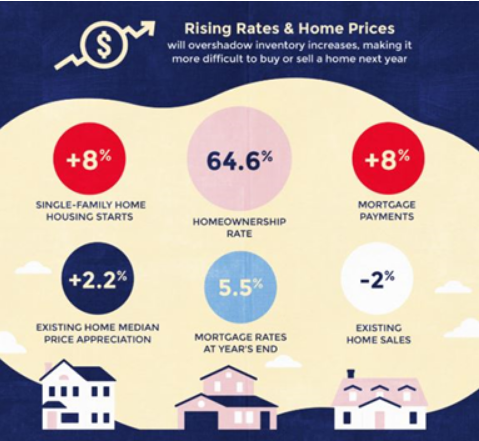
Here’s what you should expect: a limited inventory means there’ll be more competition for leads. Higher mortgage rates mean more priced-out buyers and a harder time generating leads. And a mild decline of home sales means closing deals might take more incentives.
In other words, whatever strategies worked for you in 2018 might not be as effective in 2019. Success in the new market is going to require more creativity. You’ll need to be comfortable evolving with the market, or you’ll risk the market leaving you behind.
But don’t be too intimidated. Even though the market is going to be tougher than last year, it’s still healthy. If anything, this is a chance for you to show what you’re made of. It’s an opportunity to break above the competition instead of getting discouraged or sticking to business as usual. But that’s going to take some preparation…
How to Grow Your Real Estate Business: Understanding The 2019 Market
Realtor.com’s 2019 housing forecast reports that this will be a tough year for buyers and sellers. Buyers are facing increasing mortgage rates and pricier monthly payments (about 8% more expensive). This will keep quite a few would-be first-time homebuyers out of the market.
Sellers and investors don’t have it much easier. There’s going to be a lot more competition out there, and you probably won’t be able to close deals as easily. Selling is going to take longer and it might even require some incentives like price cuts. Bidding wars are also pretty unlikely since inventory will be limited.
Remember, the market is still healthy, it’s just a bit tougher than it used to be. If you price competitively, use incentives, and get creative when it comes to generating leads, you can still thrive.
Your Mindset Should Evolve With The Market
The market is changing, so your mindset should too. After all, this isn’t 2018 anymore, so it’s time to throw out last year’s strategies and get ready to find new ones.
If you don’t change your strategy to account for the changing market, you might miss out on some great opportunities to grow your real estate business in 2019. So, let’s talk about where you should focus your energy.
There’s some evidence to support that marketing harder during downturns can give you a competitive edge. A study by McGraw Hill’s Research Laboratory of Advertising found that business people who put more money and time into marketing during downturns did better than those who buried their heads in the sand. By the time the economy recovered, they hit the ground running and flew even further past the competition.
You should also pay attention to your testimonials. Your clients have a lot of money on the line, so boosting your credibility profile is a must. Don’t just tell everyone how good you are – show them with case studies, career highlights, or glowing testimonials.
It’s a worthy use of your time and it could give you a leg up on the competition.
It’s also crucial to get creative with closing deals. Since you probably won’t be able to name a price and make it in full, and it’s even less likely that buyers will get in a bidding war for the home, you might have to use price cuts or some other kind of incentive to stay competitive.
Rise above those who aren’t ready to innovate and stand out with out-of-the-box deal closers.
Generating Leads in 2019
All of the changes the market is going through, in addition to some new players on the field (like Zillow’s iBuyer program and Facebook advertising), is putting a lot of pressure on you to find clever ways to generate leads and grow your business.
Like I said before, you’re going to have to get creative if you want to thrive in the new market. Here are 4 examples of what I mean.
1.Use Facebook Messenger Ads to Increase Response Rates
The more text boxes and steps your form has, the more opportunities you’re giving a potential lead to get bored or discouraged and leave. Never lose a promising lead to something so easily preventable.
As a rule of thumb, interactivity will help you boost lead engagement, so finding a way to interact with potential leads immediately is essential, even if that means you don’t get all of their information up front.
One great way to do this is by using Facebook Messenger ads. At the click of a button, the potential buyer is connected to a live conversation with you or whoever it is you’ve delegated to the chat box. This cuts out practically every step on your form, so the person can ask whatever they want in real time without giving up any boring information. Since there’s minimal time investment on their end, this can ward off early dropouts and boost your response rate.
You can do something similar with your real estate business.
I know. Cold calling is intimidating, but if you’re just sitting back waiting for leads to roll in, why not give it a shot? You’ll get hung-up on more often than not, but if you find a lead, it’s all worth it.
If a pure cold call is asking too much, try calling people on your own contact list. You already have a relationship with them, and even if they aren’t interested, maybe they have friends who are. Better yet, try calling expired leads. Freshly expired leads are probably a no-go (competition is fierce for those), but the much older leads, think 6 months to a year, are far less competitive.
Give some of these people a call and ask what their plans are. If you can find out why they decided not to sell, tell them how you can help. Even if they say no at first, you might have gotten them back in a selling mindset and earn their business down the line.
3.Give Automated Text Messages a Shot
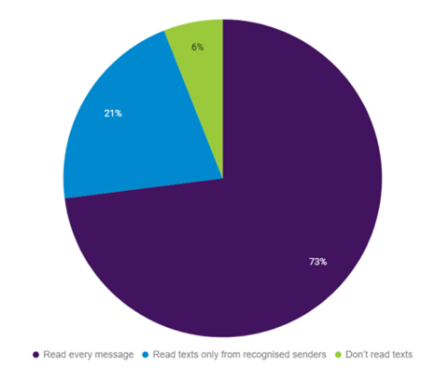
Believe it or not, emails aren’t the best way to reach your prospects these days. MailChimp reported that the average email open rate is a dismal 21%. Compare that to the 94% open rate of text messages reported by Essendex and there’s no question which method is best for securing leads.
But why stop there? Your competition has already figured out that they should use SMS to contact leads, so you need to take it to the next level: automated text messages!
Imagine losing a potential lead because you were driving, eating, sleeping, stuck in a meeting, or just missed the notification.
You probably weren’t the only person they reached out to, and whoever gets back to them first might win them over. Having a simple automated message that asks a few questions and assures them that you’ll get back to them is a great way to immediately engage them and stay on their radar.
4.Invest in SEO
So, credibility, testimonials, and response rates are all important if you want to generate and maintain leads – but not if no one can find you on the internet! In their 2018 report, the National Association of Realtors found that 44% of home buyers began their property search online.
That’s where search engine optimization (SEO) comes in. By filling your website with high quality content written with SEO best practices, you’ll be able to rank higher on major search engines and pull in new leads.
You can be certain that your competition has already begun optimizing their websites and publishing keyword-rich articles and blog posts, so jump into the SEO game as soon as possible. It’s a long-term strategy, but once you get it rolling, it can save you a lot of money and win over plenty of leads.
I covered the importance of SEO in real estate in a previous article. Some of the most important ranking factors I talked about were website loading speed, optimization for mobile users, lowering your bounce rate, getting SSL protection, and consistently publishing optimized content.
That might sound pretty intimidating, but you don’t have to do it alone. Here at Carrot, we have plenty of great resources for you like our SEO Keyword Bible or Content Pro and Advanced Marketer plans (which come with 12 and 24 optimized blog posts per month respectively).
Here are just a few Carrot “Doses of Awesomeness” for SEO inspiration…
“Just wanted you guys to know the you’re absolutely amazing! With all of the tools and SEO advice that come with Carrot, I was able to make huge changes in my rankings in just one week!! Not to mention A1 customer support! Thank you!”
– Taylor Madewell
Good morning!
My name is Erin Pennington and I am the Marketing Manager for Alcala Properties/Laurel Buys Houses. I just attended your 2 day Carrot marketing summit and have been watching all the videos on how to improve SEO, let me tell you that we got 4 deals into contract this week, 2 of which are SEO. I would love to get one of those adorable carrot stuffies to put on my desk and flaunt in the office! Thank you for all the help you and your team provide on a daily basis! I think 2019 is going to be an epic year for our company!!!
“From SEO this year we’ve done 19 deals. 13 of those have been in the last 3 months. That’s great!!”
– Teal Clise (CR of Maryland)
Conclusion
These are just a few examples of what I mean by finding innovative and creative ways to generate leads. Get those creative juices flowing this year and come up with a few of your own. That’s the kind of mindset you need to adopt if you want to thrive in this year’s market.
It’ll be a challenge, but it’s also an opportunity to show what you’re really capable of.
What fears do you need to conquer in order to become the absolute best version of yourself?
Trevor Mauch, CEO of Carrot
I thought I had it all figured out. I was making over 100k a year as my own boss. But I wasn’t happy…
I wasn’t who I wanted to become – the best version of myself. I was Insecure. I was afraid of failing.
There had to be something more and I was going to do whatever it took to take the leap of faith, even if it meant walking away from everything I’d built. It was time to chase my vision. It was time to take a risk, conquer my fears, my insecurities, and forget about what other people think.
It was time to go down, so I could go up.
Listen to the CarrotCast Podcast:
[podcast-subscribe]
The Conversation
2:18 – I was miserable… It was 2010 and I’d hit a financial low of making just 16k a year. Something had to change. I knew there was more. More purpose, more happiness, more purpose. I had to transform.
4:48 – Why risks and sacrifices, and ultimately facing your fears must come before success: A tree, a seed, and a bird.
6:57 – 15-20 years the tree is fully grown, producing fruit. What happens when a baby bird learns how to fly? He has to stand on the edge of the nest first.
10:03 – I finally had a breakthrough and netted 15k in one day! At the time I thought I had it all figured out. But I wasn’t happy. I wasn’t where I wanted to be. I had to take a leap of faith and figure out how to make money while being happy, having purpose, and adding value.
12:15 – I’m someone who doesn’t ask for help. I tried to leave it all up to myself and do it alone. I had to get over that. I had to shed my shell, get transparent, and get over my insecurities.
15:04 – “I’ve got a plan” Why any time someone criticizes you for following your own dreams, they’re speaking to their own insecurities or inabilities.
19:35 – Ego was one of my biggest obstacles. I had to conquer that too.
20:56 – I want to give you permission to take a step back, to forget what other people might think, and take a step down, so you can grow up. Let me walk you through writing down your “shells” aka what’s holding you back. What do you need to conquer?
23:39 – Now write down your vision – the seed, water, and the tree. Does it get you insanely excited? Does it give you the energy you need to become your best self?
EP 103: Forgot To Have Fun? Lost Touch With Your Passions? This 7 Minutes Can Change It All For You: CarrotCast
EP 101: I Hung Out With 6 People Each Worth $300M+ This Month… 6 KEY Lessons I Learned: CarrotCast
EP 36: What’s Your Credibility Score? The Top 5% Of Earners Are Doing These “Simple” Things To Build More Credibility In A Cluttered Market w/ Trevor Mauch: CarrotCast
We want to hear your thoughts on the podcast! Drop them in the comments section below or hit us up on Facebook or Instagram
It’s crucial to say what you do and do what you say… your personal reputation is too important.
Jack Bosch
Jack Bosch is the expert when it comes to land. In 17 years of flipping land, he has successfully flipped over 4,000 lots, and plans to flip about 15 deals PER MONTH this year!
2019 has been his best year ever and he’s going to share why now is an amazing time to start and how you can break into the market with a few tips and tricks.
Learn how to create cash flow that provides generational wealth and get the knowledge, capability, confidence, and courage to succeed.
Listen to the CarrotCast Podcast:
[podcast-subscribe]
The Conversation
4:03 – Jack’s background in Real Estate – His main game is land flipping, but his team also deals in multi-family and other markets.
8:46 – Creating cash: Using the wheel of wealth to reduce expenses and invest it into assets.
23:21 – The 3 types of land Jack goes after and exactly how to find land buyers and sellers that turn into the best deals.
27:46 – Jack Bosch’s top tips on how to start buying and selling land.
35:30 – Breaking down the math behind Jack’s investments. How much revenue are his deals generating?
42:30 – Jack’s marketing mix for finding buyers and sellers. How direct mail and online are working together.
47:27 – Top resources for where to find buyers for land. Carrot.com with PPC and, LandWatch, Lands of America, LandFlip, Facebook Marketplace, Craigslist, RedFin, and Zillow. Start with free resources and amplify them with paid marketing.
EP 57: You Can Achieve Financial Freedom and Build True Wealth w/ Jack Bosch: CarrotCast
EP 47: Flipping Vacant Land: How Gary Horton Pivoted His Wholesaling Business In A Tough Market To Be On Track To Flip 100 Pieces Of Bare Land In 2017: CarrotCast
EP 36: What’s Your Credibility Score? The Top 5% Of Earners Are Doing These “Simple” Things To Build More Credibility In A Cluttered Market w/ Trevor Mauch: CarrotCast
We want to hear your thoughts on the podcast! Drop them in the comments section below or hit us up on Facebook or Instagram
Listen to the CarrotCast Podcast and Subscribe Below!
Focus on progress, not perfection.
Trevor Mauch, CEO of Carrot
Meet Troy. Troy is a 10-year real estate investor, so he kind of knows his stuff. One day while driving to work, Troy thought
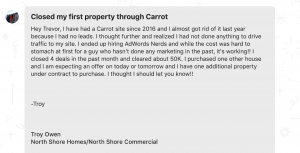
“I’m not getting any leads through my Carrot website, I think I’m just going to cancel.” But Troy’s not a quitter, so he decided “Ya know what, I actually like making money. Maybe I’ll give it another shot.”
So Troy started ramping up his marketing through PPC and got some help from the Carrot folks. It turns out his work paid off… Troy made over $50k last month by closing 4 deals he got through his site.
Now Troy is getting results. Now Troy is ramping up his business. Now Troy is happy! Here’s how he did it…
[podcast-subscribe]
The Conversation
2:29 – Troy’s started out 10 years ago as a real estate investor and house flipper in Milwaukee, Wisconsin. Right now, he’s averaging about 8-10k per PPC deal and closing roughly every 1 in 5-10 leads. Get in touch with the PPC experts he used HERE.
8:41 – What one thing is costing you the most money? Lack of follow-up with your leads. Consistent follow up is key to closing your deals. Sometimes we think we’re bugging people by calling, texting, and emailing him. Without his persistence through 8-10 phone calls, Troy would’ve missed out on $30k from someone who wanted to sell their house.
13:12 – How he plans to ramp up his marketing this next year. Doubling down in online, optimizing his website, and committing to larger direct mail campaigns.
17:32 – How much can you afford to spend per deal? Figure out your max cost per lead and max cost per deal by watching this video: https://carrot.com/blog/max-cost-per-lead/
18:16 – When something is not working, make a mindset shift and ask yourself “Have I truly given this a real chance?” Troy knew his time could be better spent on getting deals done so instead of going the DIY route with his website and marketing, he outsourced it and hired experts, and switched to Carrot’s advanced marketer plan.
21:15 -Suggestions for success from a Carrot customer. Commit to finding a way to drive traffic to your website. There’s a reason why we repeat ourselves at Carrot… the model works! Implement and educate, implement and educate.
The Secret To True Happiness For Ambitious Entrepreneurs w/ Seth Buechley: CarrotCast
My Struggles And 8 Success Lessons Learned… From Paying Taxes With My Credit Card To Multi-Million Dollar Businesses:CarrotCast
What’s Your Credibility Score? The Top 5% Of Earners Are Doing These “Simple” Things To Build More Credibility In A Cluttered Market w/ Trevor Mauch: CarrotCast
We want to hear how we can make our products better and what we can do to help you! Drop them in the comments section below or hit us up on Facebook or Instagram
Listen to the CarrotCast Podcast and Subscribe Below!
Prosperity comes from purpose. Knowing why you’re doing what you’re doing will give you the strength to endure.
Trevor Mauch, CEO of Carrot
I invited my mentor and close friend Seth Buechley out to my house this past weekend to talk about what we’re learning on our journeys as entrepreneurs, some of the growing pains with scaling Carrot (#599 on the Inc 500/5000 & Oregon’s fastest growing software company) and what we’re doing in order to lead our teams well and continue building valuable businesses.
Seth has sold multiple companies worth hundreds of millions of dollars, is the CEO of Cathedral Consulting, and the host of the Business Done Right podcast.
Listen to the CarrotCast Podcast
[podcast-subscribe]
The Conversation Between Seth Buechley and Trevor Mauch
3:36 – Once you have a vision for your future, your dreams will begin to materialize quicker. Think long term for your family and your business – create a life list! Where do you want to wake up in 5, 10, 25, 50 years? The life I was living as a serial-entrepreneur and freelancer actually wasn’t the life I wanted.
7:27 – If you’re like most entrepreneurs, you tend to “cycle” every 3-5 years or so and get bored or distracted by the next big thing. We need to practice patience and persistence and focus on what resources that we have right in front of us in order to be successful. Become an expert in one thing before branching out and focus on niching down in your industry.
15:59 – Make yourself “less relevant”. Being a great leader sometimes means taking a step back and empowering your team to step in. Learn how Trevor has created systems and processes that have allowed him to gain more freedom and flexibility, while still being the voice of the brand.
23:31 – Leaders must make tough decisions. When we avoid them, we put the successes of our business, our team, and ourselves at risk. Hear why turnover is a sign of a healthy culture… to a certain point.
28:17 – What’s the difference between transactional leadership and transformational leadership? Transactional leadership worked for Trevor until Carrot hit around the $1 million revenue mark. It’s reacting and delegating. It’s creating basic processes for how to complete tasks. Transformational leadership is empowering and unleashing your team, ultimately freeing you up from small tasks. It’s done by asking “What’s the outcome we’re looking for? and What’s the way we measure success? And “What’s blocking you?” Write down where they’re blocked and invest in the time to train them on decision making – design a process that guides them through the right questions to ask.
46:20 – I used to say I wasn’t a morning person. A habit tracker is the key tool that helped me change that…. and I’ve never even been good at habits!
52:34 – Accountability is misconstrued. You can create it for yourself through social pressure, measurements, and honesty. Habits that get you thinking about things differently.
ADDITIONAL CARROTCAST EPISODES
The Secret To True Happiness For Ambitious Entrepreneurs w/ Seth Buechley: CarrotCast
My Struggles And 8 Success Lessons Learned… From Paying Taxes With My Credit Card To Multi-Million Dollar Businesses:CarrotCast
What’s Your Credibility Score? The Top 5% Of Earners Are Doing These “Simple” Things To Build More Credibility In A Cluttered Market w/ Trevor Mauch: CarrotCast
We want to hear how we can make our products better and what we can do to help you! Drop them in the comments section below or hit us up on Facebook or Instagram