In part one of this PPC landing page series, we covered the 4 Major Problems with Your PPC Landing Page (that cost you leads). These are major, commonly recurring issues we see local business owners make when they launch PPC ad campaigns. But they’re not the only thing standing in your way of having an amazing ad campaign that generates lots of leads and revenue. Once you address the common issues, it’s time to take your landing page to the next level.
Here are the 5 elements we see on every top-converting PPC landing page. Revisit your current landing pages to make sure they have each of these elements, and keep them in mind as you launch new ads and campaigns.
Key Takeaways
- Make sure the message, key talking points, and exact phrases in your ads are used on the landing page they link to. This “message match” is important for ad quality, but also reassures visitors that you’re legitimate and will solve the problem that made them click.
- Directly address a visitor’s main fears or painpoints. This gives them the confidence that you understand their challenges and can help.
- Build credibility by including trust signals like real images of your team, client reviews, and specifics about your business (i.e., locally owned and operated since 2006) on the landing page.
- Make the button text clear and compelling. Specific language like “Get My Fair Cash Offer” outperforms generic text like “Click Here” by 49.55%.
Table of Contents
- Bonus Tip: Match Your Messages!
- Element 1: The Winning Headline Formula
- Element 2: Address Visitor’s Fears
- Element 3: Trust Signals
- Element 4: Make Your Call-To-Action (Button) Clear & Compellings
- Element 5: Low-Friction Contact Methods

Bonus Tip: Match Your Messages!
Before we get into the landing page-specific elements, I want to take a minute to remind you of the importance of having landing pages that match the talking points of your ad.
Covered in The Homepage Problem section of our last blog, message matching gives your ads credibility and helps them score higher in Google’s Ad Scoring algorithm.
So what does message matching look like? Here are a few examples …
It might be tempting to personalize your ads by saying something like “Matt Buys Houses.” That personalization isn’t necessarily bad. But if the ad links to a page that only has your business name and doesn’t mention Matt again, you’ll run into message match and credibility issues. Someone clicked on an ad about Matt, but Matt is suddenly gone, replaced by a nameless business. Because the ad doesn’t match the landing page, visitors (and Google) aren’t sure the landing page is for the same businesses as the ad. Visitors lose trust (cautious of a bait and switch), and Google may flag your ad as scammy. The end result is your ad showing up less often and visitors who leave without contacting you.
You can still run the “Matt” ad and include your business name on your website, just make sure to also use the phrase “Matt Buys Houses” on the landing page in addition to your business name. Similarly, if you use a picture of yourself (or a happy client) in your ad, make sure that image is also used on the landing page for continuity and credibility.
Whatever talking points you specifically call out in the ad (a certain location, quick response times, fast closings, purchasing houses in as-is condition, etc.) make sure every single point you mention in the ad is repeated in the copy of your website. (We walk through some good and bad examples in minute 37:30 of the original webinar.)
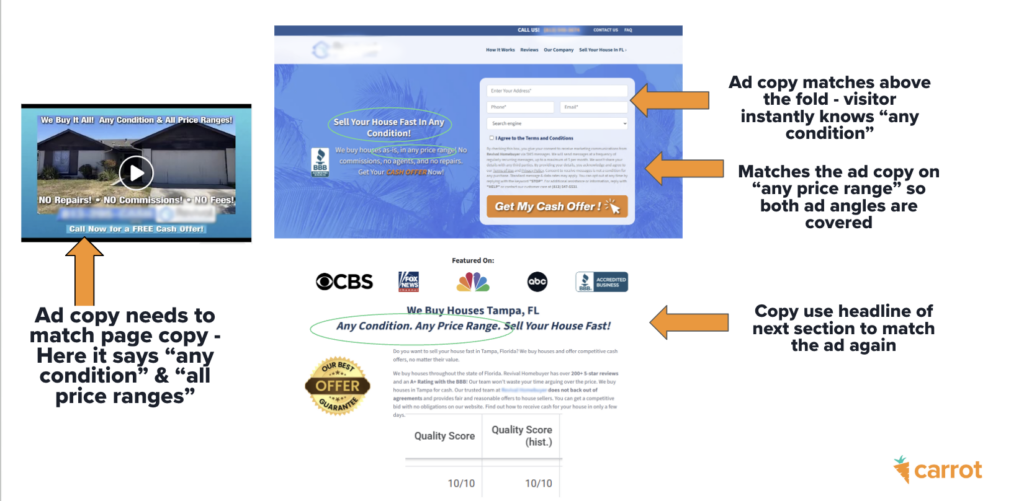
Does that mean you need a specific landing page for every ad you run? If each ad has different selling points, then yes, absolutely. Someone who clicks on an ad for emergency HVAC repair doesn’t care that you also design and install new systems. They clicked on your ad to solve a specific problem, so make sure the landing page attached to that ad directly addresses that exact problem.
Pro Tip: You don’t need a dedicated landing page for each ad if the message is the same, but you’re testing different designs. As long as you cover all the same talking points and use the same language on the landing page as you do in the ads, you can point multiple ads to a single page.
Now, let’s get into how to design a simple, high-converting PPC landing page!
Must-Have PPC Landing Page Element 1: The Winning Headline Formula
Your headline should match the talking points of your ad (I think we’ve covered that thoroughly!), but we’ve also come up with a specific formula that wins over and over again. After spending 10+ years testing and refining landing pages for Carrot members, here’s the most effective PPC landing page headline formula:
[What visitors get] + [How Fast] + [Biggest Fear Removed]
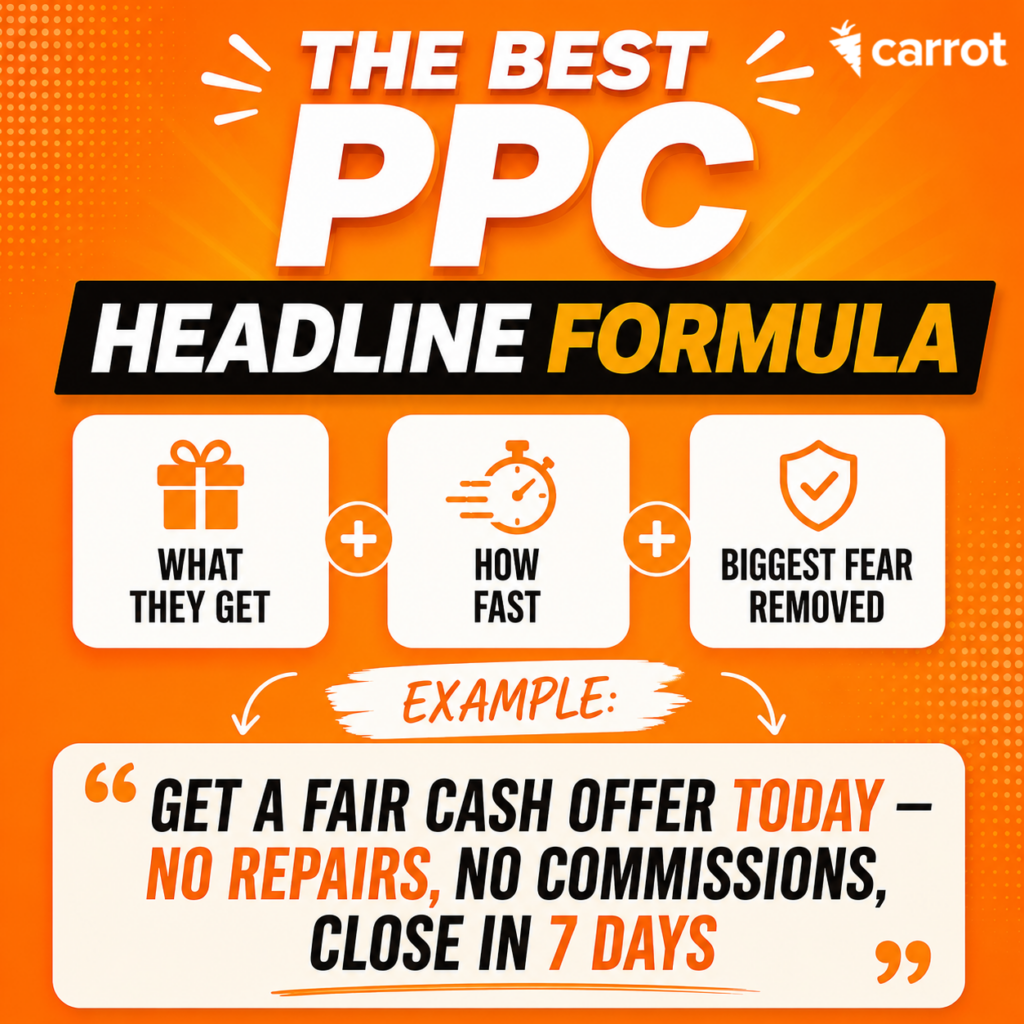
The biggest fear can also be the major painpoint they’re trying to solve for …
- Selling a house in as-is condition
- A fast closing timeline
- Fast or affordable emergency repair for a plumbing or HVAC issue
- Wanting a new roof with a long guarantee
- Needed a local service provider in their small or remote area
This simple formula captures attention right away and directly addresses the problem a visitor is trying to solve. Nothing complicated, nothing too clever that the visitor needs to figure out, just a straightforward, appealing promise.
Don’t worry too much about length when writing a headline using this formula, just focus on getting your point across clearly and compellingly. (Though you don’t want it to be so long that the visitor just glosses over it). You can also play with the order of the elements, as long as the headline reads naturally. Here are a few examples:
- Get a Fair Cash Offer [what they get] Today [how fast] — No Repairs, No Commissions, Close in 7 Days [their fear/painpoint]
- We Buy Houses Anywhere in the US [what they get] With Closing in as Little as 5 Days. [how fast] You Pay No Fees and No Repairs [their fear]
- A Carrot member uses this exact headline and sees a 41.9% conversion rate on their landing page!
- Emergency Plumbing Repair [what they get] Within an Hour! [how fast] Trusted plumbers in Portland for 20 years! [their fear]
Use this formula to test different headlines and find the best combination that inspires visitors to contact you.
Must-Have PPC Landing Page Element 2: Address Visitor’s Fears
Fear is the number one thing stopping people from contacting you. (How many times have you talked yourself out of a purchase or service because you weren’t sure about the quality, how reputable the business was, or if it was worth it? Those are all fear-based holdups.) When it comes to selling a property or hiring a local service provider, fear-based emotions are extra hard to get over. This isn’t buying a new jacket, it’s a major transaction that most people are probably inexperienced with.
The best way to get someone over their fears is to address them directly and honestly. You’ve touched on one or two of the major issues in the headline, but that’s only one sentence. You need to drive the point home repeatedly.
Identify 2-3 major reasons someone might hesitate to contact you or what they might be concerned about. These can also be reasons too work with you. Here are some examples:
- A specific closing timeline (5 days, 7 days, “close on your timeline”)
- No fees, no commissions
- As-is condition, No repairs
- Fair offer, free quote
- 100+ five-star reviews
- In business since 2016, In business for over 20 years
- Local family-owned business
- All techs are background checked
Just below the headline is a great place to address these fees. It can be as simple as a bulleted list in the hero section of the page.
Again, make sure the fears you highlight in your ad are the most important ones addressed on the landing page. You can talk about more on the landing page, but keep the main focus in line with the ad.
Must-Have PPC Landing Page Element 3: Trust Signals
Now that you’ve promised to solve their problem, a visitor’s next priority is making sure you’re a reputable business worth contacting. When someone evaluates a business or service provider, they ask themselves a set of questions:
- Is this person/company real?
- Have they done this before?
- Are they local?
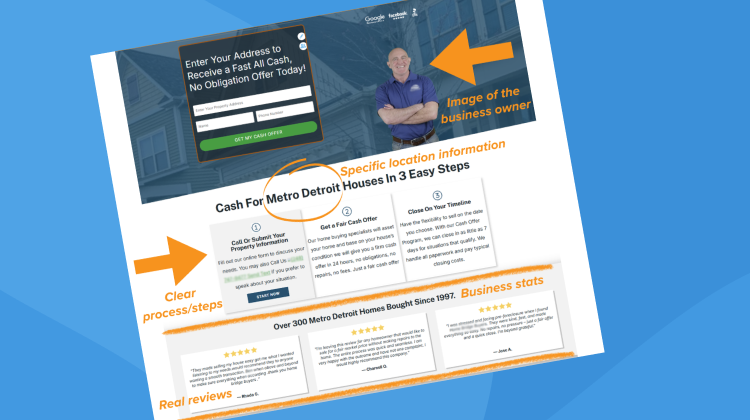
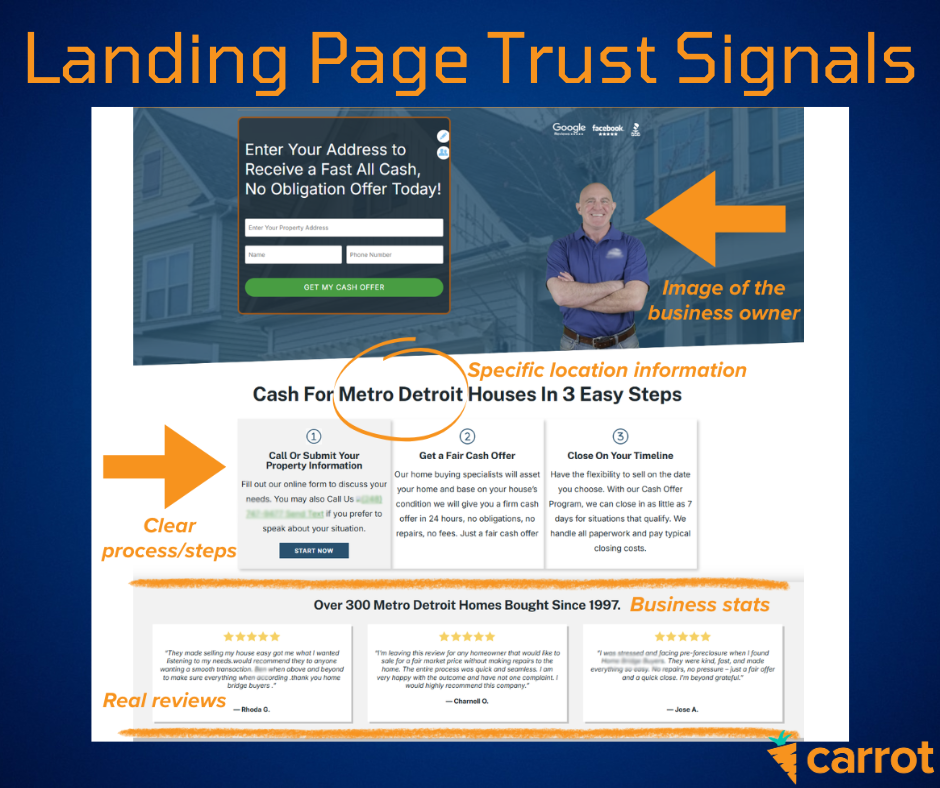
Include credibility builders and trust signals on the landing page to put them at ease. A few of the example fears listed above are also trust builders (in business since 2016, local family-owned business, all techs are background checked). A few other examples of trust signals to include on your PPC landing page are:
- Real photos of you and your team
- Stats about your business (number of houses you’ve bought/serviced)
- Local city/neighborhood references and photos
- Reviews and testimonials from real clients
- Badges (5 stars on Google, A+ from BBB)
- License info
- Process transparency (“here’s what happens next,” “here’s our process”)
Here’s what a landing page with good trust signals looks like …
Must-Have PPC Landing Page Element 4: Make Your Call-To-Action (Button) Clear & Compelling
The button language on landing page forms is another thing Carrot has tested extensively over the years. Known as the call-to-action (CTA), what your button says should be specific and detailed.
Clear language like “Get My Fair Cash Offer” outperforms generic text like “Click Here” by 49.55%. That’s because generic button text doesn’t tell the visitor what’s going to happen, what they’ll get, or what they can expect. Making it crystal clear what happens when they give you their information gives them confidence.
| Good CTAs | Bad CTAs |
| ✅ Get My Fair Cash Offer ✅ “See What My House Is Worth ✅ “Get My Free Quote | ❌ Submit ❌ Click Here ❌ Contact Us |
Having a strong CTA in the hero section of your landing page is particularly important. This is the most common contact point for visitors.
Must-Have PPC Landing Page Element 5: Low-Friction Contact Methods
By now a visitor has gotten to your PPC landing page, determined that you can solve their problem, decided that you’re trustworthy, and knows exactly what they’ll get by contacting you. The last thing you want is to have them back out now because your contact form is too long or they can’t find your phone number.
If you want people to call you, make your phone number very prominent both as your CTA and in places that a visitor would expect to find your phone number on a website (at the top and bottom of the page). Neary 83% of PPC traffic comes from a mobile device, so make sure the phone numbers on your landing page have click-to-call enabled and are easy to touch with your finger (meaning there isn’t so much stuff around them that the number itself is hard it hit).
Pro Tip: Use call tracking on your PPC landing pages so you know exactly which campaigns generate the most leads and business!
If your CTA is form-based, keep forms short! We strongly recommend using only 3 fields on your form.
- For real estate: Name, phone, address
- For home service providers: Name, phone, problem
While it’s tempting to want to gather more information with your form, every field you add above three reduces conversions. Think of each field as a friction point. If the form takes too long to fill out, asks for too much information, or makes the visitor think too hard, they’re going to leave without completing it.
If you absolutely need to collect more information, consider using a multi-step form instead of one long form. Multi-step forms put each question on its own “screen” so the visitor doesn’t get immediately overwhelmed by the amount of information they need to share. This is particularly helpful for mobile users where a long form would take up too much space on the screen and be difficult to fill in.
Keep PPC Landing Pages Simple & Focused
A good PPC landing page isn’t difficult to create. It’s actually the opposite. Keep things focused, address the visitor’s main concerns, and help them understand what will happen when they contact you.
If you want to dig into what makes a great PPC landing page even more, check out our free on-demand webinar, The 97% Blind Spot: How to Get 10x More PPC Leads Without Touching Your Ad Budget. Or use the PPC landing page templates built into Carrot to give you a jumpstart and make sure you don’t miss any important conversion elements!